The Academy Color Encoding System (ACES)
ACES standardizes a scene-referred interchange encoding, working spaces, and input and output transforms. Multiple vendors can implement the same pipeline without negotiating a custom color workflow.
The image-pipeline lead selects and documents the ACES version, transforms, working spaces, and deliverable targets. Each vendor uses that approved configuration and tests its handoff before shot production begins.
What ACES actually is
ACES is not a look, and it is not a LUT. It is four things:
- A scene-referred interchange encoding: ACES2065-1, standardized as SMPTE ST 2065-1.
- Working spaces derived from it for compositing and grading.
- Defined transforms at the input and output of the pipeline.
- A container for the image data, standardized as SMPTE ST 2065-4.2
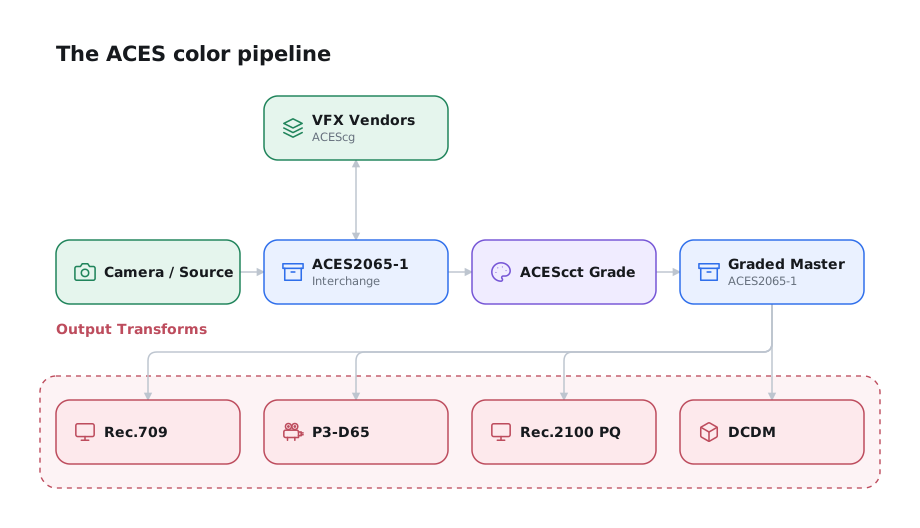
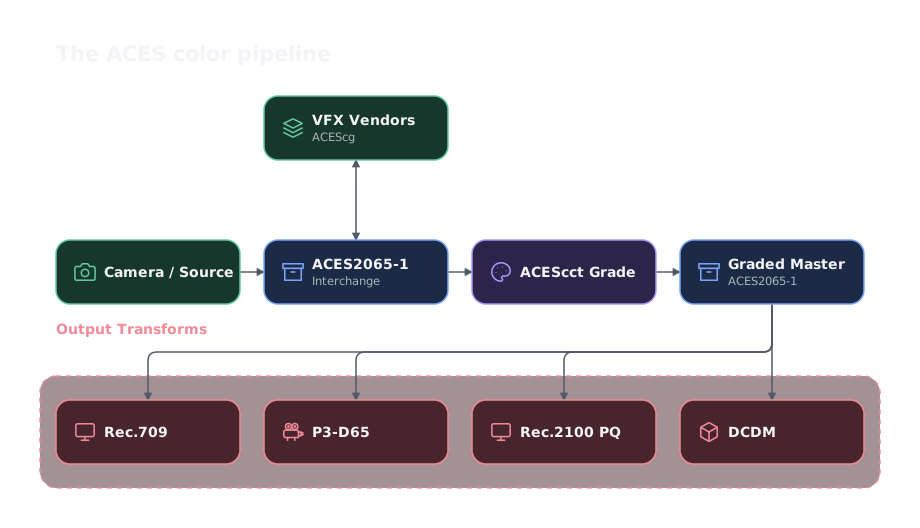
Everything converts to ACES2065-1. VFX round-trips through the interchange in ACEScg. Grading converts internally to ACEScct and back to ACES2065-1. That graded ACES2065-1 is the Graded Archival Master, and the Output Transform derives each deliverable from it. The ungraded interchange is the non-graded assembly master.1
Color primary sets
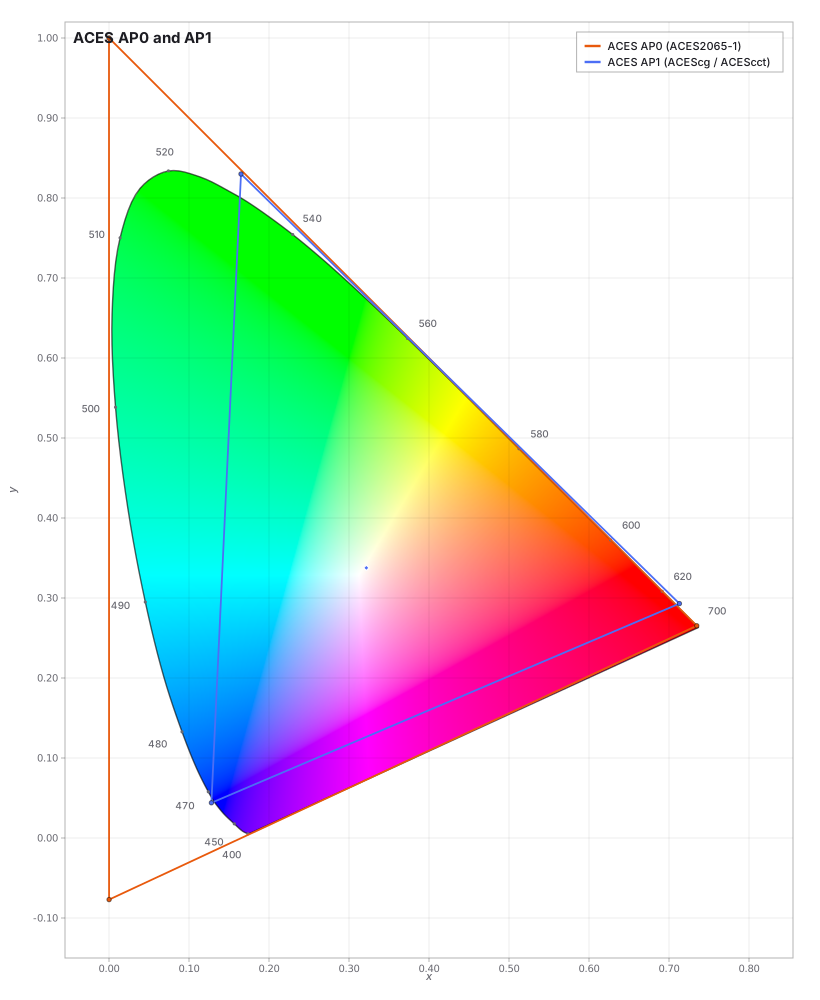
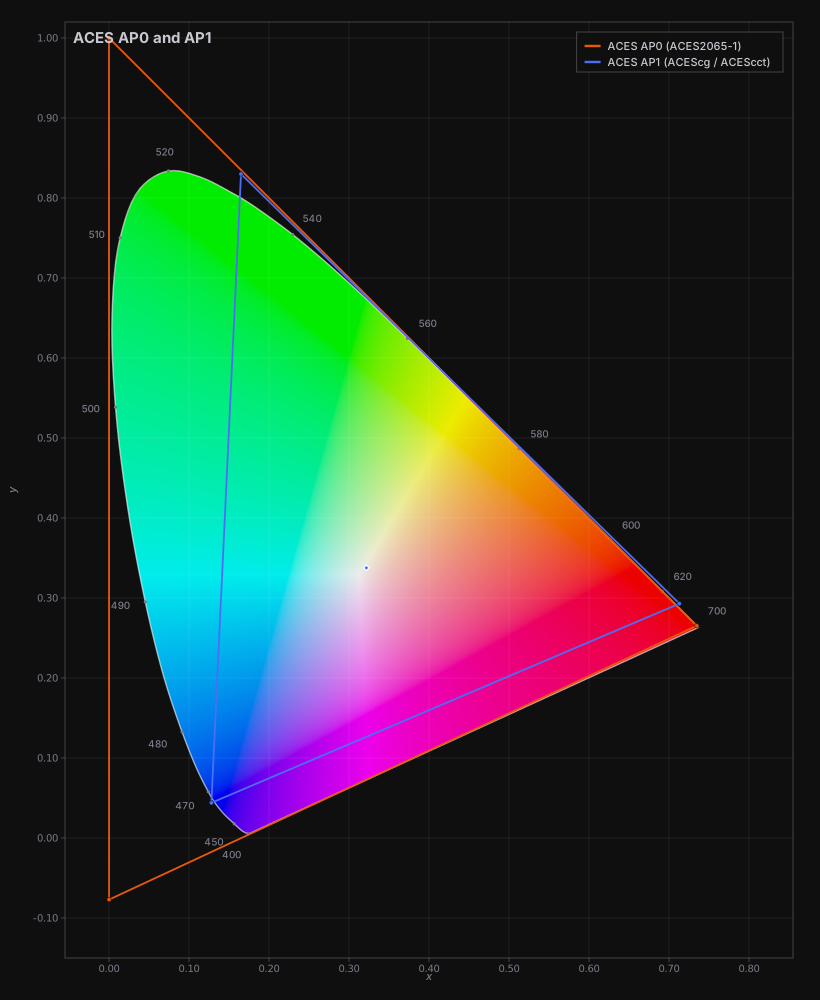
ACES defines two sets of primaries, and confusing them is the most common source of ACES-related pipeline errors.3
| Set | Role | Chromaticities (x, y) |
|---|---|---|
| AP0 | The ST 2065-1 encoding primaries. Encompasses the entire CIE 1931 visible spectrum. The primaries are non-physical. | R (0.73470, 0.26530) · G (0.00000, 1.00000) · B (0.00010, −0.07700) |
| AP1 | Working-space primaries, closer to achievable display primaries. Basis of ACEScg, ACEScc, and ACEScct. | R (0.713, 0.293) · G (0.165, 0.830) · B (0.128, 0.044) |
AP0 uses non-physical primaries so the interchange encoding can represent the visible spectrum without clipping. That makes it suitable for archival interchange but unsuitable for image processing. AP1 exists for rendering, compositing, and grading.
The most common ACES mistake
Do not render or composite in AP0 because it is "the ACES space." AP0's non-physical primaries make RGB values poor stand-ins for material reflectance. A saturated surface may render too bright, too dark, or the wrong hue under colored light. The error can carry into reflections and bounce light. Render and composite in ACEScg (AP1). Reserve ACES2065-1 (AP0) for interchange, delivery between vendors, and archival.
AP1 does not inherently clip AP0
The AP1 triangle is smaller than AP0, but converting between their primaries does not impose a gamut boundary. The ACEScg specification defines AP0-to-AP1 and AP1-to-AP0 matrix transforms. In 16-bit or 32-bit floating point, colors outside the AP1 triangle can remain encoded as negative channel values. Scene-linear values may also exceed 1.0. Preserve both through compositing, and an unchanged pixel can return to AP0 with only floating-point rounding error.4
Floating point makes this round trip possible, but does not guarantee it. A clamp, bounded integer encoding, unsuitable LUT, gamut-compression operator, or image operation that rejects negative values can alter the data. CGI rendering may also respond poorly to extreme or negative components. Reference Gamut Compression can make those values safer to process, but it intentionally changes the affected pixels and must be documented.4
ACES defines ACEScg as its CGI rendering and compositing space. An approved workflow can therefore convert an ACES2065-1 plate to ACEScg, integrate CGI, and render a floating-point ACEScg EXR. The recipient can continue in ACEScg or convert the render to ACES2065-1. Use ACES2065-1 when the handoff must be a formal ACES interchange or archival file. An ACEScg EXR remains an ordinary OpenEXR working or render file, not an ST 2065-4 ACES container.
Test the AP0-to-AP1 round trip
- Use the official ACES2065-1 and ACEScg transforms.
- Keep the pipeline in 16-bit or 32-bit floating point.
- Preserve negative values and values above 1.0 unless an approved operation changes them.
- Difference an untouched plate through AP0 to AP1 and back. Allow only floating-point rounding error.
- Label an AP1 handoff ACEScg, and record whether Reference Gamut Compression was applied.
Why ACES Is "D60" in a D65 World
All ACES encodings share a white point of x = 0.32168, y = 0.33767.
The ACES white point is D60-like but not CIE D60. It is an encoding neutral, not a required display or creative white. Grade to the calibrated display white. The Output Transform handles adaptation.5
Working with the ACES White Point
- Grade to the calibrated display white. Use P3-D65 or DCI white for theatrical work and D65 for home video.
- The Output Transform handles the adaptation. Converting ACES to a D65 output applies a chromatic adaptation. That is expected behavior, not an error.
- When neutrals drift, look here first. If grays read warm or cool between the grading display and a deliverable, a mismatched or doubled white-point adaptation in the transform chain is the usual cause, more often than a monitor calibration fault.
- Do not "correct" the ACES white point. A colorist or other end user may try to force ACES to D65 by inserting an adaptation before the Output Transform. This double-adapts and produces exactly the neutral drift it was meant to fix.
- Use D60-sim only when D60 rendering is intentional. It preserves ACES white on a D65 display without adding an extra adaptation before the Output Transform.
Encodings
| Encoding | Primaries | Transfer | Use |
|---|---|---|---|
| ACES2065-1 | AP0 | Linear | Interchange between vendors and archival. The "full fidelity" exchange format. |
| ACEScg | AP1 | Linear | CGI rendering and compositing. |
| ACEScc | AP1 | Logarithmic | Color grading, where controls expect a log relationship to scene exposure. |
| ACEScct | AP1 | Logarithmic with a toe | As ACEScc, with a film-like toe near black that makes lift/offset behave the way colorists expect. |
| ACESproxy | AP1 | Log, integer | On-set look management and transmission over HD-SDI. Not for storage, production imagery, or final grading. |
ACES2065-1 values are 16-bit floating point, with 1 sign bit, 5 exponent bits, and 10 mantissa bits. They encode relative exposure values linearly.6
ACEScc vs ACEScct
Use ACEScct unless the colorist specifies ACEScc. ACEScc remains logarithmic to black, so lift responds differently from familiar log grading controls. ACEScct adds a toe and is the common grading choice. Record one encoding in the workflow document. Mixing them across vendors creates shadow mismatches.
ADX10 and film scans
Film scans are not absolute and, despite adhering to an encoding standard, are not universally calibrated. Traditional Cineon-style scans describe density according to the scanner and laboratory's calibration. Different scanner families and laboratory alignments can therefore produce different code values from the same negative.
Academy Printing Density (APD) provides a common density target for film negative and internegative scans. The APD specification defines its red, green, and blue spectral responsivities, reference measurement device, measurement conditions, and spectral calculation. It does not prescribe one scanner or a universal scanner-calibration method. A scanner's native density values must be measured or characterized and converted to APD. The standard notes that this conversion is film-product-specific and may use a matrix and offset, polynomial conversion, or 3D LUT.7
Academy Density Exchange (ADX) encodes APD after subtracting the negative's minimum density (Dmin), which accounts for the film base and other non-image density. A generic Cineon-style scan is not ADX10 unless the scanner output has been characterized and converted to APD, then encoded with the ADX10 mapping.8
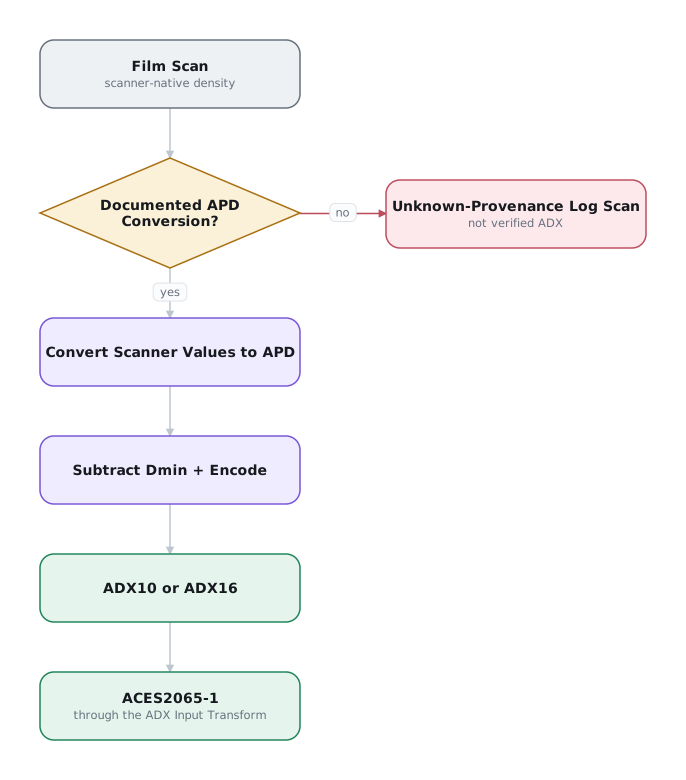
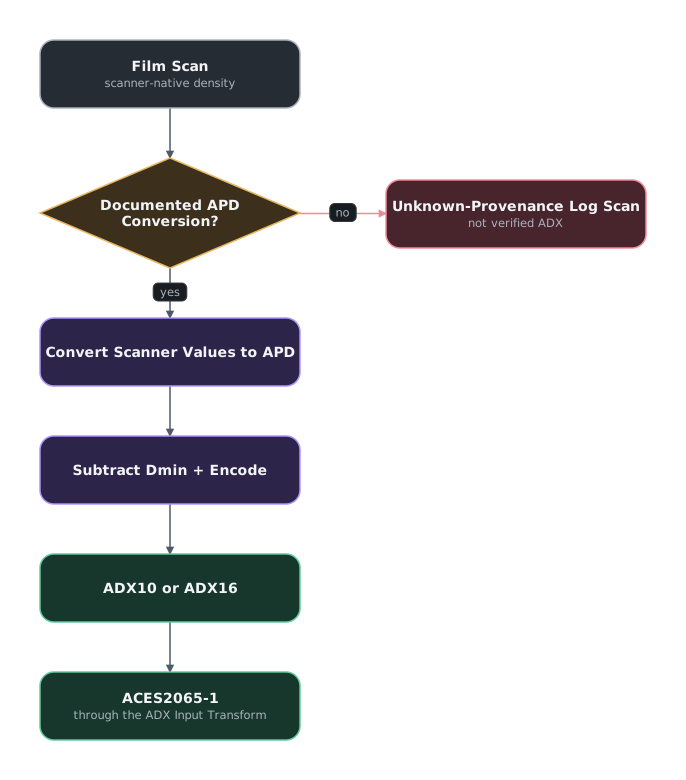
The defined conversion from an existing ADX10 value to ADX16 multiplies the code value by 16. Native ADX16 can also represent intermediate and higher-range values that ADX10 cannot. The standard prefers ADX16 when possible, but ADX16 is uncommon in current post-production workflows. A 16-bit DPX, TIFF, or EXR file is not ADX16 unless its density metric and code-value mapping are documented.
| Encoding | Code values | Practical meaning |
|---|---|---|
| ADX10 | 10-bit unsigned, 0–1023 | A legacy-compatible APD encoding. Its range may be insufficient for some modern color negative and internegative stocks. |
| ADX16 | 16-bit unsigned, 0–65,535 | Adds four bits of precision and two bits of range relative to ADX10. It is not an ADX10 signal placed in a larger container. |
Scan-only negative stocks and color print films can require another transform before ADX encoding. The ADX standard does not define that transform.8
Identify the film-scan encoding
- Ask the scanning laboratory to name the density metric, scanner characterization, film stock, Dmin handling, bit depth, and code-value mapping.
- Preserve the original scan and the laboratory's calibration or transform documentation.
- Do not relabel a generic Cineon-style scan as ADX10 based on its appearance, file extension, or bit depth.
- If provenance is unavailable, test the documented Cineon and ADX10 interpretations on representative frames with the colorist. Record the selected input transform as a working interpretation, not recovered provenance.
- Use ADX16 only when the laboratory explicitly supplied it or the conversion has been validated.
Why cameras use their own log encodings
Cinema cameras generally do not record ACES2065-1 natively. It is linear, floating-point interchange data. Camera RAW preserves camera-native data, while camera-log files map the sensor's useful range into a practical integer signal.
ACEScc and ACEScct are AP1 grading encodings applied after an Input Transform. They do not describe the camera or replace its Input Transform.9
Camera manufacturers design different log curves because their systems differ in:
- sensor dynamic range and highlight headroom
- noise floor and shadow precision
- recording bit depth and code-value limits
- exposure-index behavior
- monitoring hardware and established post workflows
A camera log curve is a storage and transport decision, not a look. Record the exact camera gamut, log version, color-science version, and exposure settings. The Input Transform uses that information to normalize each source into ACES.
Transforms
ACES 1.0 renamed the transforms in user-facing terms and deprecated “RRT” in end-user documentation.10
| Current name | Formerly | Does |
|---|---|---|
| Input Transform | Input Device Transform (IDT) | Converts camera-native data to ACES2065-1 |
| Look Transform | Look Modification Transform (LMT) | Applies a global, show-wide look upstream of the Output Transform |
| Output Transform | “RRT plus ODT” | Converts ACES data to display code values |
OCES means Output Color Encoding Space. In the original ACES model, the RRT converted scene-referred ACES into OCES, an output-referred description of how the image should appear on a reference display. The ODT then converted OCES into the code values required by a specific display. OCES was an internal handoff, not a format filmmakers normally stored or delivered. Modern ACES combines both operations inside one Output Transform, so end users rarely encounter OCES.11
The Look Transform is a show-wide creative transformation analogous to a Show LUT.12
Grade under the Output Transform. Do not bake it into the render. Keep the graded scene-referred master scene-referred and apply the display transform last.
Container
ACES image data is carried in the ACES Image Container, SMPTE ST 2065-4. It is OpenEXR-compatible but feature-restricted: a constrained profile of EXR rather than arbitrary EXR. It stores 16-bit half-float pixels and mandates a fixed set of header attributes. ST 2065-4:2023 lists ten required attributes, one of which is compression.13
ST 2065-4 containers are uncompressed
SMPTE ST 2065-4 applies only to ACES2065-1 (AP0, linear) interchange and archival files. It requires uncompressed 16-bit half-float EXR. ACEScg plates, renders, and working files are ordinary OpenEXR files and may use normal ZIP, PIZ, or DWA compression.
| File | Typical encoding | ST 2065-4 container? | Compression |
|---|---|---|---|
| Archival / source master | ACES2065-1 (AP0) | Yes | Uncompressed (mandated) |
| Full-fidelity vendor interchange | ACES2065-1 (AP0) | Yes | Uncompressed (mandated) |
| VFX plate pull | ACEScg or camera-log EXR | No | Compress freely (ZIP/PIZ/DWA) |
| VFX render back to the DI | ACEScg (AP1) EXR | No | Compress freely |
| Comp working files | ACEScg (AP1) EXR | No | Compress freely |
A compressed ACES2065-1 EXR may open normally but is not a conformant ST 2065-4 container.
Clip-level metadata travels in an ACES Metadata File (AMF). The earlier form was ACESclip. LUTs travel in the Academy-ASC Common LUT Format (CLF, S-2014-006).14
The Reference Gamut Compression (RGC) added in ACES 1.3 handles out-of-gamut camera values. Use it when saturated practical lights or lasers produce artifacts outside AP1.15
ACES 2.0
Pin your ACES version
ACES 2.0 is now the version named by the VFX Reference Platform for CY2025 and CY2026, and it ships in DaVinci Resolve 21 and Baselight v7, but plenty of in-flight shows and older OCIO configs are still pinned to 1.x. Confirm which version each vendor is actually running before committing a show.16
ACES 2.0 replaces the separate RRT and ODT with one Output Transform built on the Hellwig 2022 JMh color appearance model. It adds a unified tone scale, chroma compression, volumetric gamut compression, and improved invertibility.17
Version history: 1.0 (2014), 1.1 (2018), 1.2 (2020), 1.3 (2021), 2.0 (2024–25). Many existing projects and configs remain pinned to 1.3.
Do not switch versions mid-show
ACES 2.0 output does not match 1.x. Finish on the version used to start the show.
ACES 2.0 and alternatives such as FilmLight T-CAM use different color-appearance models. Evaluate the rendering with the colorist instead of assuming the systems will match.
When an Independent Production Benefits from ACES
Use ACES when:
- You are working with multiple camera systems and multiple VFX vendors. ACES gives every vendor the same specified interchange pipeline.
- You lack the color-science infrastructure or resources to produce and vet a custom workflow. A standardized, documented pipeline you can adopt is safer than a homemade one you cannot fully test.
Consider another managed pipeline when:
- You have a single camera acquisition format and one finishing facility. A documented camera-native workflow can require less setup.
- You have a strong creative reason to deviate from the ACES Output Transform. If the look you want fights the standard rendering, you are working against the system rather than with it.
- You have a fixed, well-understood set of deliverables and the preparation to accommodate them. If nothing about the job needs neutral interchange or archival, the setup cost may not pay for itself.
ACES does not correct an undocumented or untested pipeline. It still requires setup, testing, and version discipline across vendors.
Choose and prove the ACES pipeline
During pre-production, the image-pipeline lead chooses the ACES version and records it in the format specifications. Before shot work, round-trip a confidence package.
Pitfalls
- Compositing in AP0. Use ACEScg instead.
- Two Output Transforms. Applying a display transform in the comp and again in the DI applies tone mapping twice. Deliver scene-referred renders and let the colorist apply the Output Transform.
- An Input Transform that does not match the camera settings. Input Transforms are specific to camera, and often to color science version and recording mode. "ALEXA" is not a specification. "ALEXA 35, LogC4, AWG4" is.
- Assuming ACES supplies the look. ACES provides a rendering pipeline. Develop the creative look with the cinematographer and colorist during pre-production.
- Treating "we're ACES" as a workflow document. ACES does not specify resolution, bit depth, handles, or naming. Record those requirements separately.
-
Academy Software Foundation, Academy Color Encoding System Documentation and ACES Reference Implementation. ↩
-
Academy Software Foundation, Academy Color Encoding System Documentation, named sections “ACES2065-1,” “Input Transforms,” and “Output Transforms.” See also SMPTE ST 2065-1 and ST 2065-4. ↩
-
Academy Software Foundation, “ACES Encodings,” ACES2065-1 and ACEScg. ↩
-
Academy Software Foundation, “ACEScg Specification.” Named sections “Scope,” “Color Component Value Encoding,” “Color Component Value Range,” and “ACEScg.” See also Reference Gamut Compression Specification, “Introduction,” “Gamut Decompression,” and “Tracking.” ↩↩
-
Academy Software Foundation, “Derivation of the ACES White Point,” named sections “Derivation of CIE Chromaticity Coordinates” and “Discussion.” ↩
-
Academy Software Foundation, “ACES Encodings,” ACES2065-1, ACEScg, ACEScc, ACEScct, and ACESproxy. ↩
-
Academy Software Foundation, “Academy Printing Density (APD)”; Society of Motion Picture and Television Engineers, SMPTE ST 2065-2:2020, secs. 1 and 4. ↩
-
Academy Software Foundation, “Academy Density Exchange Encoding (ADX)”; Society of Motion Picture and Television Engineers, SMPTE ST 2065-3:2020, introduction and secs. 1, 3–4. ↩↩
-
Academy Software Foundation, “Input Transforms,” named section “Input Transforms,” and “ACES Encodings,” named sections “Why are there different spaces?” and “Overview.” See also ARRI, “Log C,” named sections “What is Log(arithmic) C encoding?” and “What is the difference between LogC3 and LogC4?” ↩
-
Academy Software Foundation, “Input Transforms,” “Look Transforms,” and “Output Transforms.” ↩
-
Kainz, Using OpenEXR and the Color Transformation Language, 6, 16. ↩
-
Academy Software Foundation, “Look Transforms.” ↩
-
SMPTE ST 2065-4 §6.5.3 and table 5. ↩
-
Academy Software Foundation, ACES Metadata File Specification and Common LUT Format Specification. ↩
-
Academy Software Foundation, Reference Gamut Compression Specification. ↩
-
VFX Reference Platform, “Reference Platform,” CY2025 and CY2026; Academy Software Foundation, Academy Color Encoding System Documentation. ↩
-
Academy Software Foundation, ACES Reference Implementation. The repository carries two non-prerelease v2.0.0 tags: v2.0.0+2024.09.05 and v2.0.0+2025.04.04, so "released in 2025" and "released in 2024" are both defensible depending on whether you mean the reference implementation or the public launch. ↩