Editorial Turnover for VFX Plate Pulls
The VFX supervisor and receiving vendor define the technical turnover requirements with editorial and the DI. The VFX producer consolidates and issues the specification. The film's producer approves the budget and schedule. On a smaller production, the film's producer may also fill the VFX producer role.
The director approves the editorial context and creative purpose of the work. The plate codec and frame-number convention are part of the agreed technical specification. The director is not typically responsible for knowing or selecting them.
Plate-pull methods vary, but the production must use one documented workflow. The VFX producer and supervisor set the image pipeline, resolution, format, naming, and delivery rules for every artist and vendor.
The Bid Package
The bid package gives a vendor enough information to quote the work. Include plates or representative frames whenever possible so the bid reflects the material rather than a description. The VFX production team is responsible for the package. On a small show, the supervisor or editor may be responsible for it.
Send a complete bid package
Include:
- Storyboards or previz that show the intended staging and action.
- Reference photography: on-set stills, cleanplates, texture and lighting reference, and any witness-camera or survey material captured during production.
- Visual examples: temp composites, frame grabs from other films, or concept art that communicate the target look.
- The relevant cut so the vendor can see the shot in context.
- The plates, or representative frames at the working resolution.
- A written description of what was photographed, what must change, the duration, and what the shot must accomplish in the story.
A precise package produces comparable bids and exposes scope before work begins. Missing information leads to contingency, underbidding, or change orders.
Timeline Preparation
The VFX editor prepares the turnover timeline and pull list. On a smaller production, the assistant editor or picture editor may fill this role.
Prepare a clean VFX turnover timeline
Identify the responsible editor before the first turnover. Build plate-pull lists from simplified timelines. Remove nested sequences, image effects, resizes, repositions, and through-edits unless the turnover notes require the vendor to reproduce them.
A through-edit can make one logical shot appear to be several clips, which may produce incomplete or duplicate plate pulls.
Pull lists usually exclude handles. Specify handles in the pull order. The plate-pull vendor adds them.
Assign every timewarp
The VFX editor flags whether each timewarp is a creative requirement. The VFX supervisor and vendor decide whether editorial, the vendor, or the DI applies it. Do not remove a timewarp from the pull without recording that plan.
Applying the timewarp before other VFX work may reduce the number of frames that require treatment. Leaving it until later preserves more timing flexibility. Some VFX work makes a later timewarp more difficult, while some complex timewarps require paint or compositing work themselves. Pull every source frame and handle required for the agreed method. Include an editorial reference that shows the intended timing.
Issue separate pull orders as each VFX sequence reaches soft lock. Sequences can turn over out of story order and in units smaller than reels.
The VFX editor assigns a unique VFX shot name to every pull event. Add the name to a timeline marker and the approved pull list so the conform editor or plate-pull operator can match each plate to the correct tracking record.
Visual Effects Shot Naming
If scenes can be reordered or intercut, name shots by sequence. Give every shot a sequence prefix. VFX production defines the logical divisions.
Number shots within each sequence, usually from 0010 in increments of ten. The gaps allow later insertions without renumbering the sequence.
Group recurring graphics such as phone messages or forced-narrative titles under one show-wide sequence name when scene-based naming is not useful.
Choose one shot-naming convention
VFX production defines the convention before the first turnover and enforces it across vendors. Consistent names support reliable tracking, automation, and interchange.
File Naming Conventions
VFX filenames pass through operating systems, transfer services, databases, scripts, and finishing applications. A portable convention keeps each shot, class, revision, frame, and file type unambiguous throughout that path.
Use portable VFX filenames
Use case-consistent names. Replace spaces with underscores (_). Separate the base name, frame
number, and extension with periods (.). Do not use parentheses or special characters.
Give every vendor the project's file-naming rules. A common pattern is:
Example: ABC0130_bg1_v002.0012.dpx, ABC0150_comp_v004_matte1.0123.exr
| Token | Meaning |
|---|---|
<SHOT> |
The sequence prefix plus a 4-digit zero-padded shot number, such as ABC0130. |
<CLASS> |
Descriptor used to denote specific plate classifications. |
<VERSION> |
A 3-digit version preceded by v. A documented per-vendor policy can use four digits. |
<DESCRIPTOR> |
Optional additional descriptor, such as a matte name. |
<FRAME> |
A 4-digit zero-padded frame number, separated from the basename and extension by dots. |
<EXT> |
The file extension. |
Plate classifications:
| Class | Meaning |
|---|---|
bg# |
Background plate |
fg# |
Foreground plate |
comp |
Composite (render) |
Optional descriptors:
| Descriptor | Meaning |
|---|---|
matte# |
Matte, for example _matte1, _matte2, _matte123, or _matte456 |
Example plate pull:
Example comp:
Frame Numbering and Handles
Handles let editorial roll a cut without ordering new work. Plate handles and comp handles are separate decisions. Pull enough plate frames to cover likely changes, then specify how many of those frames the vendor must finish. Comp handles cost labor on every shot, so set the count against the production's edit risk, budget, and schedule.
For an independent production, default to no more than four handle frames at both head and tail for plates and comps. Increase the count only when editorial identifies a very likely cut extension. Frames required for a transition, retime, or stabilization are main frames, not handles. Include them in the working range. A larger plate pull can preserve options without requiring the vendor to finish every extra frame.
A no-handles show is also a reasonable budget choice. Agree zero comp handles with the vendor and budget any later extensions separately. See the plate and comp handle guidance.
A common example of how visual effects plates might be pulled and numbered:
If the delivery specification requires a slate, the VFX vendor prepends one containing the shot name, revision, vendor, artist initials, and framing chart. The slate must not change the image-sequence frame numbers.
Preserve frame identity when handles change
Start the first comp-handle frame or first edit frame at 1001 and number head additions backward. Record which convention the show uses. Frame 1034 must continue to identify the same source frame after a head extension.
Production can provide more plate handles than the vendor must finish in the final comp. When handles are agreed, specify the count at each end. A comp delivered flush to the last edit frame requires additional work before editorial can extend its tail.
Here the shot's main action runs 1001–1015. The plate and comp carry four frames at each end:
              head handles      main action      tail handles
Plate  4+4:   0997 … 1000       1001 … 1015      1016 … 1019
Comp   4+4:   0997 … 1000       1001 … 1015      1016 … 1019
Versioning
Every delivery needs a version number. Without one, editorial and the DI can only use the delivery date to infer which render belongs in the conform.
The delivered version number does not need to match the vendor's internal version history. A CGI
shot may contain thousands of asset revisions, scene saves, publishes, and intermediate renders
from several artists. Production only needs a clear sequence for the versions it receives. Start
at v001 and increment the number each time the vendor submits a new version for review or final
delivery.
Publish every change as a new version
Increment the version for every revision, render-setting change, or replacement of a corrupt frame. Never deliver different media under the same version number.
For a multi-vendor show, production can assign each vendor a separate version-number range. The file name then identifies the vendor without another lookup.
For example, Beacon VFX can start at 1001 while Breakwater VFX starts at 2001.
Track identity, revision, representation, and state
Apply the production-wide rules in Asset Identity, Naming, and Versioning.
Keep the familiar v### token in VFX filenames. A version number alone does not identify the shot,
its format, its intended use, or its approval status. Record each property in its own field:3
| Field | Meaning | Example |
|---|---|---|
| Shot or asset ID | Stable identity for the logical shot or element | HBL_010_020 |
| Revision | Changed work intended for the same use | v012 replaces v011 |
| Representation | The same revision in another format or resolution | Full-quality EXR and review QuickTime |
| Variant | Related work intended for another context | Censored or alternate-territory shot |
| State | Current workflow decision | WIP, in review, approved, rejected, final, delivered, or superseded |
“Approved version” remains useful production shorthand. The tracking record must identify the revision and its approval state separately. A higher revision does not inherit approval from the revision before it.
Record the provenance of every published revision
Record the creator or vendor, role, creation date and time, reason or change summary, source revision, representation, state, approver, and approval date. The filename identifies the media. The provenance record explains where it came from and whether it can be used.
Format Specification
Many cameras now acquire above 4K. Choose the finish resolution from the delivery requirements, creative needs, VFX workload, storage, and budget. A 2K theatrical DI remains valid. Some streaming distributors require UHD. Netflix's published VFX best practices call for pulls and deliveries with an intended active image area at least 3840 pixels wide.4
Treat studio and streamer specifications as project-specific requirements, not universal rules. An independent production that has not been commissioned by a buyer can choose a less demanding workflow. If the film is sold, the buyer may request additional work or accept the existing finish.
Choose the imaging pipeline before plate pulls
The VFX supervisor and DI compare the budget, delivery requirements, framing, storage, transfer, and workload. Record the resulting plate-pull and final-render specifications.
Consider data transfer costs when comparing plate and render formats.
The acquisition, plate, and final-render formats can differ because each serves a different stage:
| Stage | Purpose | Typical choices |
|---|---|---|
| Acquisition | Preserve the camera's recorded image and metadata | Camera RAW or high-quality log video at the chosen compression ratio |
| VFX plate | Give the vendor a consistent, application-independent image | 16-bit scene-linear EXR, or a documented log-encoded integer format |
| Final VFX render | Return the completed shot to the DI | Usually 16-bit scene-linear EXR, matching the agreed raster and frame range |
Camera-original RAW clips are not substitutes for controlled plate pulls. The designated plate-pull operator decodes the source once through the approved pipeline and delivers the specified plate representation. Record the decoder or SDK version, decode quality, RAW controls, output encoding, and raster. See Camera RAW.
For example, a production can acquire 8K Camera RAW, make 6K scene-linear EXR plates, and receive UHD scene-linear EXR renders for a UHD finish. The higher-resolution plate retains detail for tracking and reframing. The exact combination depends on framing, delivery, storage, transfer, and VFX requirements.
Define and test all three image formats
Define:
- Acquisition format
- VFX plate-pull format
- VFX vendor-delivery format
For each format, record:
- raster dimensions and active image area
- scaling or cropping used to derive that raster
- file type and compression
- bit depth and numeric encoding
- color space and transfer function
- frame numbering and required metadata
Settle these formats with the vendor and the DI before plate pulls. Run a round-trip test before the first large turnover.
Specify the numeric encoding explicitly
Use 16-bit float EXR for scene-linear plates and renders unless the agreed pipeline requires another format. Write 16-bit in specifications rather than assuming every reader knows the term half-float.
| Image representation | Preferred format | Practical guidance |
|---|---|---|
| Scene-linear | 16-bit float EXR | Conventional for VFX plates and renders. It preserves values above 1.0 and works well with CGI. |
| Log | 16-bit integer DPX or TIFF, or high-bit-depth ProRes | Integer encoding suits log values and makes the representation easier to identify. |
| Log in EXR | 16-bit float EXR | Technically workable but unconventional. It offers no practical advantage and can be mistaken for scene-linear material. |
| Established 10-bit log workflow | 10-bit DPX | Supported film scans, VFX, and DI for decades. HDR work or aggressive grading can reveal its smaller margin. |
If a production uses log EXR, document the color space and transfer function and test the complete round trip. Grading normally takes place in floating point, so 10-bit source material is not automatically defective. A 16-bit pipeline provides a safer margin. Do not reduce bit depth only to save storage or transfer time.
Support Files
Supply the Show LUT and each shot's ASC CDL with the plates. A .cc sidecar can carry one shot's CDL.
A .ccc Color Correction Collection can carry the CDLs for a package, sequence, or full show. Give
artists only the files needed for their assigned shots. The
CDL Exporter converts and consolidates common CDL
representations.
Lens distortion grids and camera metadata
Lens behavior and camera measurements affect tracking, undistortion, CG integration, and regrain. They must be captured with the production because a vendor cannot reconstruct them reliably after the unit wraps.
Turn over lens grids and camera metadata
Include both in the bid package and vendor turnover. Production cannot recreate either after the unit wraps.
Lens distortion grids
Photograph a grid or checkerboard with each lens at the focus distances, apertures, and zoom settings used in production. Shoot the grids during camera prep. Prioritize vintage, rehoused, detuned, uncommon, and specialty lenses. These lenses are almost certainly absent from vendor databases. Do not rely on a vendor database as a substitute for production reference.
Shoot flare tests for the lens set. If VFX must reproduce a flare, the tests provide a reference for its shape, color, falloff, and response to angle and exposure.
If production adds a lens after prep, photograph its grid before use.
Camera and lens metadata
The VFX camera report connects each plate to the camera, sensor mode, lens, filtration, focus, and physical setup used for the shot. Embedded metadata can supplement that report when the pipeline preserves it.
Preserve the shot measurements
The VFX team records sensor mode and active area, lens make, focal length, T-stop, focus distance, filtration, camera height and tilt, and in-camera reframing. Export any Cooke /i, ARRI LDS, ZEISS eXtended Data, or inertial metadata before transcodes strip it. Good data may reduce the labor a vendor estimates for a matchmove-heavy job.
Identify the raster in the folder structure
Store frames under a resolution subdirectory, even when the show uses one plate format. The folder name shows the raster without probing file metadata. Proxy and full-resolution images can share the same shot structure.
Example plate pull directory structure:
./support_files/HBL_LogC4_to_Rec709_v003.cube

./HBL_010_020_bg1/4608x3164/HBL_010_020_bg1.1001-1073.exr
./HBL_010_020_bg1/support_files/HBL_010_020_bg1.cc
./HBL_010_020_bg1/support_files/HBL_010_020_bg1.cube
Vendor Turnovers and Count Sheets
Give every turnover a unique ID and date. Record what was sent, to whom, when, and which cut it represents.
Vendor package
A vendor package should let the assigned artist identify the shot, reconstruct the intended image, understand the work, and deliver the correct result without searching through unrelated material.
Build a self-contained vendor package
Include:1
- a delivery notice, file manifest, and checksums
- a machine-readable count sheet, preferably
.xlsxor.csv - plates, clean plates, elements, and their exact frame ranges
- a v000 or bash-comp reference for each shot
- a reference movie showing the shots in cut context
- the approved color package, including the configuration, Show LUT or display transform, and shot CDL data where used
- camera and lens metadata, lens grids, HDRIs, surveys, LiDAR, witness-camera material, and set reference where applicable
- artwork, previs, storyboards, and other creative references needed for the assigned work
- timewarp graphs, transform data, split-screen references, and notes for any editorial operation the vendor must reproduce
- the current plate, review-media, and final-render specifications
Agree on the folder structure and test a small turnover before the first large delivery. Do not make the vendor infer the color pipeline, frame numbering, retime, or intended framing from a reference movie.
Count sheet
The count sheet is a machine-readable index to the turnover package. It identifies each shot, the work requested, the supplied elements, and the timing of every element relative to the shot.2
Include the required count-sheet fields
Record:
- Turnover control: project, turnover ID, date, vendor, cut revision, frame rate, default handles, delivery path, manifest, and production contact.
- Shot identity: stable shot ID, sequence, scene or reel, thumbnail, assigned vendor, state, and due date.
- Editorial count: record timecode, source timecode, cut frame range, working frame range, duration, and head and tail handles.
- Source material: plate and element IDs, revisions, representations, source clips, delivered file names, paths, and frame ranges.
- Provenance: creator or vendor, role, creation date, source revision, change summary, approval state, approver, and approval date.
- Work required: a direct description of the effect, broken out by element when needed.
- Exceptions: retimes, transforms, reframes, frame extensions, split screens, missing materials, and dependencies on another vendor.
Keep extensive camera reports and set data in separate linked files. Record the report name or path in the count sheet so the vendor can find it without filling each row with production metadata.
Names vary. Some productions call the batch spreadsheet a count sheet and reserve lineup sheet for one shot. Both must identify the work, reconcile frame counts, and locate every source.
The count sheet is usually a filtered export from the production's main shot database rather than a second record maintained by hand.
Coordination and Tracking
Assign one person to maintain the shot list, active versions, outstanding notes, and deadlines. On a large show this is the VFX coordinator under the VFX producer. On a small show it can be the producer, VFX editor, or supervisor.
Autodesk Flow Production Tracking and ftrack combine shot databases, review, and pipeline APIs but require administration. A shared spreadsheet is usually enough for a few dozen shots and a small team. Use one row per shot and derive turnover sheets from that record. See Visual Effects Production Management.
Complete turnovers reduce unpaid vendor overhead. This matters especially when production is asking for discounted or donated work. Put critical information first. Include the frame count rather than making every bidder calculate it from timecode.
The Creative Review Cycle
Creative reviews judge content, design, timing, and whether the shot works in the scene. The vendor renders a named review QuickTime with the agreed viewing transform baked in. Editorial places it in the current cut. For review preparation, consolidated notes, vendor replies, and approval records, see Run a Production Review and Record What Was Approved.
Use a Coordinate Grid for Spatial Notes
Production and vendors can use a shared grid to identify a location within the frame. The coordinate-grid example and instructions are included with the guidance on writing review notes.
Return One Continuous Shot
Splitting one logical shot into treated and untreated segments creates extra conform events, grading events, keyframe boundaries, versions, and approval targets. It also makes later editorial changes harder to track.
Return one continuous shot
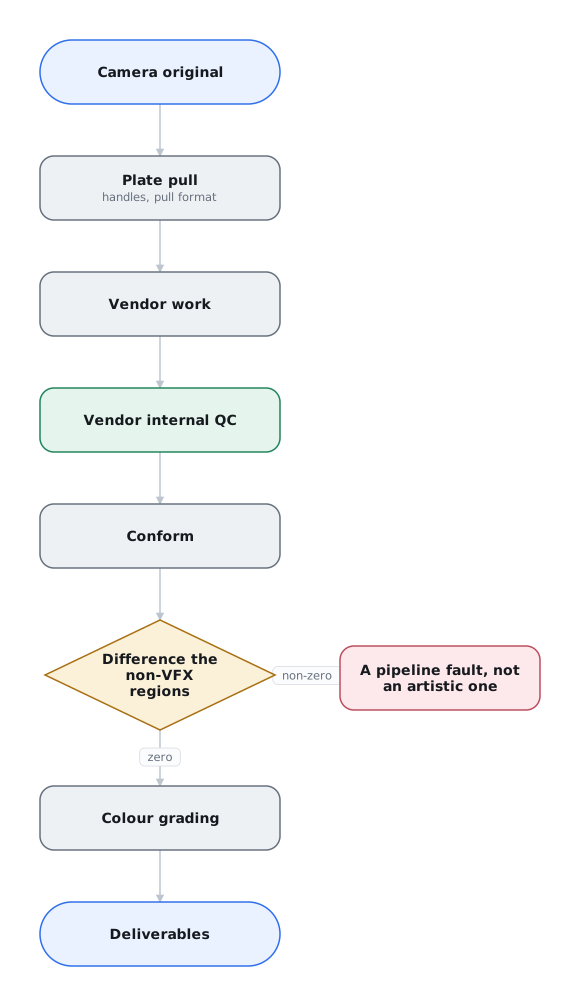
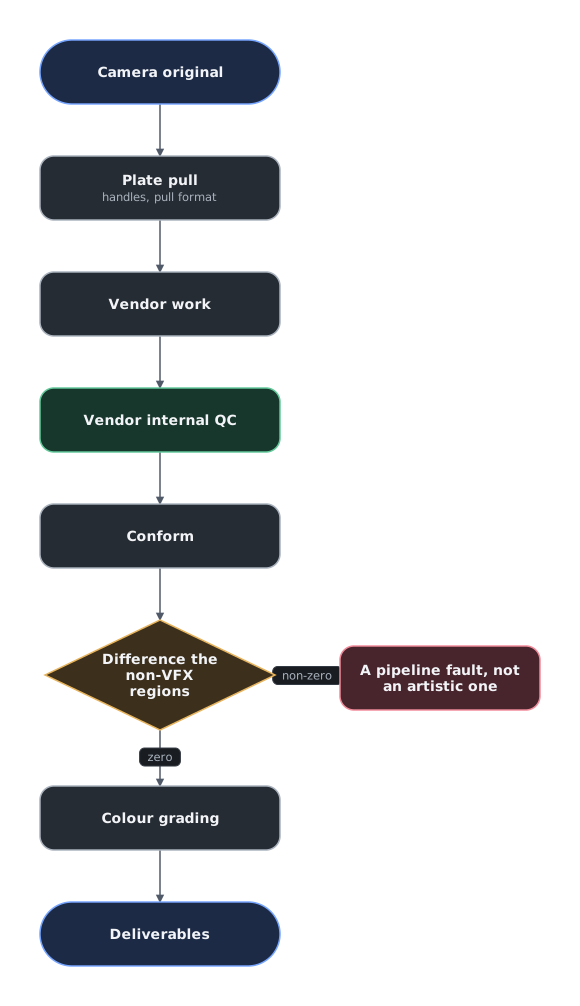
Treat each editorial shot as one VFX shot. Even when the effect appears for only a few frames, render and return the complete assigned range with its required handles. Frames outside the effect must pass through under Zero Net Change.
Define the effect range in the shot notes when work applies to only part of a long shot. Do not shorten the final delivery or ask the DI to place a short composite over the camera-original plate. The vendor must return one continuous, fully rendered shot.
VFX Turnover to DI
Creative approval confirms the shot's intended result. DI conform and QC confirm that the correct full-quality render, frame range, color encoding, and image structure reached the finished film.
Close the shot only after DI QC
After creative approval, the vendor delivers the specified final format, resolution, color encoding, frame range, and handles. The DI conforms the final high-resolution render against the offline reference, grades it in sequence, and performs final QC.
A compressed review file can hide matte lines, grain mismatches, and black-level errors. Treat the shot as final only after it passes DI conform and QC. See Visual Effects Quality Control Practices.
-
Park Road Post Production, Guide to VFX Handovers, pp. 8–11; Autodesk, “Managing Client-Side Productions,” “Editorial Turnover.” ↩
-
Schiff, “Feature Turnover Guide: VFX.”; Park Road Post Production, Guide to VFX Handovers, pp. 9–11; Autodesk, “Standard Fields for Tracking Cut Information,” “Shot Fields.” ↩
-
MovieLabs, Ontology for Media Creation, “Versions of Assets and Compositions,” “Appropriate Granularity,” “Status and State,” and “Provenance.” ↩