Scene-Referred vs. Display-Referred (Output-Referred) Imagery
An image domain defines what the image values refer to at a given stage of the pipeline. It does not define the file format. The same image can move between domains while remaining an EXR, TIFF, DPX, or QuickTime file.
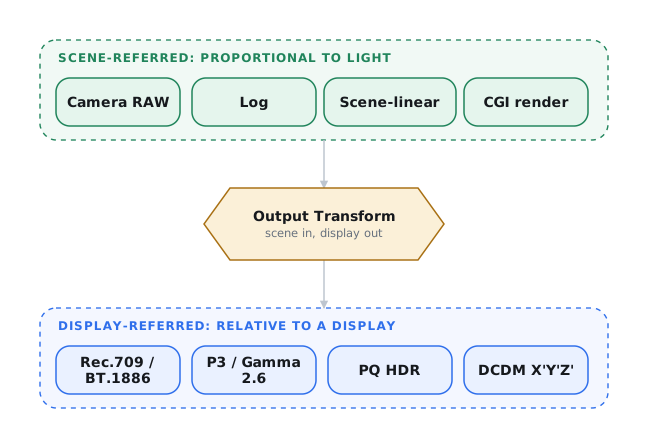
Scene-referred values retain a defined relationship to light in the photographed or computer-generated scene. Display-referred values, also called output-referred values here, describe the intended output of a display. An Output Transform moves the image between these domains by rendering the scene for a particular display and viewing environment.
Other image states exist, but scene-referred and display-referred are the two domains most often used in motion-picture color management.1
Display-Referred Imagery
Display-referred values describe either relative or absolute output on a target display, not real-world exposure. Final images prepared for web, phone, television, and cinema are display-referred. They have already received the rendering required for viewing.
The target and viewing environment determine the display transfer function. Computer and phone content commonly uses sRGB, home-video Rec.709 is viewed through BT.1886 at approximately Gamma 2.4, and standard-dynamic-range digital cinema uses Gamma 2.6.
A film print is the photochemical equivalent of a display-referred image. Every exhibition master is display-referred.
Scene-Referred Imagery
Scene-referred values preserve relative exposure relationships in a photographed or CG scene. They do not describe final display output or absolute light.
Camera originals and VFX renders remain scene-referred when they retain the camera's dynamic range and tonal relationships in an approved scene encoding.
Camera RAW and camera-log images normally remain on the scene-referred side of the Output Transform. CG renders and VFX plates may also use scene-linear encoding.
Scene-referred images from cameras commonly use manufacturer-specific quasi-logarithmic encoding. Examples include ARRI LogC3 / LogC4, RED Log3G10, Sony S-Log3, Canon Log 2 / Log 3, Blackmagic Film Gen 5, and Apple Log. Always record the version number. "LogC" and "Canon Log" each name more than one curve, and they are not interchangeable.
Blackmagic Film Generation 5 pairs a published log curve with Blackmagic Wide Gamut. Its gamut primaries, RGB-to-XYZ matrices, and transfer-function equations are published, so the encoding can be reproduced outside DaVinci Resolve.2
Do not confuse this camera encoding with DaVinci Wide Gamut / Intermediate. Resolve uses the latter as a working-space encoding with different primaries and a different log curve.
Scene-Linear
Scene-linear encoding stores relative light values without a gamma curve. Middle gray maps to 0.18, each stop doubles the value, and highlights may exceed 1.0. It is commonly stored as 16-bit half-float OpenEXR. Specify the data type because "16-bit" may mean floating-point EXR or 16-bit integer DPX, and only floating-point carries values above 100% (1.0).
Do not confuse scene-linear with normalized linear or camera linear. Those encodings commonly map sensor values into a bounded range from 0.0 to 1.0.
Video Does Not Mean Linear
Video names a medium and signal family, not a mathematical relationship between code values and light. Traditional video systems use nonlinear encoding. Picture rendering also made finished video effectively display-referred even when older standards described a camera encoding function.5
In current production shorthand, "video" can mean a moving-image file, an SDI signal, a non-RAW raster recording, or a display-ready Rec.709 image. None of those meanings establishes an image domain. A log-encoded ProRes recording can be scene-referred. A finished Rec.709 image is display-referred. Neither is linear-light.
Ambiguous language can cause a vendor to bake in a viewing transform, omit one, or apply one twice. It can also place compositing operations in the wrong domain. "Linear plates" normally means scene-linear OpenEXR, not display-referred video.
Specify the image domain
Name the image state, color space, transfer function, signal range, pixel encoding, and file format. Record every viewing or Output Transform already applied.
If a specification calls for "linear plates," name the scene-linear encoding and format, usually OpenEXR. If the source is display-referred video, state that and revise the VFX and grading pipeline accordingly.
Camera Log
Camera-log encodings are usually quasi-logarithmic. Within the logarithmic part of the curve, equal exposure changes in stops produce equal code-value intervals. Many curves add offsets or a linear toe near black, so "log" does not mean pure base-2 encoding across the entire range. ACEScc uses a base-2 logarithmic relationship above its lower threshold. JPLog2 uses base-2 above a linear toe, so it is not pure log throughout.3
Log encoding preserves scene range in integer formats with lower bit depth than 16-bit scene-linear interchange would normally require. RAW and log describe different properties. Camera RAW describes how much image construction remains for post, while log describes a transfer function. A RAW format can use nonlinear coding internally.
10-bit log can show quantization when it carries a wide camera range through heavy grading, especially for HDR and theatrical work. Use at least 12-bit log for high-dynamic-range acquisition and interchange. Use 16-bit log or 16-bit scene-linear when the workflow supports it.
Choose RAW or log around the production
The cinematographer, VFX supervisor, DIT, and DI compare image requirements, storage, dailies capacity, and delivery specifications. Broadcast productions often prefer log raster recording for faster turnaround.
Internal and External Recording
Internal log raster recording can be the primary format or an alternative to RAW. Sony VENICE 2 records X-OCN or 4K ProRes internally. FUJIFILM GFX ETERNA 55 records F-Log2 or F-Log2 C in ProRes 422 variants or H.265 internally. Its RAW output requires a compatible external recorder, which can record ProRes RAW or Blackmagic RAW.4
An external recorder changes the camera package, media, power, monitoring, cabling, and failure points. Test the complete recording path before production.
-
Blackmagic Design, Blackmagic Generation 5 Color Science, pp. 1–3. Included in the Documents folder of the Blackmagic RAW SDK, not a standalone public PDF. ↩
-
Academy Software Foundation, “ACEScc Specification,” “Encoding Function”; Academy Software Foundation, Common LUT Format Specification, “Log”; Colourlab AI, “JPLog2.” ↩
-
Sony Corporation, “VENICE 2 Digital Cinema Camera,” “High Performance, Proven Recording Formats”; FUJIFILM Corporation, “Create Cinematic Footage with the GFX System,” “F-Log and RAW.” ↩
-
Poynton, Digital Video and HD, pp. 20–23, 27–35, and 315–35. ↩