Application-Native Color Management: Resolve and FilmLight
Blackmagic Design's DaVinci Resolve and FilmLight's Baselight include scene-referred color-management frameworks. Each assigns source color spaces, maps clips into one working space, and applies a display transform at output. Unlike ACES, these systems live inside a vendor product.
The colorist or image-pipeline lead configures, documents, and tests the system. Every operator uses the approved project settings, source assignments, working space, and output transforms.
These frameworks apply a defined chain of input, working-space, and output transforms. A colorist can build the same structure manually with color space transforms (CSTs), LUTs, DCTLs, and a chosen display transform. The manual approach requires the colorist to document and maintain every transform.
DaVinci Wide Gamut is documented, and FilmLight publishes portable color-space files. Neither is an open standard like ACES (ST 2065-1). Neither has the same support across the OpenColorIO ecosystem. They are published and partially portable, but single-vendor.
Why working spaces use different primaries
There is no perfect wide-gamut primary set. A working gamut must be large enough to contain the camera and display gamuts used by the project. Making it larger is not automatically better.
Moving the primaries farther outside the visible gamut adds encoding headroom. It also changes how RGB grading operations behave. Ordinary image colors occupy a smaller part of the coordinate system, and simple channel, saturation, and interpolation operations can produce more negative or virtual RGB values. A tighter gamut gives the controls more familiar chromatic directions, but it may not contain every source or output.10
Each system balances these requirements differently:
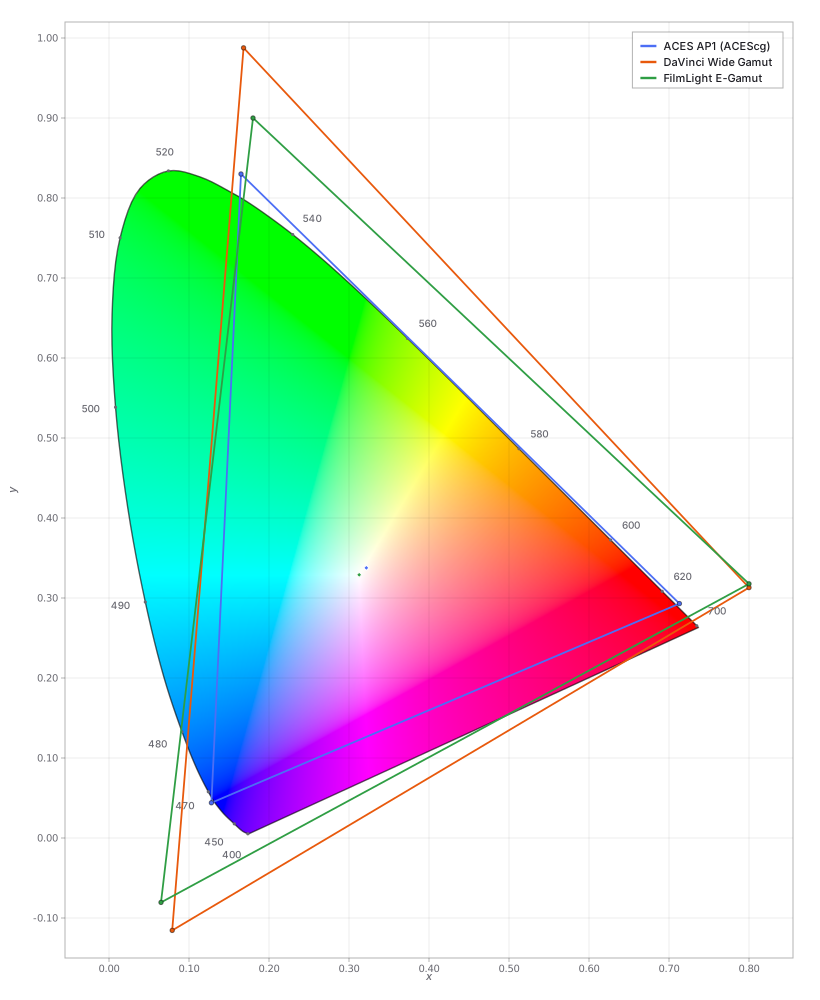
- ACES AP1 is smaller than AP0. It was designed as a practical CGI and grading gamut that contains Rec.2020 and P3 without using AP0's extreme primaries.
- DaVinci Wide Gamut prioritizes containment. It is large enough to hold the camera gamuts Resolve commonly normalizes into it.
- FilmLight E-Gamut also provides broad containment, with a different primary geometry tied to FilmLight's grading and display-rendering system.
White point and ecosystem matter too. AP1 uses the ACES white near D60. DaVinci Wide Gamut and E-Gamut use D65. The output transform, not the working primaries alone, determines the final display appearance.
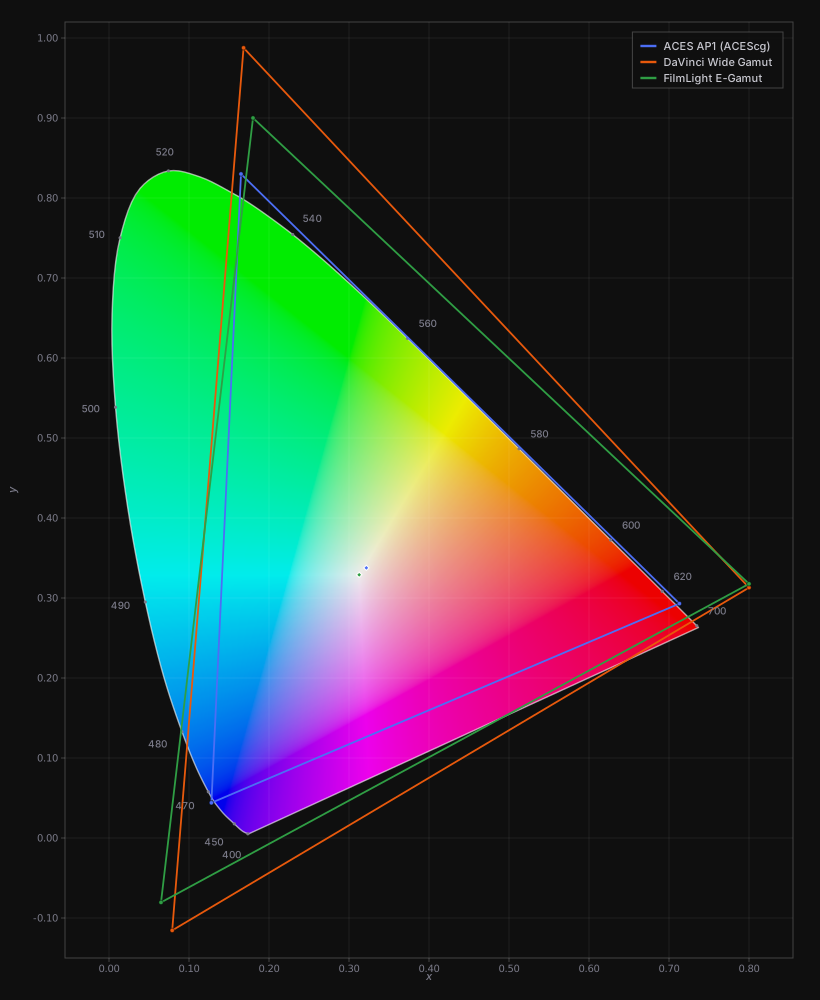
Each system works in a wide-gamut internal space. Common examples are ACES AP1 (the ACEScg working gamut), DaVinci Wide Gamut, and FilmLight's E-Gamut (what T-CAM renders from). All are deliberately wide, encompassing most camera and display gamuts, with virtual primaries that fall outside the spectral locus:
Which is closest to a scaled Rec.709 or P3 gamut?
Imagine enlarging the Rec.709 or P3D65 triangle uniformly around D65 white. Of the three working gamuts plotted above, E-Gamut is the closest geometric match to that scaled triangle for both Rec.709 and P3D65. It is not an exact enlargement. Its green primary expands differently from its red and blue primaries.11
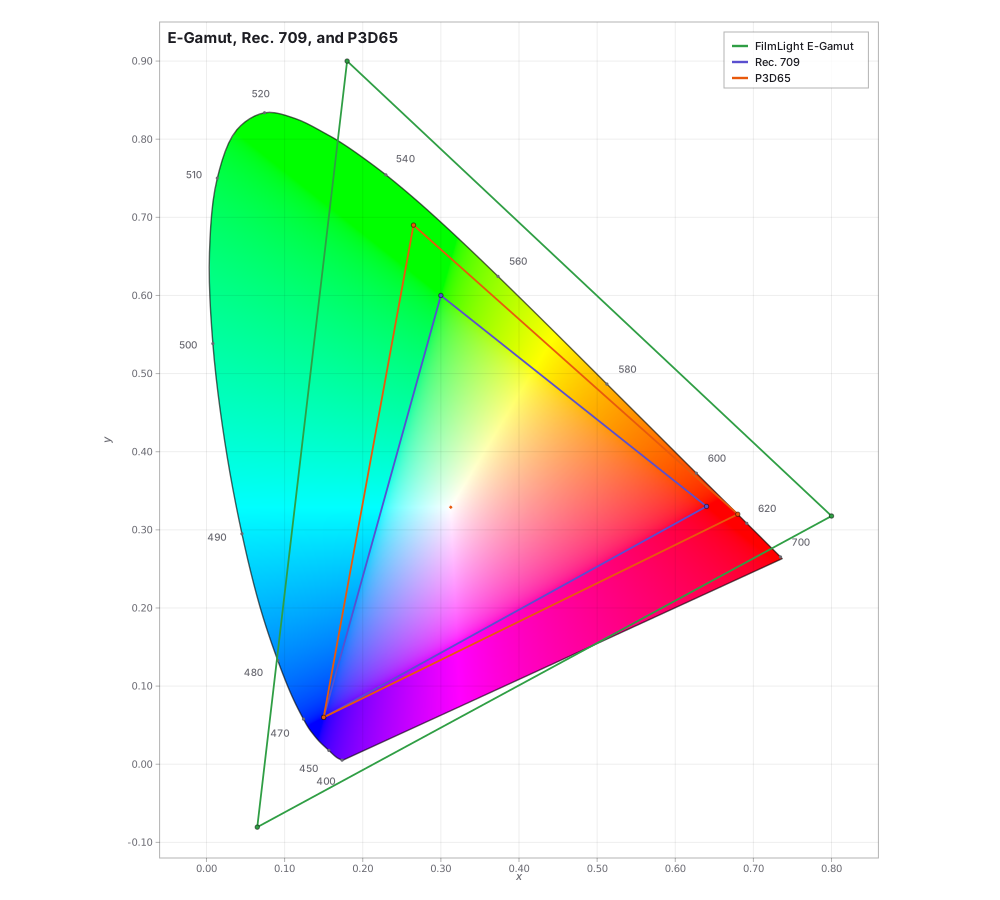
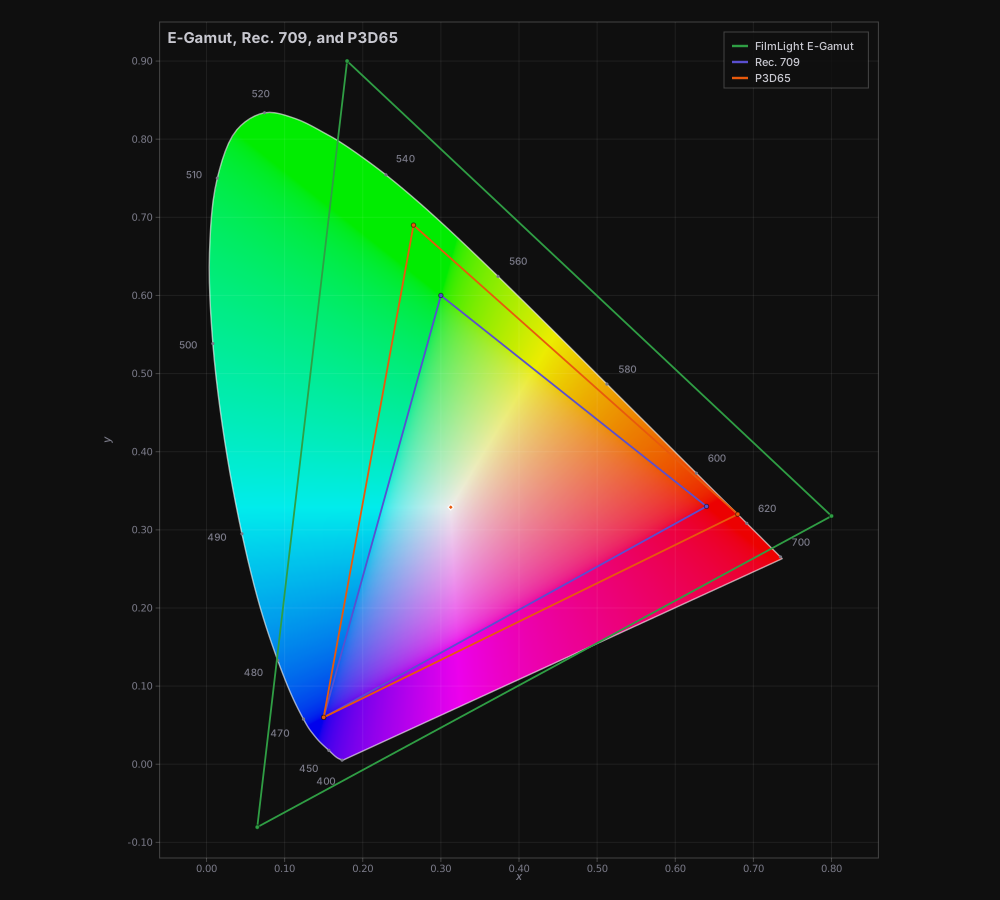
That similarity can make RGB primary and saturation controls feel more consistent with common SDR and theatrical outputs. The working-space axes point in roughly the same chromatic directions as the display primaries. This does not make E-Gamut more accurate than AP1 or DaVinci Wide Gamut. It does not remove the need for an output transform or gamut mapping. It describes one useful property of the coordinate system, not an overall ranking.
DaVinci Resolve Color Management (RCM)
RCM maps multiple cameras into one scene-referred working space and renders each deliverable through its assigned output. Assign the correct camera profile to every clip. Resolve applies the corresponding log and gamut transform.1
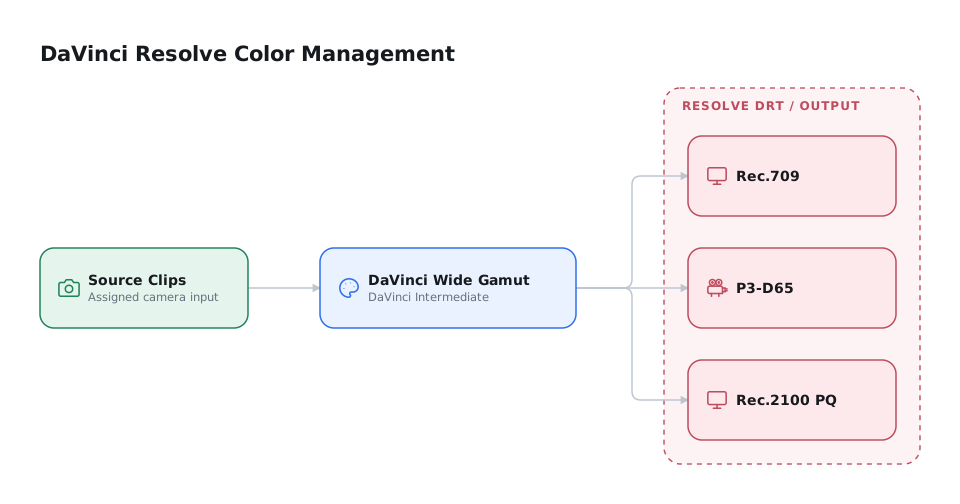
RCM and ACES are both automatic, scene-referred systems. RCM is a configurable, single-vendor framework with selectable working spaces and output tone-mapping methods. Resolve can also run ACES directly, so grading in Resolve does not preclude an ACES pipeline.3
For Resolve Color Management, use DaVinci Wide Gamut (DWG) with the DaVinci Intermediate log curve.2 Its primaries, white point, matrices, and log equations are published and can be reproduced in OCIO. Resolve's tone and gamut mapping remain internal. The encoding is specified. The rendering is not.
FilmLight: Baselight, Daylight, and the Truelight Color Spaces
Baselight and Daylight can manage a grade in E-Gamut / T-Log and render through the T-CAM v2 display transform. FilmLight calls this Truelight Color Spaces. These are product names, not standards.4
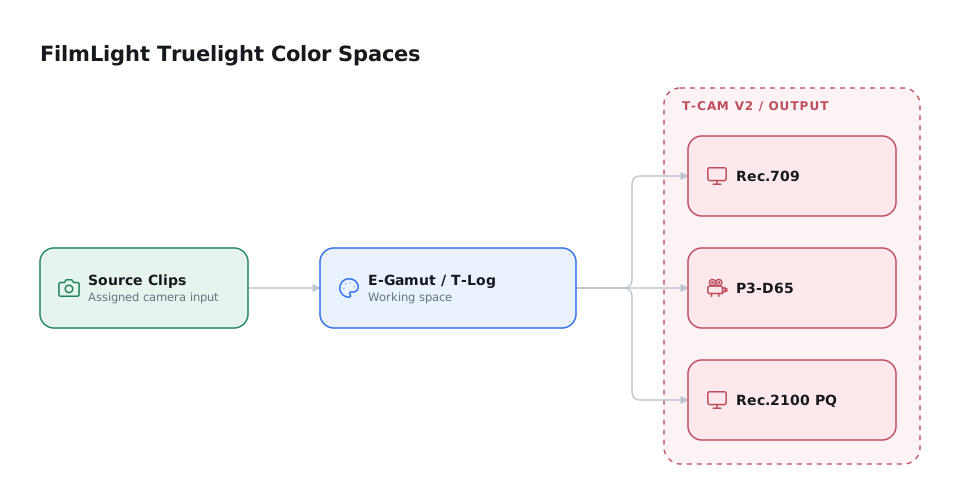
T-CAM uses a lighter appearance model plus viewing-condition correction. ACES 2.0 uses a Hellwig-derived color appearance model. Evaluate the rendering difference with the colorist.
FilmLight publishes .flspace and .fltransform files, a Truelight OCIO config, and an Autodesk Flame color policy. Baselight can also run a full ACES pipeline. These files improve portability but remain vendor-controlled rather than independently implemented standards.5
Application-native color management vs. ACES
Setup effort depends on whether the pipeline crosses applications and vendors:
| Application-native (RCM / TCS) | ACES | |
|---|---|---|
| Assigning input color spaces (camera normalization) | The same metadata-driven menu | The same metadata-driven menu: virtually identical labor |
| Single-app, single-facility finish | Enabled in project settings | Also enabled in project settings |
| Multi-vendor VFX interchange | More work: the colorist supplies LUTs or transforms and workflow guidance for each vendor | Less work: standard VFX tools include OCIO/ACES configs |
| Neutral archival master | No: a working space, not an interchange encoding | Yes: ACES2065-1 |
- Camera normalization requires similar labor in either system.
- ACES and OpenColorIO already ship in standard VFX applications through the VFX Reference Platform.6 Extending RCM or TCS across vendors requires the colorist to supply matching LUTs, transforms, and documentation.
Choose the system around the actual pipeline
Use an application-native system for a single-facility finish. Prefer ACES when the pipeline crosses vendors or requires a neutral archival master.
Why choose application-native color management over ACES?
Choose an application-native system when:
- The finish stays in one facility or application. For a documentary, commercial, or Resolve-only grade, ACES's interchange advantage may go unused.7
- The colorist prefers its grading behavior. RCM lets the colorist choose DaVinci Wide Gamut or another log timeline space to change how the grading controls respond.8
- You prefer its display rendering. The colorist may favor T-CAM or Resolve's DRT over the ACES Output Transform.9
- Only part of the pipeline needs ACES. Resolve and Baselight can use native working spaces while retaining ACES where interchange requires it.
Using a custom display transform
Either system can manage inputs and the working space while a custom LUT, DCTL, or DRT handles output. In ACES, this removes the guarantee that standard transforms alone can reconstruct the delivered look. Archive the custom transform with the master in a durable, documented form.
Documentary vs. single-camera narrative
Camera count and vendor count are separate considerations:
- Documentary: many source formats but usually one finishing facility. Application-native color management often requires less setup.
- VFX-heavy narrative: fewer source formats but multiple vendors, applications, and deliverables. ACES usually provides better interchange and archival support.
Camera count alone does not determine the choice. ACES becomes more useful as vendors, applications, deliverables, and archival requirements increase.
When to decide
The working space and display transform affect every plate, render, grade, and master. Changing them after shot work begins can invalidate earlier tests and deliveries.
Decide before shot work
During pre-production, the colorist chooses the working space and display transform. Record them in the format specifications, then prove the pipeline with a confidence package. See Assigning and Approving Color Management.
-
Blackmagic Design, DaVinci Resolve 21 Reference Manual, ch. 9, pp. 225–290, and The Colorist Guide to DaVinci Resolve 20, lesson 4. ↩
-
Blackmagic Design, DaVinci Resolve 21 Reference Manual, ch. 9, pp. 241–243, and DaVinci Resolve 17: Wide Gamut Intermediate, version 1.1. ↩
-
Blackmagic Design, DaVinci Resolve 21 Reference Manual, ch. 9. ↩
-
Kirk, Colour: Sense & Measurement, chs. 5–6. Product names and portability details come from FilmLight, “Colour Management: Truelight.” ↩
-
FilmLight, “Colour Management: Truelight,” and Allard, “FilmLight Baselight v7.” ↩
-
VFX Reference Platform, “Reference Platform.” ↩
-
Kelly, “Resolve Color Management vs ACES,” and Causey, “ACES, ACES 2.0, and RCM.” ↩
-
FilmLight, “Colour Management: Truelight,” and Allard, “FilmLight Baselight v7.” ↩
-
Academy Software Foundation, “ACES Encodings,” named sections “ACES2065-1” and “ACEScg”; Blackmagic Design, DaVinci Resolve 17: Wide Gamut Intermediate, pp. 2–3; FilmLight, “Colour Management: Truelight.” ↩
-
Geometric comparison based on the published CIE 1931 xy primaries for AP1, DaVinci Wide Gamut, and E-Gamut. AP1 was chromatically adapted from its ACES white to D65. One radial scale was fitted from D65 to the three Rec.709 primaries and then to the three P3D65 primaries. E-Gamut produced the smallest residual in both comparisons. This is a comparison of triangle geometry, not a perceptual color-difference measurement. ↩