Visual Effects Production Management
VFX production management connects the work artists are doing with the film's creative decisions, budget, and delivery dates. A useful production record shows what each vendor is making, what remains unresolved, and who needs to act next. Reviews turn submissions into decisions that the vendor can carry into the next revision.
On a large show, a VFX production team coordinates facilities while each facility manages its artists. On a small production, a producer, editor, or supervisor may manage several freelancers. The same questions need answers, but the tracking and meeting routine can be much smaller.
Establish the Production–Vendor Relationship
Before work begins, production and each vendor need a shared understanding of the brief, schedule, review process, and delivery requirements. A kickoff can be a short call followed by a written summary. Resolve missing references, unclear scope, and unrealistic dates before artists commit time to the work.
The director defines the creative purpose and approves the appearance of the shot, or delegates specific approvals. The production team translates those decisions into instructions and commitments:
- VFX supervisor: interprets creative intent, evaluates submissions, reconciles creative and technical concerns, and gives vendors consistent direction.
- VFX producer: tracks scope, cost, vendor commitments, dependencies, and the schedule. The producer obtains authorization for changes to the agreed work.
- VFX coordinator: organizes submissions and reviews, records decisions, distributes notes, and follows up on outstanding actions. Recording an approval does not grant authority to make it.
- VFX editor: places submissions in the current cut and communicates changes to the edit. A picture editor or assistant editor may perform this work on a smaller production.
One person may combine several functions. For example, a producer/editor can maintain the shot list and coordinate reviews while a freelance supervisor evaluates the composites. Identify where specialist judgment is needed rather than assuming the person maintaining the list can provide it.
Agree on contacts and review commitments
The producer and supervisor confirm with each vendor:
- the brief, references, included work, and required final delivery
- the production and vendor contacts for creative, technical, and scheduling questions
- who may approve the image and who may authorize added cost or time
- the first submission, subsequent milestones, and final delivery dates
- where submissions and official notes are recorded
- review times and the expected turnaround for feedback and replies
At a facility, route direction through the agreed vendor supervisor and production contact. Direct technical conversations with artists can be useful, but any resulting change must reach those contacts. An artist must not receive conflicting instructions from production and their own supervisor. For a freelancer, the artist may also be the vendor contact.
Scope, Revisions, and Change Orders
Creative development, technical correction, and added scope are different kinds of work. Define their boundaries before the award so reviews do not become negotiations over cost and obligation.
Define revisions and change orders before the award
Put these terms in the bid and contract:
- bid assumptions and included work
- included review stages and creative revisions
- final acceptance criteria
- technical delivery requirements
- conditions that require a change order
- the person authorized to approve added cost or schedule
Creative revisions within the agreed brief and included review rounds are part of the work. A change order covers work outside those terms, such as an editorial change, an added element, a new creative direction, or additional review rounds. Define the boundary in writing. Do not negotiate it for the first time during a review.
A delivery that fails the agreed technical requirements is a correction, not a creative revision. The contract must state the vendor's correction and delivery obligations. The authorized producer approves any change to cost, scope, or schedule before the vendor proceeds.
Asset Management
Asset management names shots, orders plate pulls, organizes media and metadata, and sends each package to the assigned vendor or artist.
Choose transfer tools around the actual exchange
Match the security requirements, transfer pattern, bandwidth, file size, and budget:
- Facility-directed transfers: Use the receiving facility's required service. Aspera Faspex, Signiant Media Shuttle, and Sohonet FileRunner are common for high-volume exchange.
- Transfer and review for a small production: Frame.io combines review and fast macOS and Windows transfers under a predictable subscription cost, without a separate charge for each download.
- Continually changing shared assets: LucidLink and similar services mount cloud storage like a local drive for artists working from the same evolving assets.
- Large one-time transfers: MASV provides accelerated browser and desktop transfers with usage-based and subscription options. It does not require on-premises transfer hardware.
- Modest, unrestricted transfers: Dropbox, Google Drive, or Hightail may be sufficient when the recipient permits them.
Control access and review separately
Set access by artist and folder. Define who may change or delete files. Set file-locking and revision rules before anyone works from shared storage. Maintain an independent preservation copy.
Use Frame.io or cineSync for frame-specific review of remote QuickTimes and exported notes. Inspect proposed finals at full quality in the calibrated finishing environment. Confirm the receiving facility's transfer method instead of assuming it will accept a shared cloud folder. See Run a Production Review.
For large deliveries, compare transfer time against copying a physical drive and sending it by courier or overnight shipping.
Production Tracking
The shot list is production's view of the work across vendors. It does not need to reproduce every task in a facility's internal database. A shared spreadsheet can be sufficient when it answers the questions production needs for the next review and delivery.
Keep the next action visible for every shot
The coordinator, or the person combining that role with another job, maintains:
- shot name, assigned vendor or artist, and a short work description
- links to plates, references, review media, and the decision history
- the latest submitted revision and any unresolved notes
- the next action, the person responsible, and the promised delivery or response date
- the approved revision and any remaining conditions
- the revisions currently in editorial and the DI once those departments receive inserts
The latest submitted revision, the approved revision, and the revision conformed in the DI may be different. A vendor may submit v013 while v012 remains approved and editorial still carries v011. Record those distinctions instead of treating the highest revision number as the intended shot.
A status such as “in progress” does not say whether the artist is working or waiting for a decision. “Awaiting director's animation notes, due Tuesday” identifies the next action. Keep earlier decisions attached to their revisions when updating the current summary.
Production can maintain this record in Excel or Google Sheets and link to the review platform. Larger shows can use a dedicated production-tracking system. Choose a system the team will keep current, and avoid copying the same notes into several competing records.
The coordinator updates the record after submissions, reviews, and changes to delivery commitments. The vendor confirms its next delivery date. The VFX editor and conform editor reconcile their cuts against the recorded intended revisions.
Schedule the Work and the Reviews
The VFX producer and vendor work backward from the dates editorial and the DI need the shots. The schedule must allow for production review, revisions, rendering, transfers, and technical corrections. A final-render deadline is not the date to begin judging whether the effect works.
Milestones depend on the work. A removal shot may need a first composite and a final candidate. A creature shot may need design, layout, animation, lighting, and compositing reviews. Agree on what each submission will demonstrate and which decisions the vendor needs before proceeding.
Production feedback is part of the schedule. If animation approval arrives late, the vendor may not be able to retain the original lighting and delivery dates. Agree on review windows that the director and supervisor can attend, and account for time zones when setting response deadlines.
Review commitments with each vendor
At the agreed update time, the producer or coordinator confirms:
- which shots reached their promised milestone
- what the vendor will submit next and on what date
- which plates, references, assets, or production decisions are missing
- which commitments are at risk and what would resolve the problem
A small team might use a weekly schedule call and two planned review sessions. Near delivery, shorter, more frequent updates may be necessary. Ask for specific commitments rather than an unexplained percentage complete. Counts of creatively approved shots and technically accepted deliveries are useful, but ten remaining paint fixes are not equivalent to ten unfinished CGI shots.
Coordinate Work Across Vendors
Vendors may share a creature asset, environment, or sequence that must look continuous. The supervisor identifies those relationships before assigning the work. The producer confirms who provides each shared asset, what the recipient needs, and when the handoff will occur.
When one vendor's delivery is another vendor's starting point, record that dependency in the schedule. The coordinator tells affected vendors when an asset, reference, or edit changes. The supervisor reviews related shots together and supplies the same approved visual references to both teams. Separate vendor reviews must not produce incompatible directions for the same scene.
Run a Production Review
Vendor internal reviews prepare work for submission. Production reviews decide whether that work serves the film and what happens next. The supervisor can screen submissions before a director's review to identify known limitations, unanswered questions, and issues that need technical attention.
The coordinator confirms which shot and revision are being reviewed and what the vendor is asking production to judge. The VFX editor places the review QuickTime in the current cut. The supervisor compares it with the brief, relevant references, and the previous revision when checking notes.
Review the submitted stage in context
The supervisor leads the review:
- Play the shot in the scene to judge performance, timing, continuity, and purpose.
- Confirm what is intentionally unfinished and what was expected in this submission.
- Compare revisions to check whether earlier notes were addressed.
- Identify required changes, questions, and optional improvements.
- Confirm the decision with the authorized reviewer before the coordinator issues notes.
A blocking pass establishes broad positions and timing before detailed animation. Unfinished textures may be expected at that stage. Review the requested decision without treating acknowledged temporary work as a new defect. Flag an unexpected problem when it could affect later work, even if its final correction belongs to another stage.
Review movies need the agreed viewing transform so the image can be judged in its intended context. Remote review is practical for creative development, but compressed media and uncontrolled displays cannot prove final image quality. See Remote Viewing and Color Review and Visual Effects Quality Control Practices.
Give Vendors Clear, Consolidated Feedback
Useful notes identify the problem and the intended result. A frame reference, annotated still, or visual reference can remove ambiguity. The supervisor can explain why a shot is not working without dictating a compositing method when the vendor is better placed to propose one.
For example, a note for Harbor Light could read:
HBL_010_020, v012, frames 1048–1060: The reflection obscures her eyes as she turns. Reduce it through the turn while retaining the surrounding window reflections. Keep the approved timing.
The coordinator records whether each note is a required change, a question awaiting an answer, or optional polish. Optional does not authorize extra spending. The producer confirms whether there is time and budget for it. Separate instructions about different problems so the vendor can answer and resolve each one.
Use a Coordinate Grid for Spatial Notes
For a small detail within a busy frame, a shared coordinate grid can replace a lengthy description of its location. It supplements the frame reference and direction rather than replacing them.
Use one coordinate grid for review notes
The supervisor gives production and vendors the same labeled grid. Agree on its orientation and revision before reviews begin. Overlay it during review or export an annotated frame. Include the frame or timecode, grid coordinate, and required action.
HBL_010_020, v012, frame 1048, H14: Remove the tracking marker without affecting the hair edge.
Production can make the grid or generate one with DCTL Studio.

Issue One Agreed Set of Notes
Comments from several reviewers may conflict. The supervisor resolves competing creative directions with the director before asking the vendor to act. The producer resolves any resulting scope or cost decision. The vendor must not have to choose between contradictory instructions.
Confirm the direction and the next delivery
The coordinator issues one agreed note set against the exact submitted revision. Summarize decisions made in calls, emails, or messages in that same record. Identify which earlier direction is superseded without deleting its history.
The vendor acknowledges the notes, asks about anything unclear, and flags consequences for cost or schedule. The producer resolves those consequences and the coordinator records the agreed next submission date. Silence is not confirmation that the instructions are understood.
A review platform can hold the detailed comments while the shot list links to that revision and summarizes the next action. Label unapproved reviewer comments as discussion until production has reconciled them. A late note that changes the agreed direction needs to be sent explicitly to the vendor contact, not left unnoticed on an older upload.
Record What Was Approved
Approval applies to a specific revision and a specific decision. “Animation approved, lighting notes remain” allows the next stage to proceed without declaring the shot final. “Looks good” in a message leaves both the scope of approval and the next action uncertain.
The coordinator records the authorized reviewer's name, date, revision, and any remaining conditions. Keep these decisions distinct:
- Stage approval: the identified work, such as animation, can advance to the next stage.
- Creative approval: the authorized reviewer accepts the shot's creative result.
- Technical acceptance: the full-quality delivery meets the agreed requirements and passes production's technical review and DI checks.
A conditional approval must name the condition and who will verify it. A newer revision does not inherit approval automatically. If production reopens an approved decision, record what changed and address its cost and schedule implications with the vendor.
Final Delivery and DI Reconciliation
A creatively approved review movie is not evidence that the final image sequence is technically acceptable. The vendor checks its full-quality render before delivery. The VFX supervisor verifies the result, and the DI checks the delivered files during ingest and conform.
Approve both the creative result and the final render
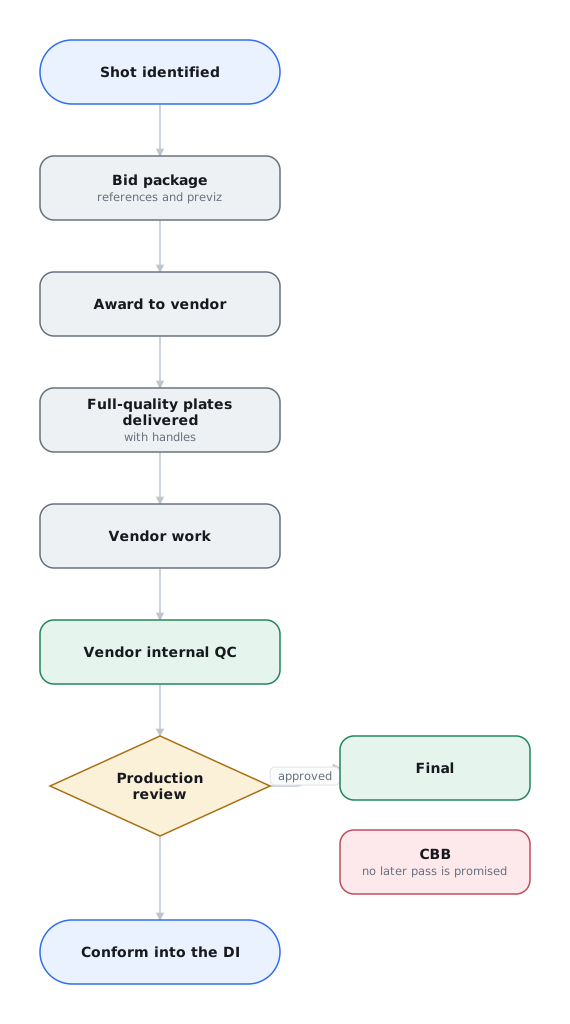
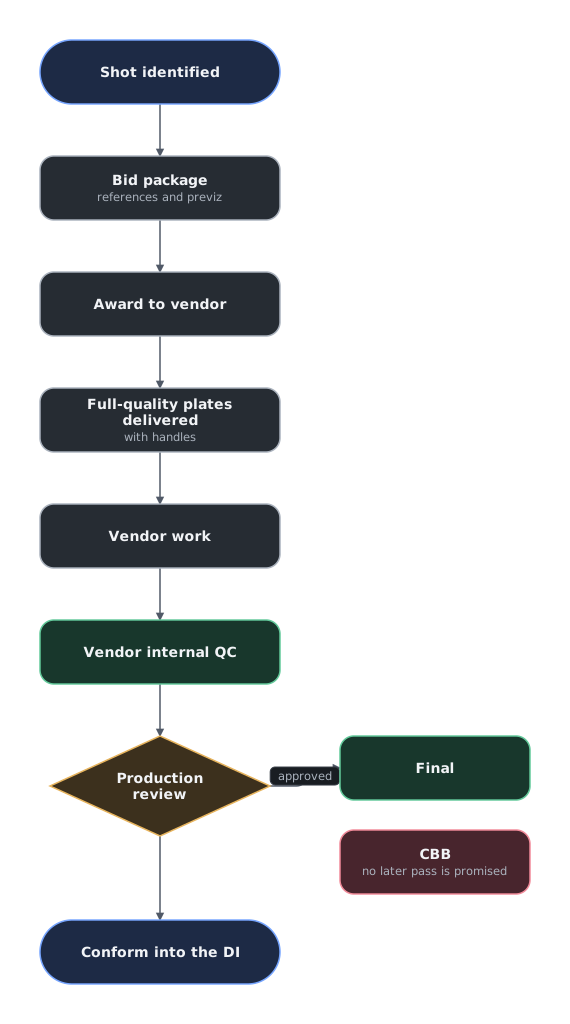
After creative approval, the VFX producer requests the vendor's full-quality final render for the DI. This is the vendor's final shot output, not a graded render produced by the DI.
The supervisor reviews proposed finals in a calibrated environment appropriate to the target displays or exhibition formats, using the agreed viewing transforms. Review the full-quality shot at its delivery frame rate. Keep technical issues open until corrected and verified. See Quality Control Practices.
Selected work-in-progress renders can reach the DI early enough for grading feedback and review in sequence. Each additional delivery also adds transfer, conform, and checking work. The producer, supervisor, and DI agree which interim deliveries are useful.
Test one final before batching deliveries
The supervisor arranges a representative full-quality vendor-to-DI round trip for each vendor. The vendor and DI validate frame ranges, handles, channels, color encoding, metadata, naming, and ingest. After the test passes, a limited-budget production can send approved finals instead of every evolving work-in-progress render. Skipping the test can repeat the same failure across many shots.
Name the intended revision in every conform update
After the initial conform, editorial sends change lists and VFX inserts with the exact intended revision in each offline QuickTime clip name. Never ask the DI to infer approval from the highest available revision.
Before finishing picture, the coordinator, editorial, and the conform editor compare the approved shot record with the revisions in the DI. Record the accepted delivery and verify that unresolved conditions have been closed. See VFX Turnover to DI.
Handle Changes, Delays, and Competing Priorities
An editorial change, new creative direction, or missed milestone can affect more than one shot. The producer first establishes what work remains and which commitments depend on it. The supervisor identifies the creative consequences and possible simplifications. The vendor supplies a revised estimate and achievable delivery dates.
Agree on a recovery plan before promising a new date
The producer and supervisor decide whether to fund additional work, simplify the effect, defer optional polish, or propose a different edit to the director and editor. Confirm the vendor's capacity before assuming overtime or additional artists will recover the schedule. Authorize changes under the agreed revision and change-order terms. The coordinator records the decision and notifies affected vendors, editorial, and the DI.
Unfinished work needed for the scene takes priority over acceptable shots that could be improved. A could-be-better (CBB) shot is acceptable for the intended release but remains a candidate for optional polish. It does not excuse a technical defect or an unmet delivery requirement. Name the accepted revision before ordering an optional replacement, and review that replacement before use.
If production and a vendor disagree about whether a note changes scope, identify the disputed work and resolve it against the brief and contract. Agree which unaffected work can continue while the producer settles the change. Do not leave artists guessing whether to proceed.
Team Management
At large VFX facilities, technical directors and pipeline engineers often build the color and image pipelines. Artists can focus on compositing, lighting, animation, or another discipline without managing the entire handoff.
Experience at a large facility does not prove that a freelancer can run an end-to-end shot workflow.
Evaluate the complete freelance workflow
Evaluate the artist's primary discipline and ability to follow the production's color management, plate setup, naming, revision, QC, and delivery requirements. Identify the artist's limits and assign technical support where needed. A strong artist can still create major rework by rendering in the wrong color space or delivering the wrong format.
A Small-Production Review Routine
For example, Harbor Light assigns window replacements to Beacon VFX and cleanup shots to Breakwater VFX. One producer/editor coordinates both vendors, with a freelance VFX supervisor joining the reviews. They use one shared shot list and one review platform, not a separate database for every company.
On Monday, each vendor confirms its next submissions and missing inputs. The producer/editor updates the promised dates. Reviews are booked for Tuesday and Thursday, with an agreed time for production to send consolidated notes afterward. Between reviews, vendors flag anything that cannot wait for the next call.
For Tuesday's review, the producer/editor cuts the submitted revisions into the current scene. The supervisor identifies a reflection problem in one Beacon shot. The director approves the timing but requests the reflection change. The producer/editor records that decision against the reviewed revision and sends one note set. Beacon confirms the correction and Thursday's submission.
Breakwater is waiting for a replacement plate following an edit change. The shot list names the producer/editor as responsible for arranging that plate, rather than describing the shot only as “in progress.” Breakwater gives a new delivery date after confirming when it can receive the plate. The producer/editor resolves any extension cost before authorizing the additional work.
Before final delivery to the DI, the team has already tested one representative full-quality shot through each vendor's workflow. The supervisor reviews the finals, and the producer/editor checks the shot list against the cut. The conform editor confirms which revisions reached the DI. The small team spends its coordination time on decisions, outstanding work, and actual deliveries.
Work that arrives from outside the shot list
Trailer campaigns create unscheduled VFX work, including alternate frame ranges, censored variants, replaced dialogue, and spoiler-free versions. Charge the work to marketing overage and account for the interruption in the VFX schedule. See Trailer-specific VFX.