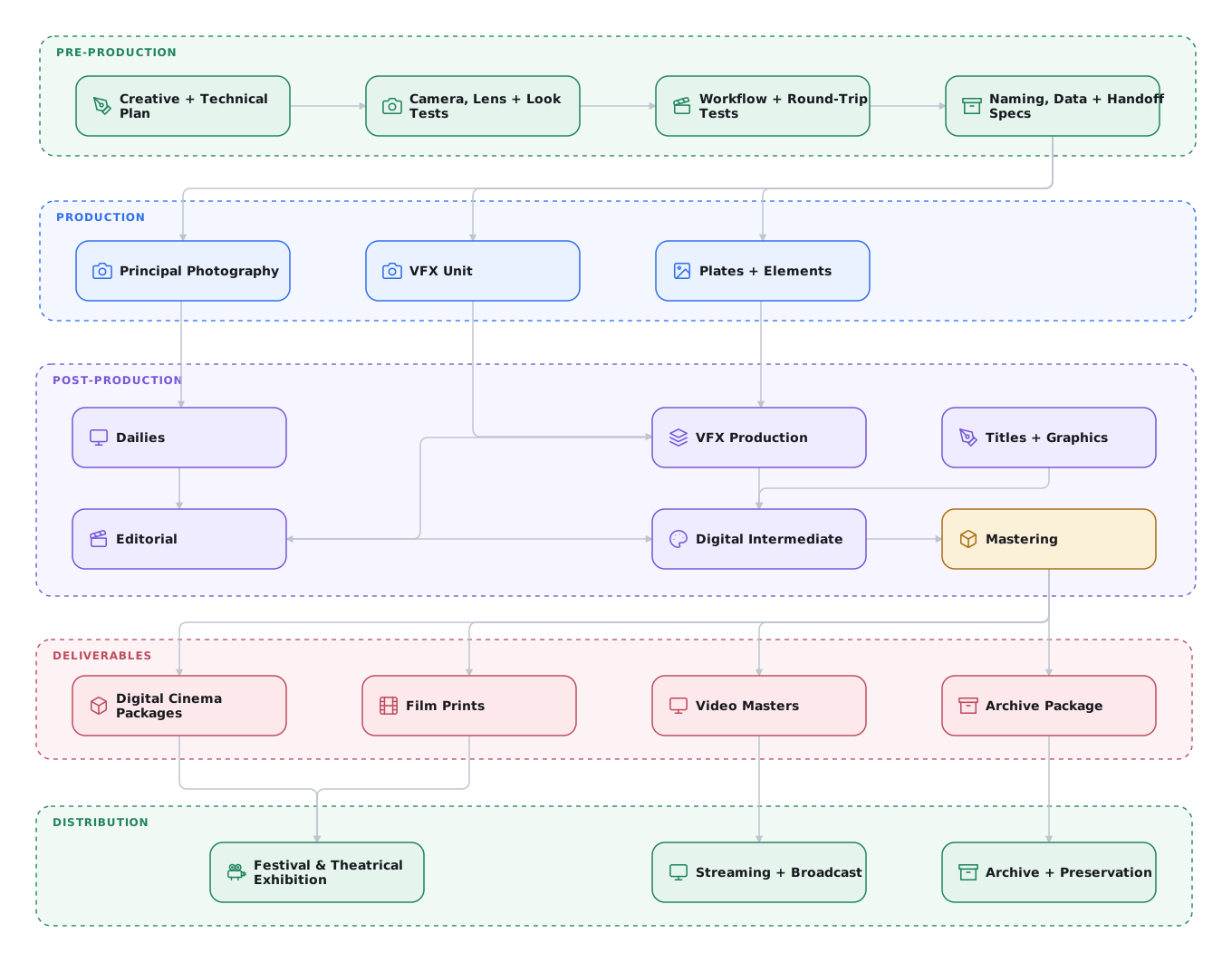
Generalized Production Workflow
Pre-Production
Pre-production is not previs. It turns creative intent into a tested production and post-production plan. Production, editorial, VFX, dailies, color, sound, and the DI must agree on how images, sound, metadata, and approvals will move between them before photography begins.
Define the Workflow
Document the decisions that every department and vendor must follow:
- Ownership: pipeline owner, handoff owners, contacts, approval authority, and escalation path.
- Acquisition: cameras, recording formats, frame rate, timecode, raster, framing, audio, and required camera and lens metadata.
- Data management: folder structure, file and shot naming, versioning, checksums, backups, transfer methods, security, and retention.
- Dailies and editorial: proxy format, sync method, burn-ins, color metadata, review system, and the metadata required to relink camera originals.
- VFX: bid and turnover process, plate and final-render specifications, handles, mattes, references, review media, version tracking, and delivery schedule.
- Finishing: editorial turnover, conform method, titles, audio references, color pipeline, masters, distribution deliverables, and archive.
Publish these decisions as one show specification and one vendor-onboarding package. Use a shared tracking system so production can locate the current asset, version, owner, and approval state without reconstructing the history from email.
For every handoff, define who publishes the material, where it goes, how the recipient confirms receipt and QC, when it is due, and how missing or rejected material is corrected. The tool can vary. The method cannot.
Start with the Production Checklists, Technical Specifications, and Reusable Production Templates.
Develop the Look and Vet the Color Pipeline
Include the colorist in camera, lens, lighting, wardrobe, makeup, and production-design tests. Use those tests to develop the show look with the director and cinematographer, establish exposure and monitoring practices, and identify where the intended look creates limits for VFX or delivery.
Document each camera input transform, working space, viewing transform, Show LUT or creative transform, and target display. Distribute the same versioned package to dailies, editorial, VFX, and finishing.
Prove the pipeline with a round trip:
- Shoot representative material with every camera and recording mode.
- Process dailies and editorial proxies with the approved look and metadata.
- Pull a VFX plate using the production specification.
- Return a test composite through the approved interchange encoding.
- Conform and grade the returned shot in the DI.
- Compare it with the source outside the composited region and review it on the target display.
Resolve mismatches before production. A visually plausible test is not enough. The round trip must preserve framing, frame range, metadata, dynamic range, gamut, and unaffected pixels.
Plan Lenses and VFX Data Capture
During camera prep, the DP and VFX supervisor should review how the proposed lenses affect VFX. Photograph distortion grids and lens charts for every production lens. Repeat the tests at the focus and zoom settings that materially change the lens.
Decide whether VFX plates and elements should use the principal-photography lenses. Green-screen elements may be easier to extract and track when photographed with cleaner, less distorted spherical lenses instead of vintage or anamorphic glass. The DP and VFX supervisor should make that choice together. The goal is to simplify VFX without losing the film's creative intent or look.
Test the lens-metadata path during prep. Systems such as Cooke /i Technology, ARRI Lens Data System (LDS), and ZEISS eXtended Data can record lens identification, focal length, focus, iris, distortion, shading, and other measurements. Some cameras and lenses also record inertial data. Confirm that the camera records the required fields, that dailies and VFX plate pulls preserve or export them, and that the receiving vendor can read them. Automated metadata supports the VFX camera report. It does not replace it.
Previsualization
Previsualization (previs) is a separate creative-planning tool. Use it to test complex blocking, staging, camera movement, lenses, equipment, coverage, and pacing. It complements storyboards. It does not replace workflow planning.
If a full previs team is outside the budget, assign a freelance artist to the shots with the greatest technical or scheduling risk.
Production / Acquisition
Camera and Workflow
Choose a camera that records high-dynamic-range, scene-referred images in a documented gamut and transfer function. The label (cinema, mirrorless, drone, or action camera) matters less than what the file preserves and whether post can build a correct input transform.
Scene-referred recording either manifests itself as a recorded logarithmic (log) raster image, a scene-linear raster image, or a Camera RAW file. These topics are explored further in An Overview of Digital Intermediates.
On-Set Visual Effects
Poor plates increase cost, schedule, and risk. Put the VFX supervisor on set for VFX photography, ideally the same person who will supervise post. If unavailable, assign a trusted senior artist or another supervisor.
The on-set supervisor coordinates with the director, DP and camera department, production design, and practical effects. They decide what to capture practically, flag conditions that complicate post, and collect the measurements and references artists will need.
Detailed camera notes aid in reproducing accurate scenes in CGI. Note that these are not the camera assistants' notes. The AC's report is a camera-department document covering rolls, takes, lenses, and stops. It exists for editorial and the lab. The VFX team owns the VFX camera report. It records the information a matchmove artist needs, including camera height and tilt, lens and filtration, focus distance, sensor mode, and survey data. Ask for it explicitly. The AC's paperwork is not a substitute.
See Lens distortion grids and camera metadata.
Common Visual Effects Production Mistakes
Do not assume a difficult setup will be easy to fix later. Have the supervisor document each risk and solve it in camera where practical. For example, production design can incorporate trackable patterns into a set instead of adding markers that must later be removed.
Frame Rate: 23.976 or 24.000
Choose the rate before photography and use it across camera, sound, editorial, VFX, and finishing. 23.976 and 24.000 are both normal. Mixing them creates progressive picture and sound drift.
Why both exist. 24.000 is true 24 frames per second. 23.976 is 24000 ÷ 1001 and exists due
to legacy broadcast compatibility with interlaced 29.97.1
Modern displays are not region-locked by mains frequency. Current TVs commonly play 23.976, 24, 25, 29.97, 30, 50, and 60 fps regardless of whether the local power system is 50 or 60 Hz. Display capability is not a good reason to choose between 23.976 and 24.000.
Broadcast is the important exception. Existing broadcast plants, schedules, and delivery systems often require a specific rate. Streaming apps do not have the same infrastructure constraint, and there is little legitimate technical reason they cannot support both 23.976 and 24.000. Delivery specifications can still impose business or workflow requirements, so confirm them before production.
Scanning or telecining film at the agreed frame rate is not a problem. Re-clocking a progressive master between 23.976 and 24.000 also preserves every frame. Avoid conversions that blend, interpolate, drop, or repeat frames. Avoid delivering 2:3 pulldown as if it were a native progressive master. Those are the damaging conversions that specifications reject.
What a mismatch costs. Run material at the wrong one of these two rates and nothing drops or repeats. Each frame stays on screen for slightly the wrong duration, so the error accumulates:
| Elapsed | Drift |
|---|---|
| 1 minute | ~1.44 frames |
| 42 seconds | ~1 frame |
| 1 hour | 3.6 seconds (~86 frames) |
| 90 minutes | ~5.4 seconds |
| 120 minutes | ~7.2 seconds |
The signature is progressive drift, not a fixed offset. Everything lines up at the head and degrades from there. If each reel is head-synced separately, the drift resets at every reel head and then climbs again.
Sound is where a mismatch becomes obvious. At 48 kHz, one 23.976 frame is exactly 2002 samples. One 24.000 frame is exactly 2000 samples. Production recorders can record at 48048 Hz so the file plays at the intended speed when a 48000 Hz clock reads it. Recorder labels and NLE behavior vary.
Specify the operation
Pull-up and pull-down can describe the sample rate, playback speed, or other unrelated processes. Write the actual instruction: "Record at 48048 and stamp it 48000," or "Slow the audio by 1000/1001."
A DCP cannot be 23.976. Digital cinema uses integer frame rates. A 23.976 finish destined for theatrical must be conformed to 24.000.1 The picture keeps the same frames and plays them 0.1% faster. Every audio element must change speed to match.
Choosing the Rate
Converting between 23.976 and 24.000 is a small speed change. The frame count stays the same. Choose the rate that avoids conversion on the primary delivery:
| Leaning | Finish at | Why |
|---|---|---|
| Independent VOD/TVOD is the realistic destination | 23.976 | Common in independent distribution schedules. Confirm the actual platform specification. |
| Theatrical or festival exhibition is the priority | 24.000 | 23.976 is not a legal DCP rate, so a DCP always forces the conform. Festival acceptances arrive late and their deadlines are short. |
| Broadcast is primary | The broadcaster's required rate | Broadcast infrastructure creates real regional and technical limits. Get the specification before photography. |
Consistency matters more than the choice. A show shot consistently at either rate is fine. Re-clocking a finished master is routine. Mismatched camera and sound rates create a sync problem that compounds through every reel.
Pick one number, put it in both departments' paperwork before you shoot, and do not change it mid-production.
Digital Dailies
In a typical studio production, camera original media is ingested on set by a Digital Imaging Technician (DIT) or a Digital Loader (also called a data wrangler or data manager) and archived to hard drives, LTO tape, or both. A copy of those assets is delivered to the dailies team, either on-set, near-set, or at the lab or post-production facility. There, a dailies colorist or dailies technician will apply looks created on-set by the DIT or the cinematographer to relevant shots in scene context and make any necessary balancing or aesthetic color corrections. They will sync the production audio tracks to picture and then process the camera original media into an offline proxy format suitable for editorial, including relevant metadata necessary to reference the original media. These offline proxies are rendered with the dailies color grade and the Show LUT baked in, and are sized and formatted in accordance with the framing chart. Dailies are often processed unmatted in order to provide editorial with creative reframing flexibility.
In the independent production world, this level of complexity is rarely observed. Typically, there is a single DIT or a Digital Loader, but rarely both. They may also be responsible for syncing and processing dailies, but that task is often delegated to the production editorial team.
Dailies Must Execute the Pre-Production Color Decision
Dailies is the first production use of the approved color pipeline, not the place to invent it. The dailies team applies the documented camera input, color metadata, Show LUT or creative transform, and viewing transform when producing editorial and review media.
If the show is going to be ACES, dailies is where that starts: an Input Transform per camera rather than a per-camera LUT of unclear provenance, and an Output Transform generating the viewing render. The practical benefit is that multiple vendors can implement the same pipeline without negotiating a bespoke workflow per show.
Choosing ACES, RCM, TCS, or a manual pipeline affects the entire post chain. Changing course after dailies begins means re-deriving looks, re-issuing plates, and re-testing vendor round trips. The colorist, cinematographer, VFX supervisor, dailies team, and post supervisor must approve the pipeline before the first day's material is processed.
The alternatives are equally legitimate. An undocumented one is not. See Choosing a Color Management Approach and confirm the production settings against the approved pre-production test.
Processed dailies are delivered to production editorial as Avid DNx LB (formerly DNxHD 36 / DNxHR LB) QuickTimes or MXFs, or Apple ProRes QuickTimes. Circled takes, and occasionally all takes, are transcoded to H.264s with audio and uploaded to a secure server and provided to the filmmakers for creative review. PIX (now Autodesk Flow Capture) and DAX (now part of CLEAR) are the predominant studio-approved review systems, but there are many more out there that can benefit productions of all scales. Frame.io (an Adobe product since 2021) belongs in the same tier rather than below it. It is TPN-assessed, carries SOC 2 and ISO 27001, and is one of the platforms that actually implements camera-to-cloud on studio productions. Its range from a free tier to studio deployments makes it practical for an independent production. Vimeo and Dropbox can serve as ad-hoc review in a pinch, but they offer no shot-level review, no burn-in control, and nothing comparable in security posture.
Efficient tools become even more important as the decrease in staffing brings the consolidation of responsibilities onto a select few individuals. Blackmagic Design's DaVinci Resolve has become a prominent resource for many DITs, loaders, and editors, as it supports all major Camera RAW formats, syncing audio, color grading, applying LUTs, rendering metadata burn-in, and transcoding to various offline and online codecs.
Creative Editorial
On studio films the picture editor and their assistants (who comprise the production editorial team) are on-set or near-set assembling cuts as the dailies arrive each day. Having nearly-immediate feedback is critical not only for the director, but also for the VFX supervisor. The VFX supervisor and VFX producer will be intimately involved with the timing and execution of complex sequences. As soon as the best takes are selected, they will have those plates processed and delivered to the visual effects vendor, whether that is a studio or a single artist. It is common for early visual effects work to begin while a film is still in production.
As the production progresses and visual effects shots are added spontaneously or reduced through alternative practices, the VFX supervisor and their team maintain an up-to-date assessment of the visual effects needs of the film through continual dialogue with the editorial team. On an independent feature with fewer complex sequences or shots, having early edits and reviews of dailies provides additional opportunities to identify any potential issues that could still be addressed during principal production.
During creative editorial it is common to use temporary graphics, rough composites (called slap comps), and previs animatics to convey story beats that will be produced and refined at a later date. This is important in estimating timing and determining whether key story elements are adequately conveyed. On a studio film, this is often the job of the visual effects editor, who works alongside the picture editor and the assistants. On an independent production without an expansive editorial team, those duties fall to the picture editor or their assistant(s).
The modern picture editor is a jack of all trades. Not only are they an expert in performance timing and an experienced storyteller, but they are also creative problem solvers looking for effective solutions to issues that arise during production or editorial post-production. Sometimes a line is cut, but there is insufficient coverage to cut away to, so they may creatively blend two halves of a shot together to remove a line of dialogue. This is accomplished with FluidMorph in Avid or similar optical flow morphing tools found in other software. Similarly, the desired dialogue of two actors in a two-shot may require the splitting and compositing of two separate takes over each other. Split-screen composites made with Avid's AniMatte or similar garbage mask tools are common and are a great example of seamless visual effects artistry.
The standard practice is to involve the VFX supervisor. On projects where the editor is the de facto VFX supervisor, VFX experience helps them judge what can be produced reasonably. They are not expected to produce the final result.
Visual Effects Plate Pulls
Once a sequence edit is locked, or very close to locked, the editorial team will produce a pull list of the visual effects shot elements so that they can be prepared and delivered to the vendors or artists who will be working on them. This list is often as simple as an EDL or XML of just the necessary visual effects shots, excluding any non-VFX footage. This list also correlates the original camera shot names with their intended VFX shot names.
It is important to pull these plates in a way that is efficient for the visual effects artists. It is not advisable to give the artists a hard drive containing the Camera RAW footage and a copy of the edit and expect them to accurately pull the shots they need. It is best to have pulls originate from a single third party or from production directly.
Pulls include handles, which are extra frames at the head and tail of the cut. This gives the visual effects artists the frames they need plus margin in case the edit is creatively rolled once the shots are complete.
Plate handles and comp handles are not the same number, and it is worth specifying them separately. Pull plates with 16 to 32 frames at the head and tail. Re-pulling a plate months later costs far more than pulling extra frames now. Delivered composites usually carry 8 frames head and tail. The VES Handbook's rule of thumb is a minimum of 8 at each end. Facility specs commonly ask for 32 on plates and 8 on returned comps.2 The exact counts are a per-show agreement between production and the vendors, because every handle frame is also a frame the artists must finish and the production must pay for.
Visual effects plate pulls are commonly produced as image sequences (DPX or EXR), where each frame is an individual file rather than a single movie container. This is a common practice in visual effects and is highly recommended.
Visual effects plates are not provided to artists in the Camera RAW format, but instead debayered with show-specific settings for resolution, color space, and transfer function. These plate pulls are performed with a scene-referred transfer function to maintain all of the camera's native dynamic range and gamut. It is important that all plate pulls are produced by the same technician or company in order to maintain consistency. Otherwise individual visual effects artists or vendors are expected to coordinate clip pull methods together, and more often than not, unintentional deviations will occur.
Camera RAW is an inefficient working format for visual effects, as it must be debayered on the fly every time a frame is viewed or referenced. This is computationally expensive and redundant compared to pre-debayering to a rasterized working format. Moreover, standardizing on a single plate format makes working with footage from multiple camera types or sources much easier for the visual effects artists and maximizes software compatibility. While many compositing applications provide support for Camera RAW formats, debayering quality and algorithms can differ system to system, and many support applications used in asset management, 2D/3D tracking, and paint do not support them.
In studio productions, plate pulls are often handled by the digital intermediate vendor, as they have intimate knowledge and experience working with Camera RAW formats and color-managed workflows. At the independent production level, involving the colorist, or someone else with digital intermediate experience, is advisable. This can be someone like a DIT or a very technically savvy editor. When in doubt, consult with a post-production vendor or the final colorist to make sure you are following the correct procedures.
There are services and products designed for managing production assets on large projects and producing visual effects clip pulls. Codex Backbone and Technicolor PULSE were two such products used to decrease the time for visual effects plate pulls and turnovers to vendors, via hardware/software and cloud-based solutions that minimize the time and staffing required. Both have since left the market. Codex Backbone is no longer in Codex's product lineup, and Technicolor PULSE is defunct. Media-management and production-tracking platforms now serve the same need.
Visual Effects Plate Pre-Grading (Optional)
In studio productions it is common to perform a pre-grading pass on visual effects plates prior to their delivery to the visual effects vendors. This is usually performed by the final film colorist, or an associate of theirs, in collaboration with the director, cinematographer, VFX supervisor, and VFX producer. This process is done to give the plates a grade close to the final intended look of the film, as best as it can be approximated at this early stage in post-production. Naturally, this occurs long before the final color grading takes place, but is done to provide an approximation of how the shot will eventually be graded.
This is critical when the eventual grade will have a significant impact on CGI rendering and lighting. For example, a day-for-night look would likely influence the creative lighting decisions the CGI artists would make.
These grades usually use the ten ASC Color Decision List values: slope, offset, power, and saturation.3 These controls are analogous to, but not identical with, lift, gamma, and gain. Apply them to the scene-referred plate under the display-referred Show LUT.
Deliver the unaltered plate and the CDL as metadata in an EDL, ALE, CC, or CCC file. This lets VFX preview the pre-grade without baking color changes into the image.
Alternatively, more complex grades can be baked in, but it is important to provide the ungraded plate as well, as grades can often reduce scene detail needed for tracking or degrade green/blue screen separations.
The Show LUT, shot-specific CDL metadata, and ungraded plates are delivered to the visual effects artists or vendors. If they apply the CDL values and the Show LUT, they will preview the exact same grade that you performed during the pre-grade. By accurately previewing the eventual grade of a shot, visual effects artists can composite their effects to look best and most accurate under that anticipated grade. This is particularly important when dealing with product shots or with characters that have a well-established color palette.
The grade and Show LUT are baked in to any reference QuickTimes delivered to editorial in order to match the original dailies grade, but ultimately not included in the final VFX render, as the colorist will apply those looks in the DI session.
Visual Effects Production
Here is where all the magic happens. During this process the visual effects artists and vendors bring the shots to life. This is an iterative process that relies on continual support and collaborative feedback from the filmmakers. Depending on the complexity of a shot there may be more than one artist assigned to it, and in some cases multiple VFX companies. There are many different departments within visual effects that artists belong to. Many are compositors, specializing in integrating elements and solving problems using 2D or 2.5D tools. Others are CGI generalists or specialists, creating something from nothing in 3D and working with compositors and lighters to integrate it into a live-action scene in a photorealistic way.
The more shots you have and the more artists working on them, the greater the need for efficient shot management. This falls under the responsibility of the VFX producer and the VFX coordinators, often grouped under VFX production management. On a small independent production this may, once again, fall back on the editor. Managing visual effects work in a flexible, organized way is critical to your success.
Different VFX producers and coordinators have different management styles and tools that they use for tracking assets, artists, client feedback, and progress. Sometimes this is as simple as shared spreadsheets either from Excel or Google Sheets. Other times it requires more complicated software specific to the visual effects industry like ftrack Studio (Backlight) or Autodesk Flow Production Tracking (formerly Shotgun, then ShotGrid). Open-source options such as Kitsu and AYON have also become realistic choices for small studios and freelance teams. These production management systems are purposely designed to maintain the flow of visual effects production and help the producers stay on track. Nothing is more worrisome than not having a reliable estimate of when you can complete your work. VFX production management is explored in greater detail in Visual Effects Production Management.
One of the core tenets of visual effects production is that regions of an image without visual effects (i.e. elements of the camera original plate that are retained in the final comp) should undergo zero net change. Unless specifically mandated by the visual effects workflow, there should be zero net change in color space or color encoding. It is very common for material to be transformed into a more convenient working space for compositing (e.g. camera log to scene-linear). It must return to its original encoding before delivery and without clamping, quantization, or other artifacts.
A best practice to avoid issues is to double-check the final render against the original plate. If there is a measurable color shift or degradation that is not part of the intended effect, there is a pipeline issue that needs to be addressed prior to delivery to the client.
It is common for the VFX production team to produce a confidence package consisting of a few test images in the project's working format and provide it to the various vendors and artists they are hiring. The vendors and artists will pass the test images through their entire pipeline and return them back to the VFX production team for review. This allows production and the vendors to identify issues in the VFX pipeline before expensive work begins on actual shots.
Visual Effects Editorial
During the visual effects process the filmmakers will receive preview renders from artists and vendors. These renders are usually lower quality QuickTime proxies and have the temp color correction (from the pre-grade) and the Show LUT baked in so that the picture editors can cut it into their timelines and review in the context of the scene or sequence dailies. These are regularly delivered as Avid DNx LB or Apple ProRes 422 LT. Here the goal is to review for content and design, not technical quality control. These offline references are named and contain timecode to match against the full quality, ungraded DPX or EXR renders that will ultimately be delivered to the DI.
It is important that the imported QuickTimes retain their timecode metadata throughout offline editorial. Without timecode, the editorial conform turnover to the DI will not accurately reference the full quality renders that VFX has delivered to the DI. It is standard practice to conduct workflow meetings and tests early on between the VFX vendors, creative editorial, and the DI to ensure that conform and color management issues are identified and resolved early.
Visual Effects Reviews
Later in the visual effects process, as shots are nearing completion, the filmmakers (director, producers, VFX supervisor, VFX producer, and their respective teams) review full quality renders of the shots in a color accurate context, often in a digital cinema theater at a post-production facility. At this stage it is important to review in a calibrated environment accurate to the intended exhibition (theater for theatrical projects, broadcast monitor for broadcast or streaming projects). Here they can identify technical issues that are more apparent on the big screen and can experiment with color grading decisions with the colorist or an associate colorist. Here they will review in the context of the Show LUT and VFX shot CDL values.
Digital Intermediate
As visual effects near completion, they are delivered both to the filmmakers and to the digital intermediate vendor/facility either simultaneously or when requested by the production editorial team. Production editorial (often the VFX editor) will cut in the latest and greatest visual effects shots and the assistants will turn over edit lists (EDLs, XMLs, or AAFs) to the DI, where the conform editor(s) will conform the DPX or EXR renders and update the colorist's timeline. It is necessary for the file naming and frame numbering of visual effects shots to consistently match the offline reference QuickTimes in order to facilitate a fast and accurate conform.
In the grading theater, filmmakers will view the shots in the full, highest quality with the colorist and make color grading adjustments. This again is an iterative process. It is prudent to provide temp visual effects shots or works in progress (WIPs) to the colorist so that they can do some of the preliminary grading work, rather than waiting idly until a shot is completely final. As the deadline approaches, it becomes more and more common for the colorist to tackle issues that are too time consuming to send back to visual effects, such as lighting continuity and color matching.
Visual effects typically fall into three categories of completion: temp (WIP), final, or could-be-better (CBB). CBBs are any shots that are deemed passable as is, but have improvements to be made if time permits. Those shots are only a priority once all of the temp shots are finalized. It is not uncommon for CBBs to make it into early deliveries of a film, such as international theatrical releases which often ship earlier than the domestic versions. On a studio picture there is usually a home-video mastering pass where outstanding CBBs get improved, on the reasoning that home video is where the film will be scrutinised most closely over time. Do not assume that pass exists on an independent film. More often the theatrical version is the only version anyone pays to finish, and a CBB shipped is a CBB shipped for good. Treat the list as work to schedule rather than work that will find its own opportunity later.
Visual Effects Version Checking
Before finalizing the DI on a reel or episode, the editorial assistants and VFX production coordinators will work with the conform editor to verify that all the correct versions of visual effects are in the film or show. This usually involves checking version numbers, but can also require visual inspection of shots to verify that the intended revisions are present. It is not uncommon for a production to roll back to an earlier version of a visual effects shot if they like it more than subsequent revisions, so it is never safe to assume the latest available version is the correct one.
In addition to manually verifying the shots, an EDL of the VFX shots, exported from the DI to production editorial, can aid in performing this critical check.
Theatrical Distribution Masters
Feature films destined for digital cinema release are mastered and delivered to theaters in Digital Cinema Packages (DCPs). DCPs are mastered from a DCI-P3 referred graded master. They are often assembled and mastered on separate systems apart from the DI, and oftentimes by facilities separate from the colorist's. The various picture deliverables required to produce a DCP are:
DSM (Digital Source Master)
An uncompressed, unencrypted, graded render of the film. Typically DCI-P3 (RGB) color space. Sized per digital cinema specifications. Often 10-bit or 16-bit DPX.
Note
This element is often skipped, as the colorist or DI facility will produce a DCDM directly from the color grading system, rather than from a DSM.
DCDM (Digital Cinema Distribution Master)
An uncompressed, unencrypted, graded DCI-P3 render of the film in DCI-X'Y'Z' color space. Sized the same as the DSM. 16-bit TIFF. The DCDM is only useful for producing a DCP and is typically not utilized in any other deliverables.
Because those 16-bit TIFF sequences can reach about 10 TB for a feature,
exchanging a DCDM between facilities is slow and costly. SMPTE ST 428-24
(2024) addresses this with what it calls a packed
image, known in practice as pDCDM. SMPTE's own drafting group and
ISDCF use the shorthand, though it does not appear in the published
standard. A pDCDM maps the
DCDM into a losslessly (reversibly) coded JPEG 2000 file sequence and
packs the image's 12-bit code values directly instead of padding them into a 16-bit container. The
baseband image reconstructs exactly. This is not a lossy proxy. File size drops by roughly
half from the reversible coding, plus a further ~25% from the 12-bit packing. It may optionally use
the high-throughput JPEG 2000 (HTJ2K) block coder for much faster encode and decode. Frames carry
the required suffix .pdc.j2c to distinguish
these reversible frames from the lossy .j2c codestreams destined for a DCP. Think of it as a
transport-efficient equivalent of the TIFF DCDM, not a substitute for the DCP's lossy essence.
DCP (Digital Cinema Package)
The DCP is a compressed, encrypted package muxed from the DCDM picture render, audio printmasters, subpictures, and timed text (subtitles). Encrypted DCPs can be played back on servers that have had valid KDMs (Key Delivery Messages) generated for them by the DCP creator.
Features being commercially exhibited in mainstream theaters are encrypted and the various theaters are given digital keys that allow them to play the film for a certain range of dates, often limiting the hours of the day that the film can be played. For festivals and private screenings of independent films, it is most common to produce unencrypted DCPs to avoid potential security issues in the event that a venue changes last minute or there is not enough time to test and validate the keys prior to the screening.
Accessibility Tracks Can Block Delivery
Captions are not an optional extra on a theatrical deliverable. Distributors and an increasing number of festivals require them, and a package that arrives without them can be rejected outright. The 2025 Utopia delivery schedule is one of several that treats accessibility as a delivery condition rather than a nice-to-have, and SXSW requires closed captions on every film, TV project and music video it programmes.
Two distinct things get confused:
- CCAP (closed captions) are delivered to the viewer's own seat-back display or handheld unit. They carry dialogue plus non-speech audio information: sound effects, speaker identification, musical scoring cues.
- OCAP (open captions) are burned into the picture and visible to the whole auditorium. These are subtitles by another name and are a picture decision, not a metadata one.
Practical constraints that catch people out: caption files have size limits (SXSW caps theirs at 256 kB, with reel-splitting as the prescribed remedy), and line-length conventions cluster around 30 characters per line, three lines. This limit appears to come from seat-back display hardware rather than from any individual festival's preference. Non-English content generally needs English subtitles regardless of whether captions are also supplied.
Budget the authoring time. Captioning a feature properly is days of work, not an export.
Premium large format
If the show has a premium-format release, those are separate deliverables, not crops of the DCP. Dolby Cinema takes a Dolby Vision cinema grade. This is a PQ-graded DCDM at a far higher peak luminance than the SDR master, flagged in the CPL rather than carried as an enhancement layer. IMAX runs its own DMR process and asks for elements in its own specifications, including a final-cropped master, since every pixel delivered reaches the screen. Other PLF chains sit somewhere between.
Each means an additional grade, additional QC, and a delivery specification you obtain from the vendor rather than infer from the general-release rules. See DCP. Almost no independent film will need this, but if a premium release is on the table it belongs in the post budget from the start, because it is a second finishing pass rather than a re-export.
Video Distribution Masters
For projects destined for home video or over-the-top (Netflix, Amazon, Apple TV, etc.) release, there are some typical delivery formats:
Uncompressed Video Master
A complete, color graded master with titles, graphics, and visual effects, with accompanying textless elements. Textless elements are often delivered with handles (the entire shot before and after the textless element). Video masters are rendered in the mastering display's color space (i.e. Rec.709 or Rec.2020) and at agreed-upon delivery resolutions, typically HD (1920x1080) and UHD (3840x2160).
IMF (Interoperable Master Format)
The studio and streamer interchange master, mastered per the SMPTE ST 2067 (IMF) specifications. Unlike a flat video master, an IMF package is not one married file: picture (JPEG 2000), each audio configuration (linear PCM), and timed text are carried as separate track files, referenced by a Composition Playlist that describes how to assemble them. That structure is what makes territory and edit versions possible from one package via supplemental packages. It is why textless elements are a core requirement rather than an omission: the alternate versions are built from them. See IMF.
ProRes 422 HQ
For independent distribution this is the dominant deliverable. Not just the Apple storefront but the great majority of TVOD platforms and independent distributors want a compressed ProRes 422 HQ variant of the video master. ProRes 4444 or 4444 XQ is increasingly specified outright, particularly for HDR. Very few independent distributors ask for an IMF package at all. IMF is a studio-and-streamer interchange format. The label releasing an independent feature almost always wants ProRes and handles the platform-specific encoding downstream. See Distribution Deliverables for Independent Film for what real indie delivery schedules actually require.
Archival Elements
The workflow does not end at the distribution masters. The last stage is often deferred until the money is gone. Preserve the elements a future version would have to be rebuilt from: the graded digital source master, the un-graded conformed master, camera original, project files and the VFX elements. Distributors increasingly specify these explicitly, and some require a preservation master that is deliberately un-colour-corrected and uncropped so that a future remaster is not locked to today's grade or framing.
Archival is a chapter in its own right. See Archival and Preservation for storage media, migration intervals, and what actually belongs in a preservation package.
-
Poynton, Digital Video and HD, 2nd ed., ch. 32–33 covers the 1000/1001 factor and its NTSC origin. SMPTE ST 170M-2004 §11 defines the rates. SMPTE ST 12-1:2014 §5.1.2 defines NTSC time as
t(NTSC) = 1.001 × t(REAL). Section 7.1.2 gives the ~86 frames (3.6 s) per hour figure. Samples per frame at 48 kHz are tabulated in SMPTE ST 2101:2015. For digital cinema, SMPTE ST 429-2:2023 §8.2 fixes the legal edit rates at 24/1, 25/1, 30/1, 48/1, 50/1 and 60/1. DCI DCSS v1.3 §3.1.4.2 requires 24.000 Hz. SMPTE RP 428-4:2010 §5.1.3 states that digital cinema "does not support fractional frame rates such as 23.976 fps … 2002 or 4004 samples per edit unit are not allowed."Drop-frame timecode does not exist at 23.976. It is a 30-frame concept. ST 12-1:2014 §7.2 says there is no counting mode "such as drop frame … applicable to 24-frame counting," and Table 3 leaves the drop-frame flag bit unassigned for 24-frame systems. Several widely-read industry references get this wrong and describe 23.976 as a "drop frame" rate. ↩↩
-
VES Handbook of Visual Effects, p. 509: "generally a minimum of 8 frames at the head and tail of each element or plate." Vendor delivery specifications commonly set 32-frame plate handles against 8-frame comp handles. See Frame Numbering and Handles. ↩
-
Joshua Pines and David Reisner, ASC Color Decision List (ASC CDL) Transfer Functions and Interchange Syntax, ASC-CDL Release 1.2, ASC Technology Committee, Digital Intermediate Subcommittee, 4 May 2009. It is not publicly hosted. Obtain it from the ASC by e-mailing
asc-cdl@theasc.com, which auto-responds with terms and instructions (see the ASC MITC Progress Report 2022, SMPTE Motion Imaging Journal, September 2022, p. 47). The transfer functions are normatively restated in the freely available Academy/ASC Common LUT Format specification (S-2014-006),ASC_CDLProcessNode. ↩