Digital Acquisition and Camera RAW
Camera RAW may provide useful creative and technical control, but it is not necessarily the best format for every production.
Choose the recording format after a camera test
The cinematographer, DIT, VFX supervisor, and DI test the actual camera and recommend the recording format. The producer approves the storage, labor, schedule, and cost.
What Camera RAW means
Camera RAW is a recording of the sensor's corrected digital readout in a scheme designed by the manufacturer. It defers part of the camera's image construction to post-production. Camera RAW is not an acronym. This handbook capitalizes RAW by convention to distinguish digital sensor RAW from the broader word raw.
In production, raw file or raw scan may simply mean original, ungraded, or unedited material. An ungraded ProRes LogC file or a film scan may be called raw in that ordinary sense.
Camera RAW is not simply uncorrected electrical output. The camera corrects and packages sensor data, records metadata, and may apply sensor-specific processing before writing the file. The format preserves enough sensor-level information to defer important image-construction decisions. Camera RAW contains enough information to inform the full image reconstruction through a demosaicing (often referred to as debayering) algorithm.
How sensor data becomes a color image
Most digital cinema cameras have a color filter array over a single sensor. A traditional Bayer-pattern array uses twice as many green-filtered photosites as red or blue. Each photosite records one filtered measurement, not a complete RGB pixel. A demosaic algorithm, also called debayering when the array is Bayer-pattern, estimates the missing color components and produces a full-color image.1
Bayer is only one style of color filter array. For example, Blackmagic Design uses an RGBW array on its 12K and 17K cinema sensors. It provides equal counts of red, green, and blue samples plus unfiltered white samples. The design supports full-sensor scaling to lower recording resolutions without changing the field of view. The camera's optical low-pass filter, sensor sampling, scaling, and image processing all affect aliasing and moire.2
RAW and Bayer are not synonyms. RAW describes data that still requires part of the camera's image construction.
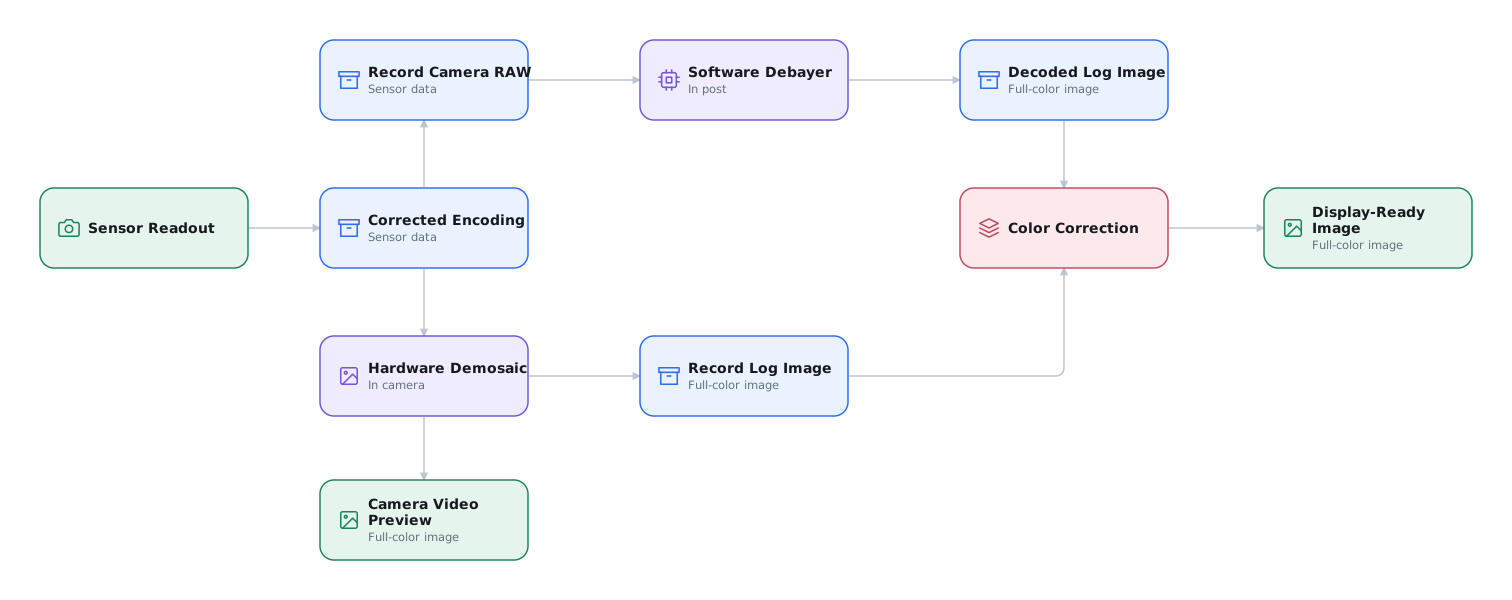
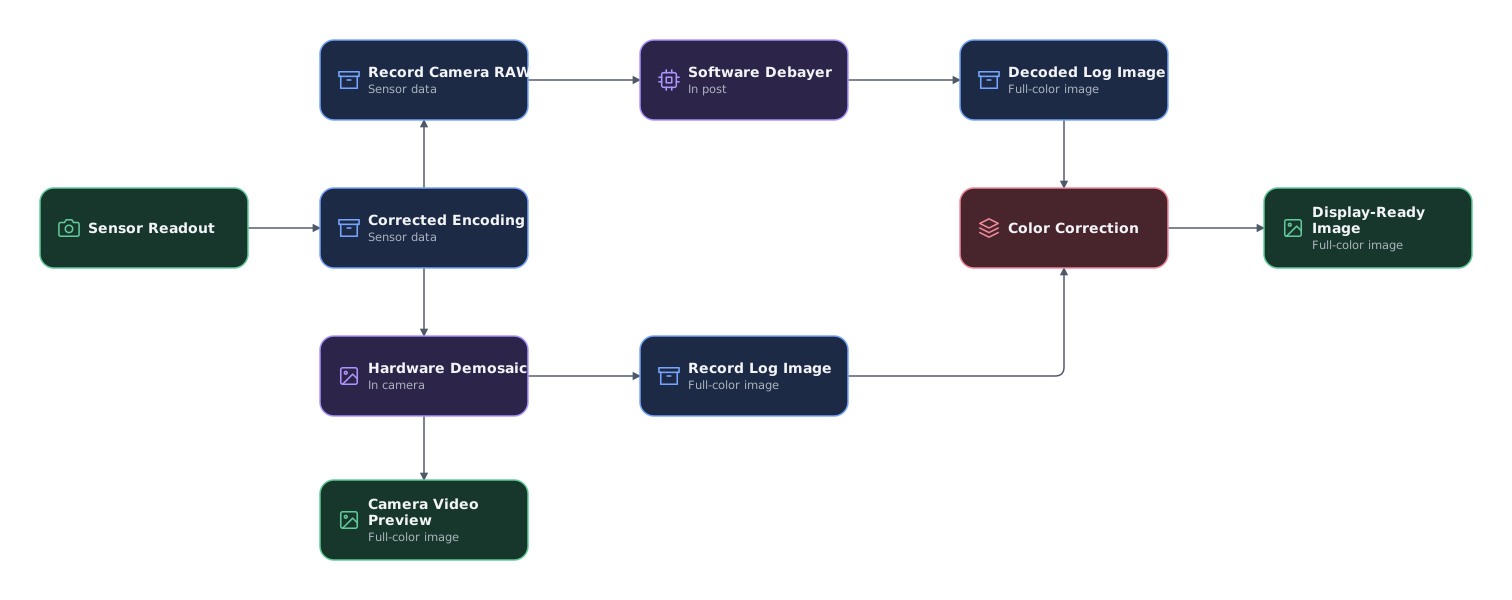
RAW samples may be uncompressed, losslessly compressed, or lossily compressed. A compressed format can rearrange, predict, or transform the sensor data to reduce redundancy. Lossless compression reconstructs the stored values exactly. Lossy compression quantizes or discards some precision.
Some formats store linear samples. Others use a log-like or custom nonlinear encoding to fit the sensor range into fewer bits. Metadata may include the exposure index or ISO/ASA, white balance, lens data, and other manufacturer-specific settings that inform the image processing.
Frames, wrappers, and codecs
Camera RAW can be stored as one file per frame or as a clip inside a wrapper. Legacy ARRIRAW uses
.ari frame sequences. Current ARRI cameras store ARRIRAW in MXF clips. Sony RAW is also stored in
MXF clips.4 RED uses the proprietary R3D file format. Blackmagic RAW uses BRAW files.
MXF is a standardized wrapper that can keep many frames, audio, and detailed metadata in one clip. This improves interchange and reduces repeated per-frame metadata. A proprietary file format can be tailored closely to a camera and codec, but recipients depend more heavily on the manufacturer's software and SDK. The wrapper does not identify the compression method. Sony X-OCN and ARRIRAW can both use MXF while storing entirely different image data.34
Camera RAW or ProRes log
Camera RAW does not necessarily capture more dynamic range or resolution than a high-quality log recording. ARRIRAW and LogC ProRes both retain the dynamic range captured by an ALEXA sensor. The difference is where the image is constructed and which decisions remain adjustable.5
| Decision | Camera RAW | ProRes log recording |
|---|---|---|
| Image construction | Demosaic and major decode choices remain in post | The camera records a completed full-color log image |
| Color sampling | Sensor readout or a format-specific RAW representation | Codec-dependent RGB or Y'CbCr, commonly 4:4:4 or 4:2:2 |
| Post flexibility | More control over decode, white balance, exposure interpretation, and image processing | Wide grading latitude, but the in-camera demosaic and some processing cannot be changed |
| Production cost | Usually more storage, transfer time, processing, and software dependence | Usually lower data and processing costs with broad application support |
| Best use | Acquisition where deferred decode provides a creative or technical benefit | A tested pipeline where simpler processing benefits the budget or schedule |
Camera RAW can matter to VFX. A production may use a custom or high-quality software demosaic to improve green-screen edges, fine detail, or highlight recovery in clipped high-dynamic-range material. Highlight reconstruction can use unclipped channels to estimate missing information. It cannot recover measured detail where every channel has clipped.7 ProRes log may be functionally equivalent for many other shots when the in-camera image processing has been tested and approved.
Choose RAW only when its flexibility matters
Use Camera RAW when deferred image construction provides a creative or technical benefit. Use ProRes log when the in-camera image processing is approved and the simpler workflow benefits the budget or schedule.
Chroma subsampling: 4:4:4, 4:2:2, and 4:2:0
4:4:4, 4:2:2, and 4:2:0 describe how the components of a processed, full-color image are sampled. They do not describe the undecoded sensor mosaic in Camera RAW. Most subsampled formats use Y′CbCr, comprising a luma channel, Y′, and two color-difference channels. Luma is a weighted sum of nonlinear R′, G′, and B′ signals, not CIE luminance or perceived brightness. In conventional video, it carries much of the fine light-dark detail.6
Scene-referred camera log can also be stored as Y′CbCr. In that case, luma names the codec's Y′ signal channel, formed from log-encoded R′G′B′ rather than display-ready video. It is not a measurement of scene luminance, display luminance, or light output in nits. Converting log RGB to Y′CbCr does not apply a viewing transform or make the image display-referred. The log curve and component-sampling scheme are separate choices.8
RGB and 4:4:4 are not interchangeable descriptions. Full-resolution RGB has an R, G, and B sample at every pixel. Y′CbCr 4:4:4 instead has a Y′, Cb, and Cr sample at every pixel. Both retain full spatial sampling of all three components, so RGB is often called 4:4:4 in codec and interface terminology. RGB itself has no separate luma or chroma channels, and may be scene-linear, log, or display-referred. Neither the RGB label nor 4:4:4 identifies the transfer function.9
| Sampling | What it retains | Practical effect |
|---|---|---|
| 4:4:4 | Full horizontal and vertical resolution for all three image components | Preserves the most spatial color detail for grading, keying, and compositing |
| 4:2:2 | Full-resolution luma with half as many horizontal samples in each chroma channel | Reduces data while retaining full vertical chroma resolution |
| 4:2:0 | Full-resolution luma with half-resolution chroma horizontally and vertically | Saves more data and provides the least spatial color detail |
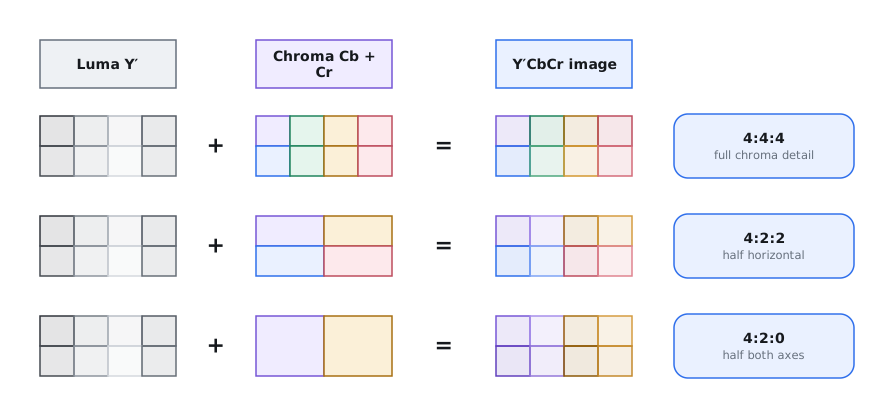
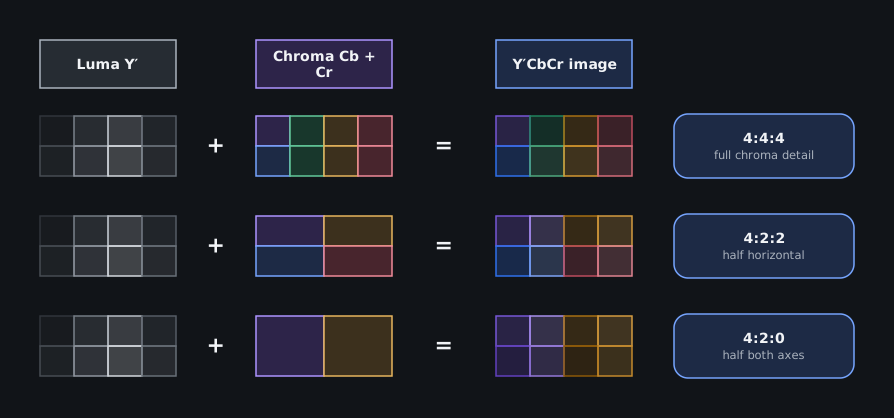
Common codecs and formats use these patterns differently:
| Sampling | Common examples |
|---|---|
| 4:4:4 / full-resolution RGB | Apple ProRes 4444 and 4444 XQ, Avid DNx 444, and RGB DPX, TIFF, or OpenEXR sequences with all RGB channels at full resolution |
| 4:2:2 | The Apple ProRes 422 family, Avid DNx HQX and other 4:2:2 DNx modes, many professional camera recordings, and uncompressed 4:2:2 camera outputs |
| 4:2:0 | Most consumer H.264/AVC and HEVC/H.265 distribution encodes, many mirrorless and action-camera modes, streaming files, and review files |
A codec family does not always determine chroma sampling. H.264 and HEVC support 4:2:0, 4:2:2, and 4:4:4 profiles, although consumer distribution usually uses 4:2:0. Inspect the actual recording mode, file, or delivery specification instead of inferring the sampling from the filename extension.11 See Common Working Formats for the codec details.
Treat chroma subsampling as a distribution optimization, not the preferred acquisition or intermediate format. It saves bandwidth in streaming, broadcast delivery, review files, and other finished-picture uses by discarding color resolution that is less visible in many natural images. Acquisition and intermediate media still need to survive color correction, keys, isolation, resizing, compositing, and multiple conversions. Each process can expose the missing color detail. The strongest pipeline keeps 4:4:4 or Camera RAW upstream, then creates subsampled files when distribution requires them.12
The loss becomes obvious when most of an edge exists in chroma instead of luma. Fine, colorful graphics, saturated text, neon, and high-contrast red or blue against black can show soft or stair-stepped edges, color bleed, and halos. These images may reveal 4:2:2 sampling and make 4:2:0 sampling difficult to miss.13
Uncompressed does not mean 4:4:4. An uncompressed camera signal or file can still be 4:2:2 or 4:2:0. Uncompressed means that the retained samples have not been compressed. It does not mean that every color sample was retained. Converting the result to an uncompressed or 4:4:4 format cannot recover chroma detail that was discarded earlier.14
Bit depth and compression are separate properties. A sampling ratio alone does not establish the quality of a recording. Weigh subsampling with the bit depth, codec, data rate, and encoding function.10
Prefer 4:4:4, but test the camera that gets the shot
Use 4:4:4 for principal full-color acquisition when the camera, recorder, storage, and workflow support it. A smaller 4:2:2 or 4:2:0 specialty camera can still be the right choice for inserts, crash shots, body or vehicle mounts, aerial work, underwater work, confined spaces, and dangerous setups.
Test the exact camera, recording mode, codec, bit depth, intended grade, VFX work, and color pipeline. Expose and white-balance the specialty camera carefully, and identify its shots in the turnover.
Recording resolution depends on the camera
Camera RAW does not automatically mean higher resolution. Common production cameras vary significantly, so compare the actual camera, sensor mode, codec, and frame rate.15
| Current camera family | Camera RAW or sensor format | Full-color recording | Practical distinction |
|---|---|---|---|
| ARRI ALEXA 35 Xtreme | ARRIRAW up to 4.6K | ProRes and ARRICORE up to 4.6K in supported modes | RAW and full-color recordings can use the same active sensor area and raster. |
| Sony VENICE 2 | X-OCN up to the 8.6K or 6K sensor resolution | ProRes up to 4K | Full-resolution acquisition requires X-OCN. |
| RED V-RAPTOR XL [X] | R3D up to 8K | ProRes up to 4K | Full-resolution acquisition requires R3D. |
| Canon EOS C400 | Cinema RAW Light up to 6K | XF-AVC and related formats up to 4K | Full-resolution acquisition requires RAW. |
| Blackmagic URSA Cine 12K and 17K | Blackmagic RAW at native and full-sensor scaled resolutions | H.264 proxies | These cameras record BRAW originals instead of an internal ProRes master. |
An external recorder can capture a camera's video output, but that is not equivalent to its internal Camera RAW. The result is limited by the output raster, frame rate, bit depth, chroma subsampling, and the camera's real-time image processing. Test this video-output workaround as a separate acquisition path, to be used only as a last resort when the preferred internal recording is unavailable. This is distinct from a camera designed to send RAW sensor data to an external RAW recorder.
Hardware and software demosaic
A traditional RAW workflow captures RAW sensor data and performs the demosaic in software, such as a color corrector, in post-production. The decoder may use a manufacturer SDK or another supported implementation. Decoder version, quality mode, metadata interpretation, and user settings can change the result.
An in-camera hardware demosaic runs in real time and can be tuned to the sensor. A recorded ProRes image contains that completed result. The production cannot substitute a different algorithm after photography.
Some formats divide the work. Blackmagic RAW performs part of the demosaic in camera, then stores partially demosaiced image data and sensor information. Its SDK retains controls for ISO, white balance, exposure, and other decode settings.16 ARRICORE completes the demosaic in camera and records compressed RGB. The ARRI Image SDK retains non-destructive exposure index, white-balance, and tint controls.17
Hardware processing is not inherently worse than software processing. Compare which decisions remain adjustable, which processing is irreversible, and whether every approved application produces the same result.
ARRIRAW, ARRIRAW HDE, and ARRICORE
Three recording and storage methods are worth considering:
| Format | Stored image | Compression | Practical meaning |
|---|---|---|---|
| ARRIRAW | Bayer sensor data | Uncompressed | Software performs the demosaic and ARRI color processing. ALEXA 35 records 13-bit log ARRIRAW in MXF. |
| ARRIRAW HDE | ARRIRAW Bayer data | Lossless, variable bitrate | HDE reduces ARRIRAW storage and reconstructs the original values exactly. It is compressed from ARRIRAW during offload or later with ARRI's HDE tool. It is not recorded in camera. |
| ARRICORE | Demosaiced RGB in ARRI Sensor Log | Proprietary, compressed, and constant bitrate. ARRI does not publicly label it lossless or lossy. | ARRICORE is not RAW. It records ARRI's in-camera demosaic at about half the ARRIRAW data rate while retaining selected RAW-like controls through the ARRI Image SDK. |
Sensor Log is the stored encoding, not LogC4. The ARRI Image SDK decodes the Sensor Log RGB through REVEAL and delivers a LogC4 RGB image to the grading application. This distinction explains why ARRICORE can retain adjustable exposure index, white balance, and tint after an in-camera demosaic.18
ARRIRAW HDE changes storage, not the image. Legacy HDE may appear as .arx frame sequences. Newer
formats use MXF-wrapped HDE. During normal offload, Codex Device Manager presents an HDE volume and
encodes the files as they are copied. ALEXA 35, ALEXA 35 Xtreme, and ALEXA 265 material can also be
encoded later with the ARRIRAW HDE Transcoder. HDE does not extend the recording time of the camera
card because the camera records uncompressed ARRIRAW.20
ARRICORE is available on the ALEXA 35 Xtreme and is intended for future ARRI cameras. It preserves the REVEAL workflow, ALF4 metadata, and ARRI Textures behavior. ARRI Textures remain baked into both ARRIRAW and ARRICORE. ARRICORE is compressed, but its public documentation does not plainly label the method lossless or lossy. Unlike HDE, there is no published claim of bit-exact reconstruction.19
Other compressed RAW formats
Compressed RAW formats trade data rate, decode speed, and deferred control differently.25
| Format | Encoding approach |
|---|---|
| Sony X-OCN | Proprietary, visually lossless 16-bit scene-linear compressed RAW with several quality and data-rate classes. |
| RED R3D | Proprietary compressed RAW. REDCODE used a wavelet transform on earlier cameras. RED documents a change to a discrete cosine transform beginning with KOMODO 6K. |
| Blackmagic RAW | Partially demosaiced, custom nonlinear 12-bit encoding with constant-bitrate ratios and variable-bitrate quality modes. |
| Canon Cinema RAW Light | Proprietary 12-bit compressed RAW with camera-dependent HQ, ST, and LT modes. It is Canon's current internal cinema RAW format. Earlier Canon cameras also used uncompressed Cinema RAW. |
Wavelet does not mean JPEG 2000
JPEG 2000 uses a wavelet transform, but not every wavelet codec is JPEG 2000. HDE has its own published bitstream. ARRICORE uses proprietary compression. X-OCN is a proprietary wavelet codec. BRAW is a custom codec. REDCODE moved from wavelet processing to DCT.26
None of those descriptions makes the format a JPEG 2000 codestream. JPEG 2000 remains important to DCP, IMF, and pDCDM workflows. Those uses are separate from Camera RAW acquisition.
Choose a compression setting
Compression ratios are comparable only within the same codec. 8:1 in one codec does not predict
the quality of 8:1 in another because the source representation and compression method differ.
Within one codec, a lower ratio usually means less compression and a higher data rate.
Test the exact recording setting
Test the exact camera, sensor mode, frame rate, firmware, and recording setting. Include:
- fine texture, foliage, hair, smoke, confetti, and moving water
- underexposure, sensor noise, and intended grain or texture
- fast motion and high frame rates
- green screen, fine edges, tracking detail, and heavy VFX manipulation
- the most aggressive expected exposure and color adjustment
Inspect the tests at full resolution after the intended decode, VFX round trip, grade, and output transform. Do not approve a setting from the camera monitor or an editorial proxy. If a proper test is impossible, use a lower compression ratio for VFX plate photography.
Constant-bitrate modes make recording time and storage easier to predict. Constant-quality modes spend more data on complex frames, so actual storage can vary. Budget the tested upper data rate, offload time, backup time, and archive size. Record the approved setting in the production specification.27
Use the Camera and Format Data Rate Calculator to estimate card time, daily camera-original volume, shoot storage, and a three-copy protection footprint for current camera systems.
Camera clip names
Camera-generated names carry different fields by manufacturer. Set the camera and reel identifiers before photography. Preserve the original names and source timecode through dailies, editorial, VFX, and conform. A familiar prefix is not a universal naming format.
ARRI ALEXA 35 and later cameras
ALEXA 35 and later cameras use an extended MXF clip name containing these fields in order:
- two-character camera index
- four-digit reel counter
Cplus a three-digit clip counter- recording date in
YYMMDD - recording time in
HHMMSS - one-character codec identifier
- four-character camera ID
The codec identifier is a for ARRIRAW, c for ARRICORE, and p for ProRes. The ARRIRAW HDE
Transcoder changes a to h.21
The examples below show the parallel naming structure:
| Example clip name | Encoding |
|---|---|
A_1234C345_YYMMDD_HHMMSS_p6ZJA.mxf |
Apple ProRes |
A_1234C345_YYMMDD_HHMMSS_a6ZJA.mxf |
ARRIRAW |
A_1234C345_YYMMDD_HHMMSS_h6ZJA.mxf |
HDE-encoded ARRIRAW |
A_1234C345_YYMMDD_HHMMSS_c6ZJA.mxf |
ARRICORE |
For example, read B_0042C017_260816_143052_a12RJ.mxf as follows:
| Segment | Meaning |
|---|---|
B_ |
Camera B |
0042 |
Reel 42 |
C017 |
Clip 17 |
260816 |
Recorded 16 Aug. 2026 |
143052 |
Recorded at 14:30:52 |
a |
ARRIRAW |
12RJ |
Camera ID encoded from the serial number |
.mxf |
MXF file wrapper |
RED V-RAPTOR and V-RAPTOR [X]
RED names the clip folder, not only the R3D essence file. Read A001_C001_12046M.RDC as follows:
| Segment | Meaning |
|---|---|
A |
Camera ID |
001 |
Reel 1 |
C001 |
Camera position C, clip 1 |
1204 |
Recorded 4 Dec. |
6M |
Random characters added to prevent duplicate names |
.RDC |
Clip folder containing R3D and related files |
Preserve complete RED clip folders
Copy the complete .RDC folder. Do not flatten its contents or rename individual R3D
files.22
Sony VENICE 2 and Cinema Line cameras
Sony's Cam ID + Reel# format appears on VENICE 2 and other Cinema Line cameras. Exact menu
options vary by model. Read A001C001_230101AB as follows:
| Segment | Meaning |
|---|---|
A |
Camera ID |
001 |
Reel 1 |
C001 |
Camera position C, clip 1 |
230101 |
Recorded 1 Jan. 2023 |
AB |
Random characters added to prevent duplicate names |
Use Sony Cam ID and Reel numbers
Use Cam ID + Reel# where the camera offers it. Generic counter-based names are easier to duplicate across cameras and cards.23
Blackmagic Design URSA Cine
Read A001_08151512_C001.braw as follows:
| Segment | Meaning |
|---|---|
A |
Camera index |
001 |
Reel 1 |
0815 |
Recorded 15 Aug. |
1512 |
Recorded at 15:12 |
C001 |
Clip 1 |
.braw |
Blackmagic RAW file |
URSA Cine records a proxy with the same base name, an .mp4 extension, and a location inside the
Proxy folder. Give each camera a distinct camera index and keep the camera originals and proxy
folders intact.24
Across all four systems, require dailies proxies to retain the source clip name or reel name and source timecode. Do not rename camera originals casually. These fields are used to relink the edit to the original camera files.
Do not use camera originals as VFX plates
Sending camera-original RAW clips instead of controlled plates unfairly places the decoding responsibility on every recipient.
Deliver controlled VFX plates
The VFX producer must approve a technically managed plate-pull pipeline. It may be operated in-house, by editorial, or by the DI. Deliver standardized scene-referred OpenEXR plates or an agreed log encoding with source identifiers and the color-management package.
Two applications can interpret the same RAW clip differently. White balance, exposure index, tint, highlight recovery, demosaic quality, sharpness, noise processing, output gamut, and log encoding may differ. Software updates can also change the decoder or manufacturer SDK. An artist can return a seemingly valid render with an unintended color interpretation baked into the pixels.
Document and test the RAW decode
Record the application and version used for the pull and DI conform, such as DaVinci Resolve 21.0.4 or Colorfront Transkoder 2025. Also record the decode quality, exposure and white-balance interpretation, output color space, transfer function, raster, and applied look. Test one plate through the vendor and back into the DI before production turnovers begin.28
See Scene-Referred and Display-Referred Imagery and VFX Plate Pulls and Turnover for the concepts and handoff requirements behind this workflow.
Camera RAW and long-term preservation
Camera originals and a grading-application archive cannot be the only route to a future remaster. A DaVinci Resolve Archive can be useful in the short term, but it depends on one application, its project format, installed codecs, plugins, fonts, and backward compatibility.
Camera RAW adds another dependency. A future system must still decode the proprietary format and reproduce the intended image. The manufacturer, SDK, license, operating system, or supported CPU and GPU architecture may no longer exist. Keeping the original bits is necessary, but it does not make them usable by itself.29
Preserve a decoder-independent fallback
Keep the camera originals and project files, then render documented, application-independent picture masters. An open format such as scene-linear OpenEXR provides a safer fallback because its specification and reference implementation are public and hardware-independent.30
See the three-layer preservation model for the ungraded, graded, and display-referred masters.
-
ARRI, “ARRIRAW FAQ,” “What is ARRIRAW?” and “What is the de-bayer process?” ↩
-
Blackmagic Design, “Blackmagic URSA Cine,” “Large Format RGBW 12K Sensor,” and “Recording Formats.” ↩
-
ARRI, “ARRIRAW FAQ,” “What is MXF/ARRIRAW?” ↩
-
ARRI, “ARRIRAW FAQ,” “How does the dynamic range compare to ProRes?” ↩
-
Poynton, Digital Video and HD, pp. 111–13, 121–23. ↩
-
RED Digital Cinema, Benefits & Evolution of REDCODE RAW, p. 1, “Benefits of REDCODE RAW.” The described highlight extension is an estimate from retained sensor information, not recovery of measurements lost to clipping in every channel. ↩
-
Poynton, Digital Video and HD, pp. 121–23. ARRI, ALEXA 35 User Manual, secs. 9.1 and 11.2. Apple Inc., Apple ProRes, p. 17. The scene-log distinction applies the signal-domain definition of luma to LogC4 recording through a Y′CbCr codec such as ProRes 422 HQ. ↩
-
Apple Inc., Apple ProRes, pp. 17–18, “Chroma Sampling” and “Alpha Channel Support in Apple ProRes 4444 Codecs.” ↩
-
International Telecommunication Union, Recommendation ITU-R BT.2020, table 5. Apple Inc., Apple ProRes, pp. 5, 13, 17. ↩
-
Apple Inc., Apple ProRes, pp. 5, 17. Avid Technology, “Avid DNx Naming Scheme and Data Rates.” International Telecommunication Union, Recommendation ITU-T H.264, table 6-1, and Recommendation ITU-T H.265, table 6-1. ↩
-
Apple Inc., “Converting Chroma-Subsampled Images,” “Overview.” ↩
-
Amazon Web Services, “Using High Color Accuracy.” ↩
-
Apple Inc., Apple ProRes, pp. 5, 8. ↩
-
ARRI, “ALEXA 35 Xtreme,” “Technical Data.” Sony, “VENICE 2,” “High Performance, Proven Recording Formats.” RED Digital Cinema, “V-RAPTOR XL [X] 8K VV,” “Technical Specifications.” Canon U.S.A., “EOS C400,” “Internal Cinema RAW Light.” Blackmagic Design, “Blackmagic URSA Cine,” “Recording Formats.” ↩
-
Blackmagic Design, “Blackmagic RAW,” “Advanced De-Mosaic.” ↩
-
ARRI, ARRICORE, secs. 2.1–2.2, pp. 3–4, distinguishing stored Sensor Log from SDK-output LogC4. ↩
-
ARRI, “ARRICORE FAQ,” “Is ARRICORE a lossless compression codec or uncompressed?” and “Is the ARRICORE compression lossless?” ↩
-
ARRI, “High Density Encoding,” “How to Encode ARRIRAW.” ↩
-
ARRI, “Editorial Workflow,” “Structure of file names.” ARRI, ALEXA 35 User Manual, sec. 11.6. ARRI, ARRIRAW HDE Transcoder Quick Guide, p. 4. ↩
-
RED Digital Cinema, “Clip Folder Naming Convention.” ↩
-
Sony Corporation, VENICE 2 Operating Instructions, pp. 56, 76, 107. Sony Corporation, “File Settings,” “Cam ID + Reel#.” ↩
-
Blackmagic Design, Blackmagic URSA Cine Manual, “File Naming Convention,” p. 110. ↩
-
Sony, X-OCN, pp. 2–7. RED Digital Cinema, Benefits & Evolution of REDCODE RAW, pp. 2–3. Blackmagic Design, “Blackmagic RAW,” “Advanced De-Mosaic” and “Constant Bitrate or Constant Quality.” Canon U.S.A., “EOS C400,” “Internal Cinema RAW Light.” Canon U.S.A., EOS C700, “Recording Codec.” ↩
-
SMPTE, RDD 51:2020, secs. 5–7. Sony, X-OCN, p. 8. RED Digital Cinema, Benefits & Evolution of REDCODE RAW, p. 3. Blackmagic Design, “Blackmagic RAW,” “Advanced De-Mosaic.” ARRI, ARRICORE, p. 3. JPEG, “JPEG 2000,” “Part 1: Core Coding System.” ↩
-
Blackmagic Design, “Blackmagic RAW,” “Constant Bitrate or Constant Quality.” ↩
-
Blackmagic Design, DaVinci Resolve 21 Reference Manual, “Camera RAW Palette.” Blackmagic Design, “Blackmagic RAW,” “Integrated Metadata.” ↩
-
Library of Congress, “Bit Level Preservation and Long Term Usability.” Library of Congress, “Camera Raw Formats.” ↩
-
Library of Congress, “OpenEXR,” “Sustainability Factors.” ↩