Common Working Formats
Movie-Based Formats
The VFX supervisor and DI specify frame-based sequences for VFX plates, intermediate renders, and film scans. ProRes 4444 QuickTimes are common on smaller productions. They can be acceptable for final VFX delivery.
Test the working format before turnover
The VFX supervisor and DI round-trip one representative shot between production, VFX, and the DI. Compare the color and transfer function before and after the transcode. Avoid movie files for intermediate CGI and compositing renders. Use the appropriate ProRes or Avid DNx level for offline editorial and mastering outside the VFX pipeline.
Apple ProRes
Apple ProRes codecs are resolution-independent, professional video codecs most often seen in
QuickTime (.mov) wrappers. The bitstream itself is published as SMPTE RDD 36, with carriage in
MXF standardized as RDD 44 and the IMF application as RDD 45. Avid Media Composer manages
ProRes as MXF OP-Atom, and Final Cut Pro has exported ProRes-in-MXF since version 10.3. ProRes can
therefore be used in an IMF workflow that permits RDD 45.
| Variant | Encoding | Typical use |
|---|---|---|
| ProRes 4444 XQ | 12-bit 4:4:4 (RGBA / Y′CbCrA), with alpha | Highest quality: camera acquisition, intermediate grading, VFX plates and delivery |
| ProRes 4444 | 12-bit 4:4:4, with alpha | Camera acquisition, intermediate grading, VFX plates and delivery |
| ProRes 422 HQ | 10-bit 4:2:2 | High-quality mastering and delivery |
| ProRes 422 | 10-bit 4:2:2 | Mastering and delivery |
| ProRes 422 LT | 10-bit 4:2:2 | Lighter editorial |
| ProRes 422 Proxy | 10-bit 4:2:2 | Offline dailies and editorial proxies |
The 4444 variants sustain multiple generations of encoding without meaningful image degradation and are visually indistinguishable from equivalent uncompressed alternatives, which is why they serve as camera acquisition,1 intermediate grading, and VFX plate and delivery formats.2
ProRes also has a RAW variant (ProRes RAW, 2018), but it is a camera-acquisition format only, like ARRIRAW or R3D, and is not applicable to transcoded VFX plate pulls.
Don't encode delivery ProRes with FFmpeg
FFmpeg's ProRes encoders are reverse-engineered and unlicensed. A file may look correct but fail delivery QC on metadata or encoder identification. Encode deliverables with an Apple-approved implementation in Resolve, Premiere, or another professional application.
FFmpeg remains suitable for disposable dailies, references, and internal proxies.
Avid DNx
At IBC 2025 Avid rebranded the DNxHD and DNxHR families to a single name, Avid DNx. It dropped the
HD, HR, and GX acronyms, which were misleading once the codec became resolution-independent,
in favor of five quality levels. The rebrand also made 8- to 16-bit encoding and an optional alpha
channel available at every Avid DNx level. The level indicates the chroma sampling and
bandwidth (compression), not a fixed bit depth:3
| Level | Chroma | Typical use |
|---|---|---|
| 444 | 4:4:4 / RGB | Finishing, VFX delivery, cinema masters |
| HQX | 4:2:2 | Color and mastering. Multi-generation work |
| HQ | 4:4:4 / 4:2:2 / 4:2:0 / RGB | High-quality editorial and production |
| SQ | 4:4:4 / 4:2:2 / 4:2:0 / RGB | Editorial and broadcast delivery |
| LB | 4:2:2 / 4:2:0, low bandwidth | Offline editorial and proxies |
Data rates scale with resolution and frame rate. From Avid's published figures, at UHD (3840×2160) / 23.976 fps they run roughly 167 MB/s (444), 83 MB/s (HQX and HQ), 55 MB/s (SQ), and 17 MB/s (LB): about 1.3 Gb/s down to 137 Mb/s. At HD they are roughly a quarter of that (444 ≈ 42 MB/s, LB ≈ 4 MB/s). Avid Media Composer manages DNx media natively in MXF OP-Atom, and Avid also ships DNx QuickTime codecs. The codec is standardized as SMPTE ST 2019-1 (VC-3).4
H.264 / H.265 (HEVC)
Treat H.264 and H.265 as distribution formats, not VFX or DI working formats. Their long-GOP compression stores many frames as differences from neighboring reference frames, making frame-accurate access slower and less reliable for post.
They are suitable creative-review proxies. Browser review platforms generally stream an H.264 or H.265 transcode, which is adequate for staging, timing, and creative notes. Perform final QC sign-off on the graded full-quality shot in the DI.
Consumer H.264 and H.265 deliverables are usually 8-bit and 10-bit 4:2:0, respectively. Both standards also define higher-bit-depth and higher-chroma professional profiles used in mezzanine and archival work. Embedded alpha is uncommon.
These codecs are commonly found in .mov, .mp4, .m4v, and .mkv file wrappers.
AV1 and H.266/VVC
AV1 and H.266/VVC are downstream distribution codecs, not post-production working formats.
AV1 (AOMedia, royalty-free) has broad browser and hardware support, though Safari depends on the underlying device. By late 2025, AV1 carried a large share of Netflix streaming hours. Platforms encode masters into AV1 downstream. Independent productions do not normally deliver it.
H.266/VVC has little consumer hardware decoding and no browser support. Its adoption is mainly in broadcast. Brazil's TV 3.0 / DTV+ mandates VVC and began 4K HDR transmission in 2025.
Keep AV1 and VVC downstream
Do not acquire, work, or master in either format.
Frame-Based Formats
OpenEXR (.exr)
OpenEXR, commonly called EXR, is an open-source image format developed by Industrial Light & Magic. It supports multichannel 16-bit and 32-bit floating-point data and commonly carries scene-linear VFX images.
EXR supports alpha, multiple layers, and arbitrary channels in one file. It offers uncompressed, lossless, and lossy compression schemes.
Compression affects DI playback, but no compression name guarantees real-time performance. Resolution, frame rate, channel count, storage, CPU, threading, the OpenEXR library, the host application, and the operating system all matter. Higher resolutions, high frame rates, extra views, and additional channels reduce the available decode time sharply.
OpenEXR guidance documents relative compression tradeoffs, not 4K playback guarantees.5 Use
exrmetrics to compare actual frames, then test the
candidate format in the target DI application and version. A codec that barely sustains 4K/24 has no useful
headroom for 4K/48, multiview work, extra channels, or processing. Faster CPUs and newer libraries may move that
threshold, but do not build the current workflow around expected future performance.
| Compression | Fidelity | Decode guidance | Notes / when to use |
|---|---|---|---|
| None | Lossless | No codec work | Largest files and highest storage bandwidth. The only option permitted in the ACES2065-1 archival container (ST 2065-4). |
| ZIP / ZIP1 (ZIPS) | Lossless | ZIP is faster than PIZ | ZIP works in 16-scanline blocks. ZIPS works one scanline at a time. Test either before final DI delivery. |
| RLE | Lossless | Fast | Modest savings. Effective on large flat areas, but weak on photographic images. |
| PIZ | Lossless | Slower than ZIP | Wavelet plus Huffman compression. Often effective on grainy or noisy plates. Test it instead of treating it as an automatic playback failure. |
| PXR24 | Half / UINT: lossless. FLOAT: lossy | Similar to ZIP | Useful for depth and other 32-bit float channels when reduced precision is acceptable. |
| B44 / B44A | Lossy for HALF | Designed for playback | Fixed-rate and officially designed for real-time decoding. UINT and FLOAT channels are stored uncompressed. Avoid for final DI renders unless approved. |
| DWAA / DWAB | Lossy | DWAB is faster for full frames | DCT-based. DWAA uses 32-scanline blocks for partial access. DWAB uses 256-scanline blocks and favors full-frame decoding. Avoid for final DI renders unless approved. |
| HTJ2K32 / HTJ2K256 | Lossless | Designed for fast encoding and decoding | OpenEXR 3.4 added both variants. HTJ2K32 uses 32-scanline blocks for greater parallelism. HTJ2K256 uses 256-scanline blocks and usually makes slightly smaller files. DaVinci Resolve reads and writes HTJ2K-compressed EXRs. Other applications require OpenEXR 3.4 or another compatible implementation. |
Default final DI delivery to uncompressed or ZIP / ZIP1 unless the facility specifies otherwise. Before using HTJ2K for interchange, the image-pipeline lead must test every application required by the production. Resolve support does not establish support in a VFX vendor's other applications.
In practice: Avatar: The Way of Water
A multipart EXR can assign different compression to each part. On Avatar: The Way of Water, we kept the RGB part uncompressed for playback and ZIP-compressed the embedded matte parts. Matte work usually required caching anyway, so its additional decode cost was acceptable. This preserved the real-time RGB path without paying the full storage cost of uncompressed mattes.6
EXR can carry AOVs such as normal maps and Z-depth. Keep these in VFX working files unless the DI requests them. Unused channels increase delivery size and conform overhead.
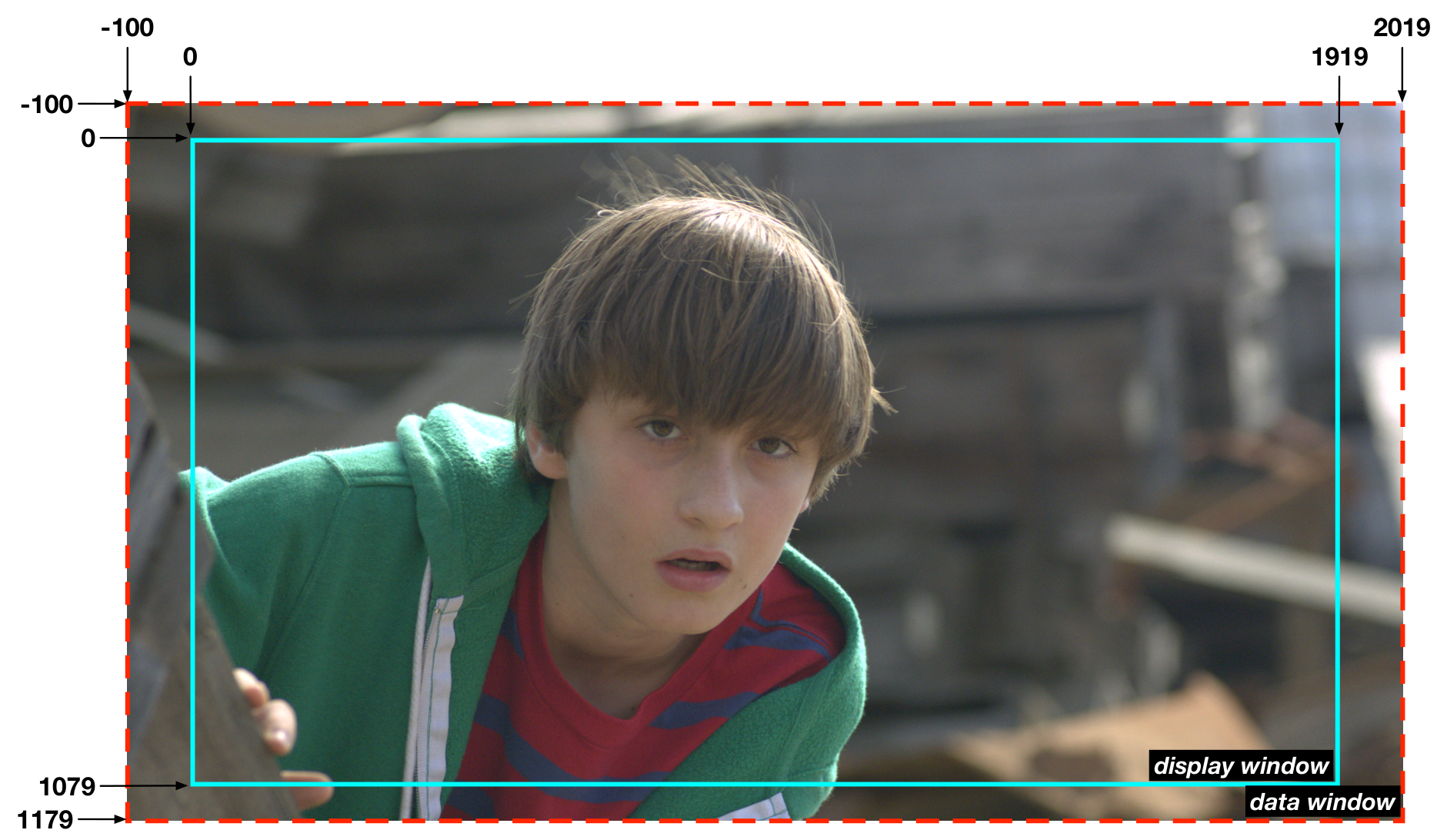
An EXR has a display window for the visible frame and a data window for stored pixels. The data window can extend outside the display window or cover only part of it. Compositing uses this feature for overscan, large blurs, and camera shake. Many DI systems mishandle unequal windows. Require final DI renders to use matching data and display windows unless the DI approves another structure.
DPX (.dpx)
DPX has carried film scans, color grading, and DI work since SMPTE 268M was published in 1994. It
remains common for film scans and log-encoded conform, while ACES/OpenEXR now carries much
scene-referred interchange and archival work. SMPTE designates ST 268-1 as Stable, meaning it
remains in force but is no longer under active review. DPX succeeded Cineon (.cin).
DPX file headers can store embedded timecode and tape name for assisting in conform.
Image data is routinely stored as fully uncompressed RGB 10-bit or 16-bit integer. Although the DPX specification defines support for floating point data types, many software and digital intermediate systems do not support floating point DPX. Alpha channel support is defined in the specification, but many systems do not support DPX with embedded alpha.
DPX is normally uncompressed and retains image fidelity across successive passes. SMPTE ST 268-1 defines optional run-length encoding, but post tools rarely write it. Plan DPX storage as uncompressed. File size depends on raster, bit depth, and header length rather than image content.
TIFF (.tif, .tiff)
TIFF is almost unheard of as a VFX plate or rendered VFX element format. DPX and EXR provide the metadata and image structures expected by VFX and the DI.
Mastering is a separate use case. Uncompressed 16-bit TIFF remains the predominant carrier for X'Y'Z' DCDMs and is also used for SDR and HDR image-sequence masters. A mastering TIFF can contain display-referred Rec.709, P3, BT.2020, or X'Y'Z' data as defined by the recipient.8
TIFF and other legacy graphics formats7 remain common for simple title graphics. TIFF supports alpha and is widely supported by Photoshop and DI systems.
Do not infer a VFX workflow from a TIFF master
Specify TIFF for VFX plates or rendered elements only when the receiving vendor requires it. Use DPX or EXR for those exchanges. A TIFF master does not mean the VFX was performed in TIFF.
TIFF commonly stores 8-bit or 16-bit integer RGB with optional alpha. Floating-point variants exist, but TIFF does not carry the tape-name and timecode metadata used for conform.
TIFF supports uncompressed, lossless, and lossy compression plus multiple image layers.
-
ARRI ALEXA ProRes, RED V-RAPTOR [X], Blackmagic URSA Cine, and external third-party recorders. ↩
-
Apple, Apple ProRes, pp. 5–7 and 13–17. ↩
-
Avid, “Avid DNx Naming Scheme and Data Rates,” and DNxHR Codec Bandwidth Specifications. ↩
-
Avid, “Avid DNx Naming Scheme and Data Rates.” Rebrand announced at IBC 2025. ↩
-
OpenEXR Project, “Data Compression.” ↩
-
Mixing Light, “Color Grading ‘Avatar: The Way of Water’ With Colorist Tashi Trieu”, named section “Post facility, team, & tech setup.” ↩
-
JPEG, PNG, Targa for example. ↩
-
Walt Disney Studios, “Image Sequence Master,” “Image Sequence Master TIFF DPX.” ↩