Detailed Production Workflow
This chapter expands the Production Workflow at a Glance. It follows a film from pre-production planning through acquisition, VFX, the DI, mastering, distribution, and preservation. The producer or post supervisor uses it to assign each technical operation to a named specialist and require a written specification and a test for every handoff.
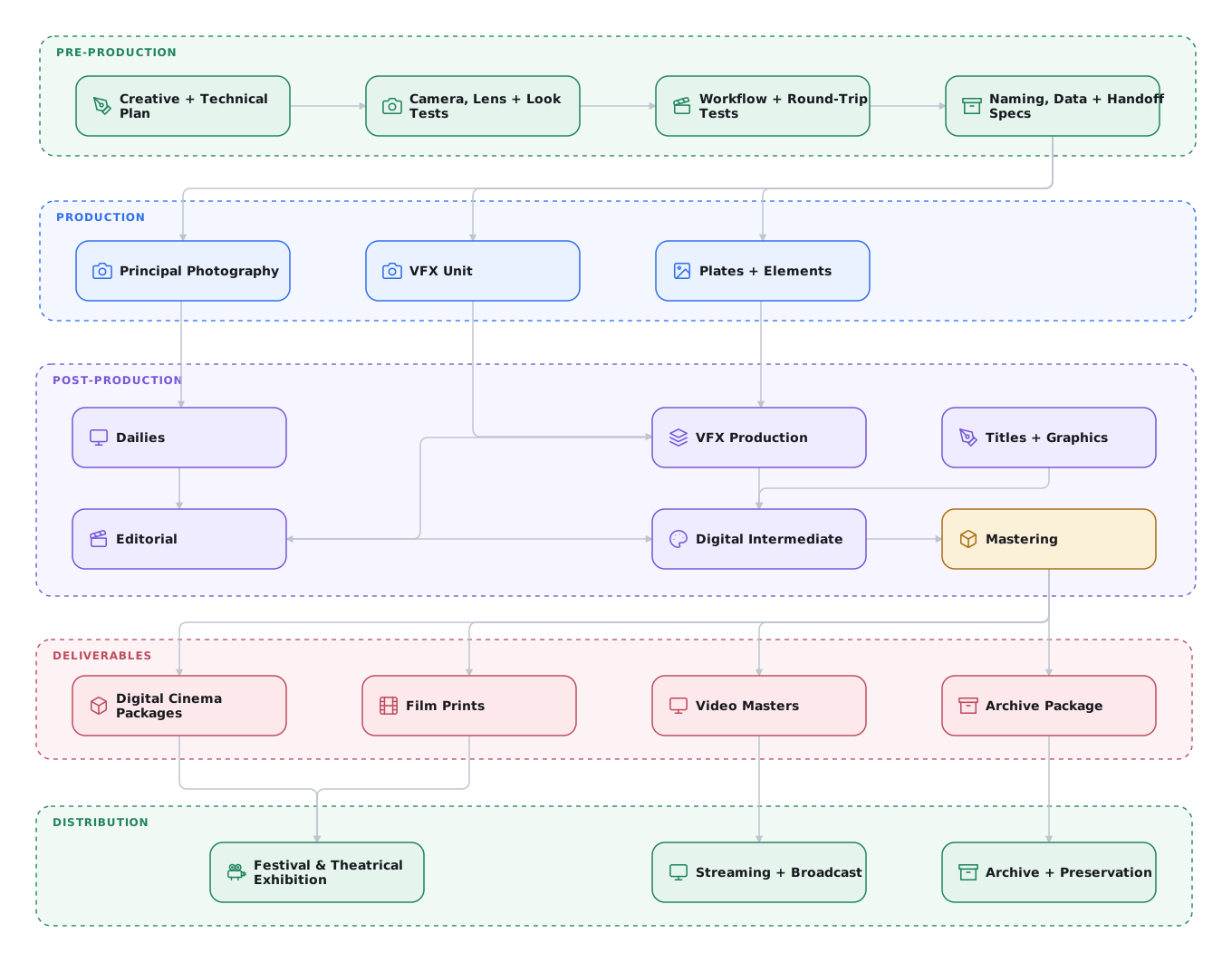
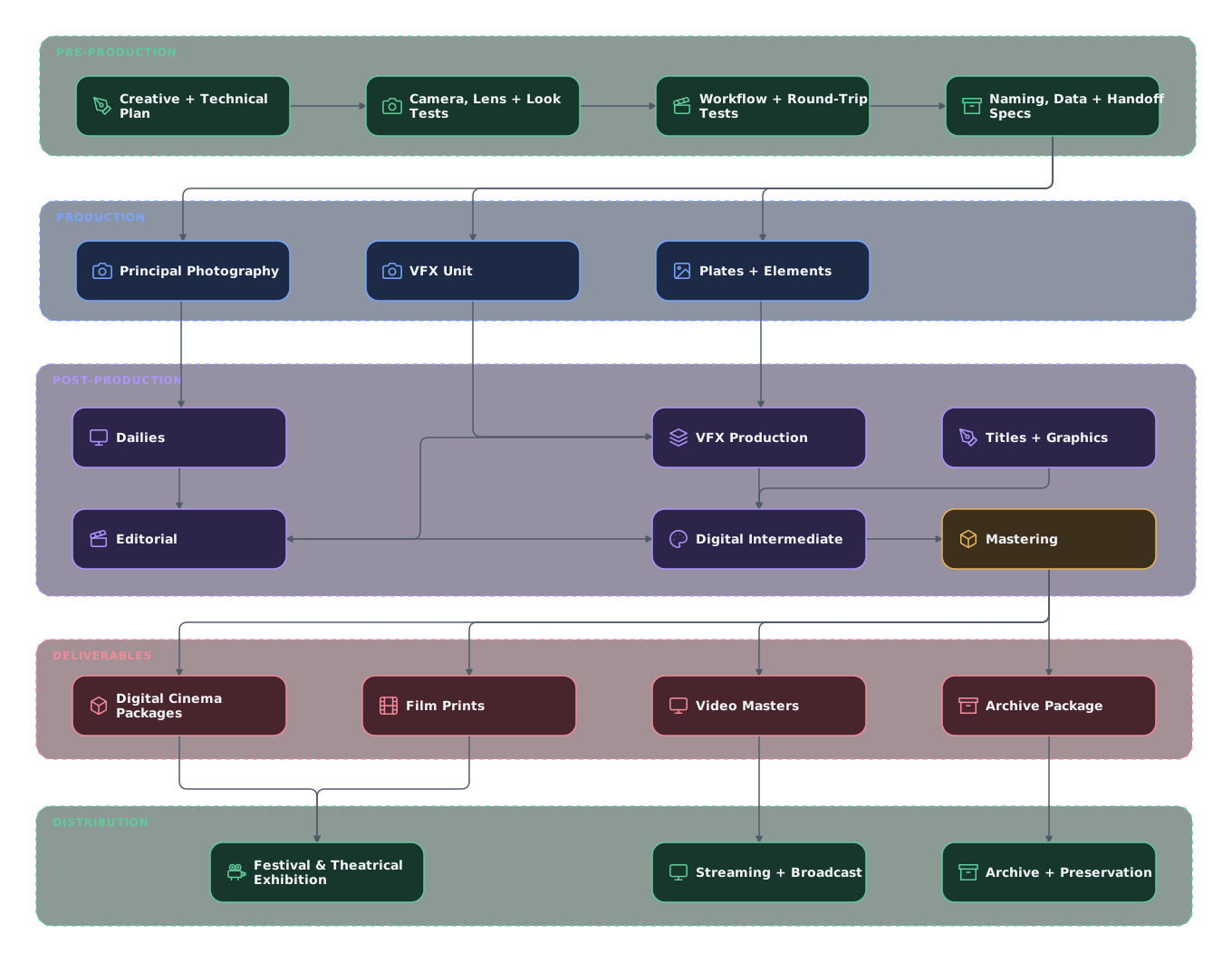
Pre-Production
Pre-production turns creative intent into a tested production and post-production plan. Production, editorial, VFX, dailies, color, sound, and the DI agree on how images, sound, metadata, and approvals will move between them before photography begins.
Define the Workflow
A workflow states who is responsible for each decision and how material moves between teams. The written plan gives every department and vendor the same requirements before work begins.
Publish one production workflow
Document the decisions every department and vendor must follow:
- Responsibilities: people responsible for each handoff, contacts, approval authority, and escalation path.
- Acquisition: cameras, recording formats, frame rate, timecode, raster, framing, audio, and required camera and lens metadata.
- Data management: folder structure, file and shot naming, versioning, checksums, backups, transfer methods, security, and retention.
- Dailies and editorial: proxy format, sync method, burn-ins, on-set color correction data, review system, and the metadata required to relink camera originals.
- VFX: bid and turnover process, plate and final-render specifications, handles, mattes, references, review media, version tracking, and delivery schedule.
- Finishing: editorial turnover, conform method, titles, audio references, color pipeline, masters, distribution deliverables, and archive.
Publish these decisions as one show specification and one vendor-onboarding package. Use a shared tracking system so production can locate the current asset, version, responsible role, and approval state without reconstructing the history from email.
For every handoff, record:
- the person who publishes the material
- the destination
- the delivery date
- the receipt and QC record
- the correction process for missing or rejected material
Use any tracking tool that the team will maintain. Keep one documented process throughout the production.
Issue the applicable Technical Specifications before each handoff.
Develop the Look and Vet the Color Pipeline
The creative look affects photography, monitoring, VFX, grading, and every rendered master. Develop the look with representative tests, then prove that the same image survives the complete pipeline.
Develop and document the look before photography
Include the colorist in camera, lens, lighting, wardrobe, makeup, and production-design tests. Use the tests to develop the look with the director and cinematographer. Establish exposure and monitoring practices and identify any limits the look creates for VFX or delivery.
The image-pipeline lead documents each camera input transform, working space, CDL placement, creative treatment, display rendering, and target display. If a Show LUT combines the creative and display functions, the specification states that explicitly. Distribute the same versioned package to dailies, editorial, VFX, and finishing.
Prove the color pipeline with a round trip
- Shoot representative material with every camera and recording mode.
- Process dailies and editorial proxies with the approved look and metadata.
- Pull a VFX plate using the production specification.
- Return a test composite through the approved interchange encoding.
- Conform and grade the returned shot in the DI.
- Compare it with the source outside the composited region and review it on the target display.
Resolve mismatches before production. A visually plausible test is not enough. The round trip must preserve framing, frame range, metadata, dynamic range, gamut, and unaffected pixels.
Previsualization
Previsualization turns a concept into a plan that the director, cinematographer, VFX team, and production departments can evaluate before photography. It can establish blocking, camera movement, lenses, equipment, coverage, timing, and the division between practical and digital work.
Previs can range from 2D storyboards and animatics to rudimentary 3D scenes or detailed renderings with physically based cameras and lighting. Match the method to the question the filmmakers need to answer. A simple animatic may settle coverage and timing. A technically demanding shot may require precise blocking, geometry, lenses, lighting, motion, timing, and equipment constraints.
Previs requires time and skilled work. Budget it as part of production planning. It costs less than discovering on set, or in post, that a shot cannot deliver the intended result.
Scale previs to the risk
Previsualize the shots with the greatest creative, technical, safety, equipment, or scheduling risk. Record the decisions that previs establishes so the plan reaches the crew and vendors who will execute it.
Plan Lenses and VFX Data Capture
Lens choice affects the look and the work required to track, key, and composite a shot. The cinematographer and VFX supervisor decide together whether VFX plates and elements will use the principal-photography lenses. Cleaner spherical lenses may simplify green-screen extraction and tracking when vintage or anamorphic lenses create unnecessary distortion, but the choice must enable the filmmakers' creative intent.
The on-set VFX team is responsible for survey data. LiDAR can record measured set geometry. Photogrammetry and Gaussian-splat capture can preserve additional spatial and appearance reference. A Gaussian splat is not automatically a survey-grade measurement, so use measured control points when dimensional accuracy matters. The camera team may advise the VFX team about camera position, height, lens settings, and metadata, but survey capture remains a VFX responsibility.
The on-set VFX team also determines which chrome and diffuse sphere passes, color charts, HDRIs, clean plates, and other references each setup requires. They schedule those captures with the assistant director and coordinate with the camera and lighting departments. When a reference must be photographed with the principal camera, the camera department records it with the VFX team. Camera and VFX reports both identify the reference take so editorial can pull the correct frames later.
Test lenses and metadata during camera prep
Photograph distortion grids and lens charts for every production lens. Repeat the tests at the focus and zoom settings that materially change the lens.
Lens-metadata systems such as Cooke /i Technology, ARRI Lens Data System (LDS), and ZEISS eXtended Data can supply lens identification, focal length, focus, iris, distortion, shading, and other measurements. The available fields depend on the lens and recording system.
Some cameras record inertial data, and certain lenses also supply motion data. Cooke S8/i FF lenses, for example, output motion-inertial metadata. Lenses with optical image stabilization can also contain gyro sensors, but a stabilization sensor does not by itself establish a recorded VFX metadata path. Confirm what the camera or external recorder captures and what the receiving software can read.1
Test the lens-metadata path
Test the lens-metadata path during prep. Record a test clip with the required metadata. Process the clip through dailies and the VFX plate pull. Ask the receiving vendor to read the metadata.
Automated metadata supports the VFX camera report. It does not replace it.
Production / Acquisition
Camera and Workflow
The camera choice establishes the recorded image, metadata, storage rate, dailies path, VFX inputs, and finishing options. Evaluate the complete image path, not the camera body in isolation.
Labels such as cinema camera, mirrorless camera, drone, or action camera are not technical qualifications. Some drones and action cameras record high-fidelity, high-dynamic-range images, while others do not. Capabilities can also vary within one manufacturer's product line. Test every camera selected for principal photography, insert photography, aerials, or crash-camera work.
Scene-referred acquisition commonly records Camera RAW or a logarithmically encoded raster image. See Digital Acquisition and Camera RAW for these formats.
Choose the camera around the tested image path
The cinematographer, VFX supervisor, and DI evaluate what the camera captures and records and whether it suits the needs of the production. Prefer high-dynamic-range, scene-referred recording in a documented gamut and transfer function.
ARRI Textures and VFX
ARRI Textures alter grain, noise processing, detail contrast, and perceived sharpness early in the camera pipeline. Selectable Textures are specific to the ALEXA 35 and ALEXA 35 Xtreme. A Texture is always active, and K445 Default is the standard setting. The processing occurs before ARRIRAW is created, so the result is baked into both ARRIRAW and ProRes and cannot be removed in post.2
Treat a non-default ARRI Texture as an acquisition decision, not a monitoring look. Test it with the director, cinematographer, VFX supervisor, and colorist before production. Include every camera body and recording mode that will share the workflow. Review the test on the intended reference display.
Baked texture creates VFX work similar to photographed film grain:
- Plates may need to be degrained before tracking, keying, or compositing.
- VFX and CGI must be regrained to match the photography.
- The vendor must match the recorded texture empirically, shot by shot.
- Other camera families cannot use the same camera-side Texture.
For VFX-heavy or multi-camera productions, consider building the creative texture in the DI instead. Modern finishing tools can create convincing film texture, grain, halation, and color emulation after the composites are final. Clean plates reduce tracking, keying, degraining, and regraining work. One adjustable finishing pipeline can then cover every camera, VFX render, and master.
Test any non-default ARRI Texture
Choose a stronger in-camera Texture only when a tested creative benefit outweighs the added VFX work. Record the selected Texture in the show specification, camera reports, dailies metadata, VFX turnovers, and DI turnover.
On-Set Visual Effects
Poor plates increase cost, schedule, and risk.
Supervise VFX photography on set
Put the VFX supervisor on set for VFX photography, ideally the same person who will supervise post. If unavailable, assign another supervisor or a trusted senior artist to supervise photography.
The on-set supervisor coordinates with the director, cinematographer, camera department, production design, and practical effects. They decide what to capture practically, flag conditions that complicate post, and collect the measurements and references artists will need.
The VFX team is responsible for the VFX camera report. It records the information a matchmove artist needs, including camera height and tilt, lens and filtration, focus distance, sensor mode, and survey data. The AC's report covers camera-department information for editorial and the lab. It is not a substitute for the VFX report.
See Lens distortion grids and camera metadata.
Common Visual Effects Production Mistakes
Missing reference, measurements, coverage, or clean plates may be impossible to recreate after the set is struck. The on-set VFX team identifies those risks while production can still respond.
Resolve avoidable VFX risks during photography
Do not assume post can repair a difficult setup. The VFX supervisor documents each risk and proposes a solution. Resolve the risk in camera when production can do so without compromising the shot.
Production example: tracking through set design
On one production with a stylized industrial spacecraft interior, the VFX supervisor worked with production design to hide high-contrast objects with unique patterns in the set. The objects read as part of the design while giving VFX useful tracking features. This avoided adding and removing separate tracking markers.
This approach does not suit every set or shot. A VFX supervisor determines when native scene geometry is sufficient and when the labor of marker removal is necessary to achieve a reliable track.
Frame Rate: 23.976 or 24.000
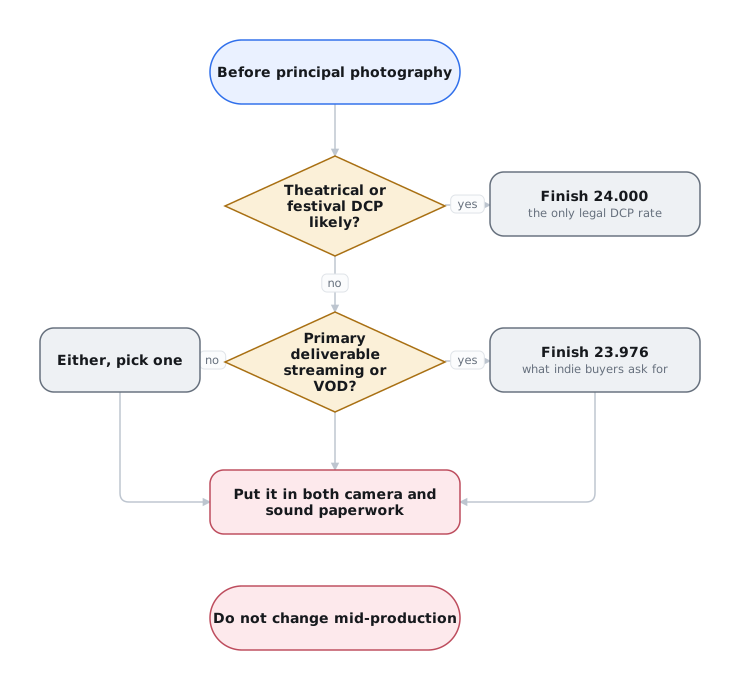
Frame rate affects camera, editorial, VFX, sound, DI, mastering, and exhibition. Consciously select a production frame rate before photography begins, seek sign-off from relevant departments, and carry it through the complete post pipeline.
Choose one production frame rate
The producer or post supervisor obtains sign-off from camera, production sound, editorial, VFX, and finishing before photography. Document the agreed rate in the production specification. Confirm synchronization during dailies. If picture is later retimed, use an audio master prepared for the new playback rate.
Capture rate is not the timebase. The capture or sensor frame rate is the number of images the camera records each second. The project timebase determines how quickly those recorded frames play back. For normal sync-sound photography, the two rates must match. A 23.976 production uses 23.976 capture, not 24.000 capture tagged for 23.976 playback.3
High-speed photography for slow motion changes the capture rate, not the production timebase. For example, 60 fps capture played at a 24.000 timebase lasts 2.5 times as long as the recorded action. Capturing 60 fps with a 60 fps timebase instead produces a normal-speed 60 fps clip. It does not automatically become slow motion when placed in a 23.976 or 24.000 edit. If a camera cannot set capture rate and timebase independently, editorial must interpret the clip at the agreed production timebase for slow-motion playback.
Keep the camera's project timebase constant throughout production. Change the capture rate only for a deliberate off-speed effect: undercranking for fast motion or overcranking for slow motion. Plan a step-printed look with editorial as well. Step printing repeats selected frames to create a different motion cadence, rather than changing the production timebase. Off-speed photography is not ordinary sync-sound recording.
Why both exist. 24.000 is true 24 frames per second. 23.976 is 24000 ÷ 1001 and exists due
to legacy broadcast compatibility with interlaced 29.97. It uses 24-frame counting and is not a
drop-frame timecode rate. The timecode display is identical to 24.000 timecode, so the numbers alone
do not reveal which frame rate was recorded.4
Modern displays are not region-locked by AC mains frequency. Digital TVs commonly play 23.976, 24, 25, 29.97, 30, 50, and 60 fps regardless of whether the local power system is 50 or 60 Hz. Display capability is not a reason to choose between 23.976 and 24.000.
Broadcast is the important exception. Existing broadcast facilities, schedules, and delivery systems often require a specific rate. Streaming apps do not have the same infrastructure constraint, and there is little legitimate technical reason they cannot support both 23.976 and 24.000.
Delivery specifications can still impose business or workflow requirements. Before production, obtain the current delivery specification.
Scanning or telecining film at the agreed frame rate is not a problem. Re-clocking a progressive master between 23.976 and 24.000 also preserves every frame. Avoid conversions that blend, interpolate, drop, or repeat frames. Avoid delivering 2:3 pulldown as if it were a native progressive master. Those are the damaging conversions that distributors reject.
Non-sync stock footage, drone shots, and inserts may arrive at the other rate. When the timing change is acceptable, the editor should interpret the clip at the sequence rate and let it play 0.1% faster or slower. This preserves every frame. An optical-flow conversion can soften the image or introduce artifacts without providing a meaningful benefit. Do not use this shortcut when synchronized sound or exact action timing must be preserved.
A mismatch can be costly, but is more noticeable over time. When material is re-clocked at the wrong one of these two rates, no frames drop or repeat. Each frame stays on screen for slightly the wrong duration. If sound remains at its original speed, the timing error accumulates:
| Elapsed | Drift |
|---|---|
| 1 minute | ~1.44 frames |
| 42 seconds | ~1 frame |
| 1 hour | 3.6 seconds (~86 frames) |
| 90 minutes | ~5.4 seconds |
| 120 minutes | ~7.2 seconds |
The error is progressive drift, not a fixed offset. Everything lines up at the head and degrades from there. If each reel is head-synced separately, the drift resets at every reel head and then climbs again.
Record normal production sound at 48.000 kHz. A production photographed, edited, and finished at 23.976 does not require a special audio sample rate. Picture and sound both represent real elapsed time and remain synchronized. At exactly 24000/1001 fps, each frame corresponds to 2002 samples at 48 kHz. Each 24.000 fps frame corresponds to 2000 samples. This difference is not a reason to change the recording sample rate.
Use 48.048 kHz only for a planned speed change. Film acquisition alone does not require it. One use is film photographed at 24.000 fps and transferred so the picture runs at 23.976. The picture and production sound must both slow by 0.1%. Some recorders offer an F-mode that records at 48.048 kHz but identifies the file as 48 kHz. A system that reads the file at 48 kHz plays it 0.1% slower. A normally identified 48.048 kHz file may be handled differently by the receiving software. Confirm the recording, metadata, and playback behavior with a workflow test.5
23.976 is not a standard DCP frame rate. The SMPTE and DCI specifications use whole-frame rates. A nonconforming 23.976 package may be technically authorable, but it is not broadly tested or supported. Standard practice for a 23.976-origin feature is to make the DCP at 24.000.6 The picture keeps the same frames and plays them 0.1% faster. Every audio element must change speed to match.
Choosing the Rate
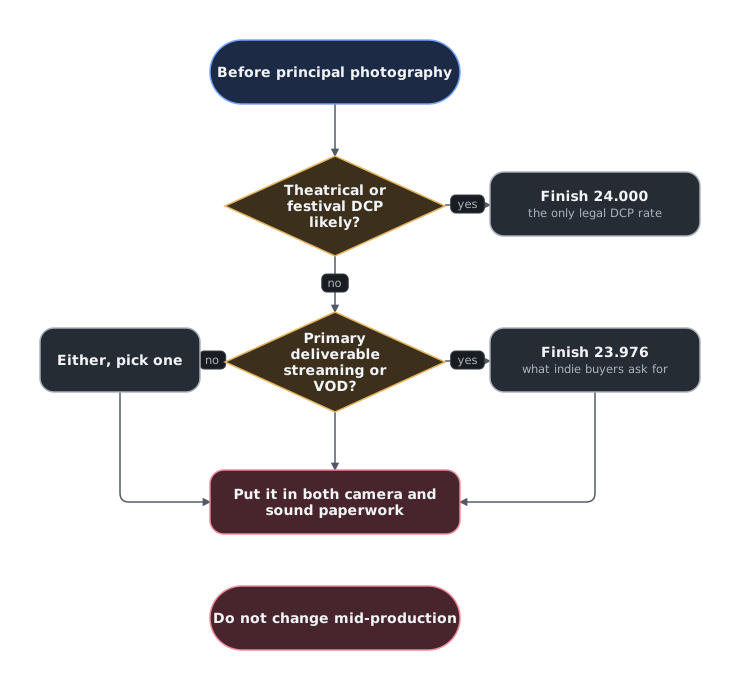
Converting between 23.976 and 24.000 is a small speed change. The frame count stays the same. Choose the rate that avoids conversion on the primary delivery:
| Leaning | Finish at | Why |
|---|---|---|
| Independent VOD/TVOD is the realistic destination | 23.976 | Common in independent distribution schedules. Confirm the actual platform specification. |
| Theatrical or festival exhibition is the priority | 24.000 | Theatrical delivery almost always precedes video delivery. Starting at 24.000 avoids a last-minute DCP conversion. |
| Broadcast is primary | The broadcaster's required rate | Broadcast infrastructure creates real regional and technical limits. Get the specification before photography. |
Consistency matters more than the choice. It does not matter much which of these two rates a production selects. Re-clocking a finished master is routine, and many systems perform the change without noticeable resampling artifacts. Consult the re-recording mixer. If the mixer can deliver both 23.976 and 24.000 printmasters, let the sound department prepare the matching versions.
Mismatched camera and production-sound rates cause the audio to drift against the synced source clips. A retimed picture master also drifts against a printmaster that was not retimed to match.
Pick one production rate and put it in the camera and sound paperwork before photography. Confirm the recording timebases and synchronization during dailies processing or in editorial while the shoot is still underway.
Digital Dailies
On a studio production, a DIT or digital loader ingests and verifies the camera originals, creates the required backups, and sends a copy to the dailies operator. The operator may work on set, near set, or at a lab or DI facility. Dailies may also be a separate hire or vendor.
The dailies colorist or technician syncs sound and applies the approved look. The dailies colorist performs necessary continuity adjustments or additional grading requested by the cinematographer, then renders editorial proxies with the source metadata required for relinking. The framing chart defines raster and masking. Unmatted proxies preserve editorial reframing room.
The DIT and dailies colorist communicate their CDL-compatible corrections as ASC Color Decision List data for downstream VFX use. A CDL does not carry every grading operation, such as windows or keys. See Visual Effects Plate Pre-Grading for those limits and options for sharing a fuller grade.
Independent productions often combine these jobs. One DIT or loader may also sync and process dailies, or editorial may take over after the camera originals are secured.
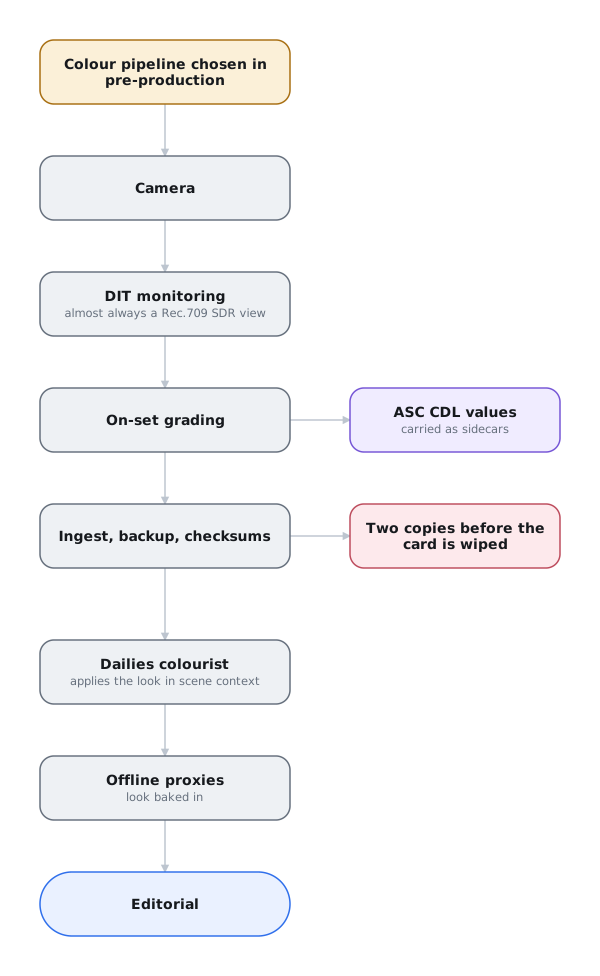
Dailies Must Execute the Pre-Production Color Decision
Dailies follows the approved color pipeline defined during pre-production. The dailies team applies the appropriate camera input transforms (if applicable), the on-set CDL, and any specified look modification. The approved Show LUT and display transform prepare the viewing image, typically for Rec.709 / Gamma 2.4. If the Show LUT already includes the look modification or display rendering, do not apply that function again. The pipeline specification identifies which functions are combined and the order in which they are applied. See Translate the Color-Management Terms.
The dailies colorist may refine the CDL in scene context. Catalog the final values and supply them with VFX plate pulls. Artists use the values to reproduce the on-set and editorial grade while working on the scene-referred plate.
On an ACES show, dailies applies the specified Input Transform for each camera and the approved Output Transform for viewing. Every vendor must use the same configuration and version.
Choosing ACES, RCM, TCS, or a manual pipeline affects the entire post chain. Altering the pipeline after dailies begins could mean re-deriving looks, re-issuing plates, and re-testing vendor round trips. The colorist, cinematographer, VFX supervisor, dailies team, and post supervisor must approve the pipeline before the first day's material is processed.
ACES, RCM, TCS, and manual pipelines can all work. Document the choice and match the approved pre-production test. See Assigning and Approving Color Management.
Editorial proxies are commonly Avid DNx LB QuickTimes or MXFs, or Apple ProRes QuickTimes. Review copies may be H.264 with synced audio and burn-ins. Frame.io is usually the practical review system for an independent production. It provides controlled access and frame-accurate notes without the infrastructure expected by larger studio systems. Use Autodesk Flow Capture, CLEAR, or PIX when a client or production requires one of those systems. Vimeo and Dropbox can distribute files, but they do not provide the same shot-review controls.
Colorfront Transkoder is the predominant dailies system in studio workflows. Its advanced feature set often exceeds the needs of an independent production. When one person handles several dailies tasks, DaVinci Resolve can cover Camera RAW processing, sound sync, dailies color, LUT application, metadata burn-ins, and proxy transcoding.
Creative Editorial
Studio editorial often works on set or nearby, assembling scenes as dailies arrive. Early cuts let the director and VFX supervisor judge timing, select plates, and identify fixes that can still be photographed during production. Keep the VFX shot list current as editorial adds, removes, or changes shots.
Temporary graphics, slap comps, and previs help editorial test timing and communicate work that will be finished later. A VFX editor normally manages these on a studio show. On a smaller production, the picture editor or assistant may take that role.
Editorial may also create morphs, split screens, and rough composites to marry multiple performances or combine coverage. Involve the VFX supervisor before treating an editorial effect as final. The offline effect communicates intent, but it may not be suitable for finishing or easy to reproduce in the DI. A complex editorial effect may require more elaborate VFX work to complete it in full resolution in a scene-referred color space.
Visual Effects Plate Pulls
When a sequence reaches soft lock, editorial creates a pull list for its VFX shots and elements. The list can be an EDL or XML containing only the VFX events. It must map each camera source to its assigned VFX shot name.
Assign one controlled plate-pull pipeline
Do not give artists the camera originals and expect each vendor to reproduce the plate pull. Assign production or one designated facility to generate every plate from the approved specification.
Plate pulls can include handles, extra source frames before and after the cut. Plate handles give the artist additional source material. Comp handles are extra finished frames the vendor is contracted to return, allowing editorial to extend the shot without ordering more work.
Handle frames can be expensive for an independent production. Every comp handle is another frame the artists must finish and production must pay for. A no-handles show is a reasonable budget choice. Production can assess and pay for later extensions case by case instead of funding extra work across every shot that the edit may never use.
VFX may need extra plate frames for tracking or motion-estimation pre-run before the first frame of the comp. Production can supply those frames without requiring the vendor to return them as finished comp handles. The plate range and the contractual comp range are separate decisions. Frames needed to complete a transition, retime, or stabilization in the cut still belong in the required working range, even on a no-handles show.
Plate pulls commonly include QuickTime proxies that editorial can overcut, replacing the corresponding shots in the timeline with proxies of the actual plates. The proxies include the pulled frame range, making its limits visible in the edit. If a revised cut exceeds that range, editorial can request an extension and new VFX plates or consider an edit within the available frames. Available plate frames do not imply that the vendor has been paid to finish them.
Specify plate and comp handles separately
The VFX producer or supervising producer agrees the plate and comp ranges with editorial and the VFX vendor before the pull. Record both ranges in the turnover and vendor agreement, including zero handles where agreed. Identify any additional source frames supplied only for tracking, motion estimation, or another processing need.
The plate-pull operator supplies matching QuickTime proxies with the complete pulled range. The editor or assistant editor overcuts those proxies and flags any later extension beyond the plate range or contracted comp range. Production approves the added cost and schedule before ordering the extension.
Deliver standardized scene-referred plates
Debayer Camera RAW once with the approved resolution, color encoding, and settings. Deliver DPX or EXR image sequences unless the show specification permits a movie format. Preserve the source range and gamut so each frame remains independently accessible and replaceable.
Studio productions often assign plate pulls to the DI vendor because its team already manages the Camera RAW decode and color pipeline.
For an independent production, assign the pull to a person with DI experience. This person can be the colorist, DIT, or a technically experienced editor.
If the team lacks this experience, consult the final colorist or post-production vendor.
Visual Effects Plate Pre-Grading
Some productions pre-grade VFX plates before turnover. The colorist develops an approximate shot grade with the director, cinematographer, and VFX team so vendors can review their work near the intended final appearance.
Use pre-grading when the intended grade affects CGI lighting or rendering. A day-for-night look, for example, informs the CG lighting. Product colors, day-for-night work, and established character palettes especially benefit from this preview.
These grades typically rely on ASC CDL values for metadata interchange. Slope, offset, power, and saturation are mathematically compatible with RGB lift, gamma, and gain.7 Apply them to the scene-referred plate under the display-referred Show LUT.
A CDL cannot carry windows, keys, spatial transformations, or most operations available in a grading system. The DaVinci Resolve Renderer Open FX plug-in can apply a DRX grade inside supported VFX applications. It transfers native color and sizing operations and most Resolve FX, but it does not transfer temporal effects or Magic Mask. FilmLight's Baselight for NUKE can render BLG files with grading layers, shapes, spatial operations, and animated keyframes. These host-specific tools can preview a fuller grade without baking it into the plate. Test the exact applications, versions, effects, and licenses before relying on either workflow.8
Send pre-grades as metadata
Deliver the unaltered plate and the CDL as metadata in an EDL, ALE, CC, or CCC file. Send the approved Show LUT separately. Vendors preview the CDL and Show LUT, then render the final shot without either baked into the image.
CDL Exporter converts between common CDL interchange formats.
If production supplies a baked pre-grade, also supply the ungraded plate. A baked grade may remove detail needed for tracking or weaken green- and blue-screen separation.
Visual Effects Production
VFX production may involve anywhere from a single generalist to several specialized departments across multiple vendors. The VFX producer and coordinators track plates, assignments, versions, reviews, approvals, and delivery dates. On a small production, the supervisor or editor may also be responsible for this work.
Maintain one current record for every shot
Use a shared spreadsheet for a small shot count. Use ftrack Studio, Autodesk Flow Production Tracking, Kitsu, or AYON when the show needs a shot database, review integration, or pipeline automation. See Visual Effects Production Management.
Viewing the Composite in Context
Artists review the composite with the production's grade and Show LUT while preserving a scene-referred final render. This viewing path applies whether or not the plates were pre-graded.
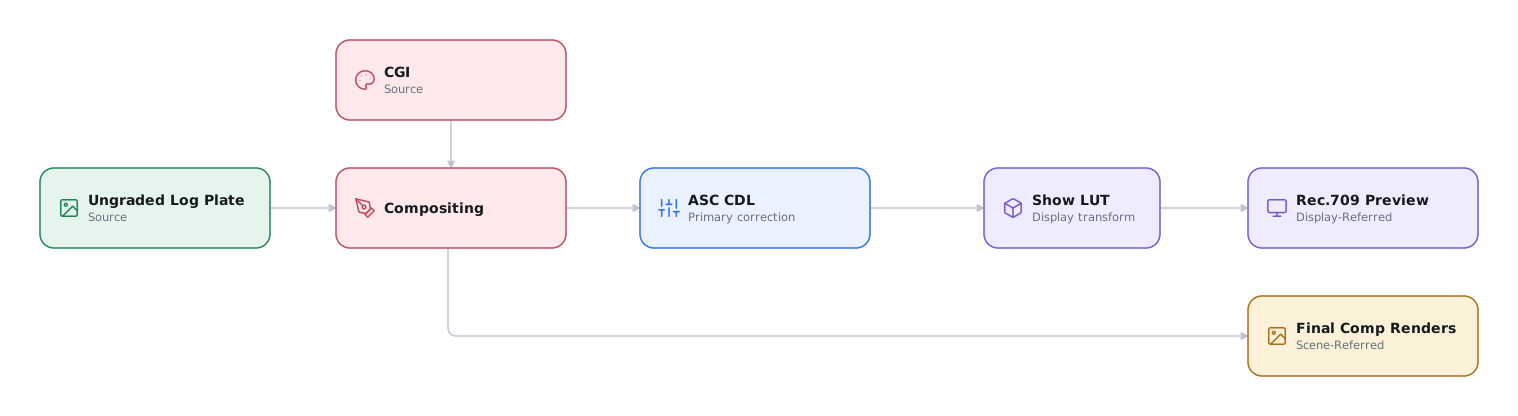
The VFX vendor applies the grade and Show LUT in editorial reference QuickTimes to match dailies. Do not include them in the final VFX render. The colorist applies those operations in the DI.
Zero Net Change
Unaffected pixels must survive the round trip
Any unaffected pixels from the original plate must return in the final comp unchanged. An unintended color shift, clipped value, resampling artifact, or encoding change is a pipeline failure.
VFX may temporarily transform camera-log plates into scene-linear or another compositing space. Return the final render to the agreed encoding without clamping, quantization, or unintended changes to gamut, tone, or detail.
Prove zero net change
- Pass representative plates through the complete vendor pipeline with no effect, returning the agreed final-render format and encoding.
- Difference the return against the source. Matching formats must difference to zero. If formats differ, compare them in a common high-precision state against an agreed tolerance.
- Fix every unexplained difference before approving the pipeline.
Include this zero-effect round trip in every vendor confidence package. Repeat it after any color-management, application, codec, or configuration change.
Visual Effects Editorial
Vendors send review QuickTimes with the temporary grade and Show LUT baked in. Editorial cuts these into the timeline to review content and refine the edit in context. Editorial, VFX, and the DI agree on a QuickTime start timecode before the first exchange. The review QuickTime and final EXR sequence must reflect matching timecode, either in file headers or through a documented mapping between timecode and image-sequence frame numbers. The DI can then conform the EXRs from editorial's turnover without guessing which frames correspond.
Test the VFX review exchange
Before the first production delivery, VFX, editorial, and the DI exchange one review file and final render. Conform the final EXRs in the DI and compare them with the editorial QuickTime. Verify clip names, start timecode, frame correspondence, framing, and intended revision.
Visual Effects Reviews
Production reviews turn vendor submissions into creative decisions, notes, and delivery commitments. See Run a Production Review for preparation, feedback, and approval records, including a small-production routine.
Compressed review media is useful for early creative iteration. It does not accurately represent the technical integrity of a near-final shot. Creative approval is not technical approval. The VFX vendor must QC the full-quality render, then obtain technical approval from the VFX supervisor.
Review near-final VFX at full quality
The VFX supervisor reviews final candidates on the largest calibrated display available, in grade and Show LUT context. Cinema projection is the best review environment for theatrical work. Moving from a workstation display to a large screen changes scale and perspective. It can expose edge, texture, motion, and integration problems that were difficult to see on a smaller display.
Include the colorist when the review requires grading decisions. Test the durability of shots by significantly increasing and decreasing exposure. The VFX supervisor and colorist assess whether exposed defects are permissible in the ultimate grading context or must be fixed by VFX.
Digital Intermediate
VFX sends full-quality renders to the DI while editorial cuts the matching QuickTime proxies into the offline timeline. Editorial then supplies an EDL, XML, or AAF naming the exact revisions and approval states. File names, frame numbers, handles, and timecode must match between review and final media.
Send useful WIPs to the DI
VFX sends useful WIPs to the colorist before every shot is final. The colorist can establish the grade and identify problems while VFX still has time to correct them. Near delivery, the colorist can handle minor continuity and color fixes that do not justify another VFX revision.
Track shots as WIP, final, or could-be-better (CBB). A CBB is a shot the filmmakers or supervisors can accept but would improve with another revision if time permits. Finish WIPs before spending time on CBBs. On studio theatrical features, CBB updates sometimes arrive after the theatrical release and are included in home-entertainment masters. The initial theatrical run is limited, but home-entertainment versions can remain available for decades. Passionate viewers can pause, replay, scrutinize, and dissect them long after the theatrical release.
Visual Effects Revision Checking
Editorial review files and full-quality DI renders may use different filenames or revision counts. The approval record, not the highest number, determines which render belongs in the film.
Reconcile VFX versions before finalizing picture
Editorial, VFX production, and the conform editor compare the shots in the final DI cut with the approval record and picture editorial's cut. This independent cross-check catches mistakes caused by incomplete communication or assumptions. Review every shot with an ambiguous revision number. The highest revision is not always approved.
Theatrical Distribution Masters
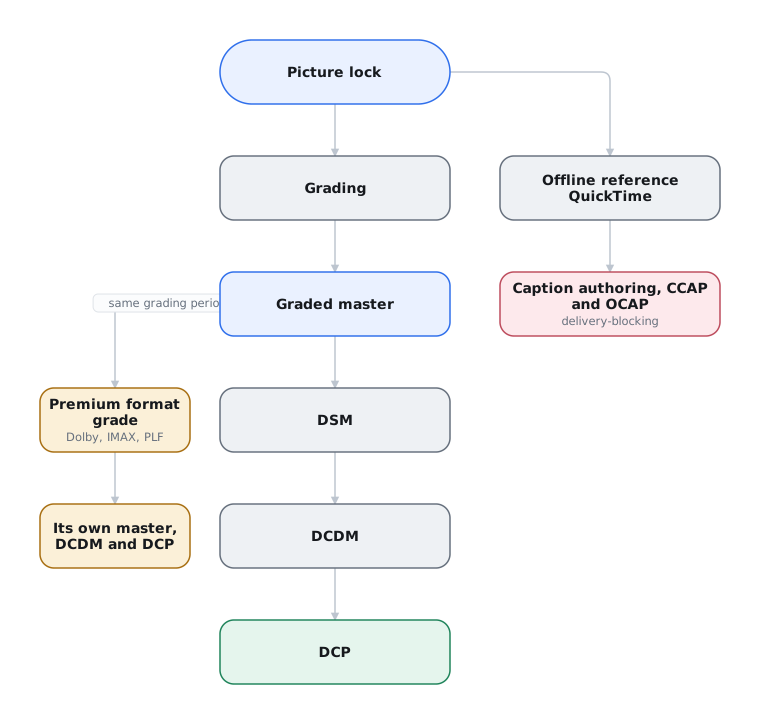
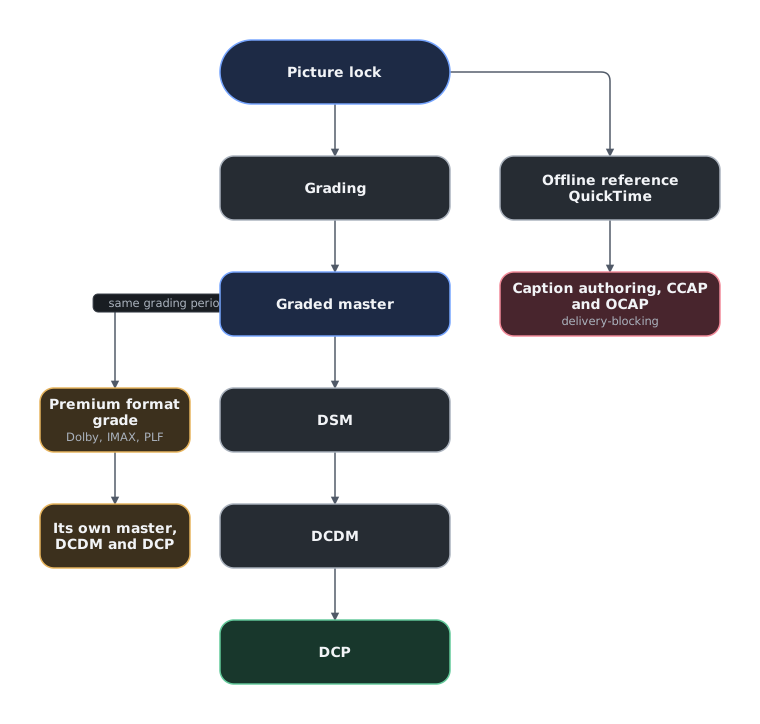
Theaters receive finished feature films as Digital Cinema Packages (DCPs). On a studio feature, a mastering and distribution vendor often authors the DCPs separately from the DI. That vendor manages large-scale distribution, multiple foreign languages of audio, captions and on-screen text, QC, encryption, and key delivery. An independent film bound for festivals rarely needs that infrastructure. Its DI vendor often authors the festival DCPs.
The picture path can include these elements:
DSM (Digital Source Master)
A graded, unencrypted theatrical RGB master in a cinema raster. Common color encodings include P3DCI / Gamma 2.6 and P3D65 / Gamma 2.6. A DSM may be encoded as 10-bit or 16-bit DPX, 16-bit TIFF, ProRes 4444, or ProRes 4444 XQ.
Note
The colorist or DI facility may produce a DCDM or even a DCP directly from the live grading project rather than from a rendered DSM. Even when it is not used for DCP authoring, a DSM is a valuable archival master.
DCDM (Digital Cinema Distribution Master)
A graded, unencrypted DCI X′Y′Z′ image master sized to a DCI raster, commonly delivered as a 16-bit TIFF sequence. A DCDM is used to produce a DCP and may also be delivered or archived as a mastering element. See Digital Cinema Mastering for the distinction between encoded image precision and TIFF storage.
Because 16-bit TIFF sequences can reach about 10 TB for a feature, exchanging a DCDM between facilities is slow and costly. A packed DCDM, or pDCDM, stores 12-bit DCDM code values in a losslessly compressed JPEG 2000 sequence. It can use the high-throughput JPEG 2000 block coder for faster encoding and decoding.9
Frames use the suffix .pdc.j2c to distinguish them from the lossy .j2c codestreams used in a
DCP. A pDCDM is a transport-efficient equivalent of a compliant TIFF DCDM, not a substitute for the
DCP's lossy picture essence.
In practice: Avatar: The Way of Water
The production had to move eleven stereo, 4K, and high-frame-rate DCDMs from post-production in New Zealand to digital cinema mastering in the United States. Ian Bidgood at Park Road Post Production proposed losslessly compressed JPEG 2000 DCDM sequences instead of 16-bit TIFF. Park Road and Disney tested the exchange with downstream distribution partners before adopting it. The method cut transfer size by as much as half and became the basis for the later standardized pDCDM workflow.10
DCP (Digital Cinema Package)
The DCP packages compressed DCDM picture, audio printmasters, and timed text. An encrypted DCP plays only when the cinema server is given a valid Key Delivery Message (KDM).
Commercial releases commonly use encrypted DCPs. Each KDM authorizes one cinema server for a fixed validity window, often a span of weeks around the release date. The key cannot be moved to another server or used outside that window. A different server or an extension requires a new KDM.
Independent festivals and private screenings commonly use unencrypted DCPs. An unencrypted package remains playable if the venue changes its server or schedule at the last minute.
Accessibility Tracks Can Block Delivery
Captions and accessibility options are mandatory on studio theatrical deliverables. Festival requirements are also increasing for independent films. Sundance, for example, requires selected projects to deliver both closed-caption and open-caption DCP versions.11
In the United States, the ADA requires public movie theaters to provide closed captions and audio description when they exhibit a digital movie distributed with those features, subject to the rule's exceptions. The federal rule governs the exhibitor. It does not require every filmmaker to author captions. A festival, distributor, venue, or local law may still make captions a delivery condition.12
Two distinct things get confused:
- CCAP (closed captions) are delivered to a personal display or handheld unit. They carry dialogue plus non-speech audio information: sound effects, speaker identification, musical scoring cues.
- OCAP (open captions) are visible to the whole auditorium. A DCP can carry them as timed text rendered by the cinema system or as text baked into the picture.
Keep timed text within cinema-system limits
- Keep each closed-caption timed-text DCDM XML essence file at or below 256 KB. This limit applies to the XML inside the timed-text MXF, not the MXF file itself, which will usually be larger. Split the composition into reels if the XML exceeds the limit.
- Keep the complete timed-text track for each reel, including XML, PNGs, and fonts, below 115 MB.
- Follow the Bv2.1 line limits below. A festival may impose a stricter limit.13
| Bv2.1 timed-text type | Maximum lines | Characters per line |
|---|---|---|
CCAP (ClosedCaption) |
3 | 32 maximum |
OCAP or subtitle (MainSubtitle) |
3 | 52 recommended, 79 maximum |
Stay within these limits for compatibility with common older personal-display hardware such as Doremi/Dolby CaptiView.14
Non-English dialogue in an otherwise English-language film is usually treated as forced narrative. Forced narratives are usually rendered into the picture rather than carried as timed text. Those sections are also supplied textless to distribution mastering for localized versions. Timed-text delivery remains possible when the distributor's workflow calls for it.
Accurate feature captioning takes time and human review. Use automatic transcription only as a draft. Begin caption work as soon as picture editorial is locked, or earlier when the cut is stable.
Premium large format
If the show has a premium-format release, those are separate deliverables, not necessarily exhibitions of the standard DCP. Dolby Cinema takes a Dolby Vision cinema grade. This is a PQ-graded DCDM at a higher peak luminance than the SDR master. IMAX produces its own DCPs. It requests a DCDM and may perform proprietary frame-by-frame image enhancement through IMAX DMR, depending on the agreement with the filmmakers.15 HDR by Barco uses another separately graded ST 2084 (PQ) HDR DCDM for its Lightsteering cinema system.16 Some cinemas use emissive LED screens, such as Samsung Onyx and LG Miraclass, instead of projection. The screen itself produces the light. These installations can have different luminance targets and mastering requirements from conventional projection.17
Each means a potential trim grade, additional QC, and a delivery specification you obtain from the vendor rather than infer from the general-release rules.
Independent films are rarely exhibited in these formats. If a premium release is possible, include it in the initial post budget. It can require another render, creative finishing time, and QC. If the opportunity arises, the distribution partner will provide its specification and workflow.
Video Distribution Masters
Home-video and streaming releases commonly use these delivery formats:
Uncompressed Video Master
A complete, color-graded DPX or TIFF image sequence with titles, graphics, and visual effects. This uncompressed master is used to make ProRes and IMF deliverables. It is rendered in the mastering display's color space and at the agreed raster.
ProRes 422 HQ
For independent distribution, many TVOD platforms and distributors request a compressed ProRes 422 HQ variant of the video master. Retain a ProRes 4444 master and derive the requested 4:2:2 or 4:4:4 submaster from it. ProRes 4444 XQ is also specified for some HDR deliveries. Most distributors releasing independent features want ProRes and handle the platform-specific encoding downstream. See Distribution Deliverables for Independent Film.
IMF (Interoperable Master Format)
Very few independent distributors ask for an IMF package. IMF is primarily a studio-and-streamer interchange format.18 Unlike a QuickTime, an IMF package is not a single file containing picture and audio. Picture (JPEG 2000), each audio configuration (linear PCM), and timed text are carried as separate MXF elements. A Composition Playlist describes how to assemble them.
That structure makes territory-specific versions possible from one original version package and supplemental packages. It is why textless elements are a core requirement rather than an omission. Alternate versions are built from them. See IMF.
Archival Elements
Responsible archival preservation keeps enough source material, masters, projects, metadata, and instructions to remaster or repurpose the film after the original vendors and systems are gone.
Budget and assemble the archive before delivery
Preserve the ungraded scene-referred conform, graded scene-referred master, display-referred preservation masters, camera originals, project files, and VFX elements. Studios commonly require an ungraded, uncropped preservation master for their own films. Distributors rarely require one, but it is good practice for every film owner, whether studio or independent. It keeps a future remaster from being locked to the current grade or framing.
Archival is a chapter in its own right. See Archival and Preservation for storage media, migration intervals, and what actually belongs in a preservation package.
-
Cooke Optics, “S8/i FF,” “/i Technology inside,” and “New Cooke /i3 Technology System.” Canon, “Technology,” RF Lens World, “IS (in-lens image stabilization)” and “Coordinated Control IS.” ↩
-
ARRI, “ARRI Textures,” sections “What are ARRI Textures?,” “Textures are exclusive to ALEXA 35,” and “Textures are not reversible.” ↩
-
ARRI, ALEXA 35 User Manual, Software Update Package 5.2, secs. 8.1–8.2, “Project Rate” and “Sensor Frame Rate,” pp. 40–41. ↩
-
Poynton, Digital Video and HD, chs. 32–33. See also SMPTE ST 170M §11 and SMPTE ST 12-1 §§5.1.2, 7.1.2, and 7.2, including table 3. ↩
-
Sound Devices, “Sample Rate and Frame Rate Settings for Production Sound,” and 688 User Guide, “F Sample Modes,” p. 70. ↩
-
DCI, Digital Cinema System Specification, §3.1.4.2; SMPTE ST 429-2 §8.2; SMPTE RP 428-4 §5.1.3. RP 428-4 also specifies the permitted sample counts per edit unit. ↩
-
Pines and Reisner, ASC Color Decision List, release 1.2. Not publicly hosted. Request the specification from the ASC. See also Academy Software Foundation, Common LUT Format Specification, ASC_CDL ProcessNode, for the publicly available definition of the operations. ↩
-
Blackmagic Design, DaVinci Resolve 19 New Features Guide, pp. 7–8; FilmLight, Baselight for NUKE. ↩
-
SMPTE, ST 428-24: D-Cinema Distribution Master: Packed Image, introduction and §8. ↩
-
Trieu, “Color Grading Avatar: The Way of Water,” part 2, section on DCDM delivery. ↩
-
Sundance Institute, 2027 Sundance Film Festival Submissions FAQ, p. 8. ↩
-
U.S. Department of Justice, Americans with Disabilities Act Title III Regulations, §36.303(g)(2). ↩
-
SMPTE, RDD 52, §§7.2.1 and 7.2.6–7.2.7, pp. 9–10; Sundance Institute, Technical Specifications for Festival Presentation, p. 2. ↩
-
Inter-Society Digital Cinema Forum, Closed Caption Authoring Best Practices, p. 1; Dolby Laboratories, Dolby CaptiView. ↩
-
IMAX Corporation, “F1: The Movie.” ↩
-
Digital Cinema Initiatives, High Dynamic Range D-Cinema Addendum, sec. 6.1.2; Barco, “HDR by Barco.” ↩
-
Samsung Electronics, “Samsung Unveils New Onyx at CinemaCon 2025, Setting New Standards for LED Cinema Innovation,” “Brighter, Bolder and More Immersive” and “A Proven Legacy With Global Recognition.” LG Electronics, “LG Cinema LED Screen ‘LG Miraclass’ Brings Immersive Viewing Experience to Theaters.” ↩