Color Management and OpenColorIO
What OCIO is
OpenColorIO is an open-source color management framework. It was developed at Sony Pictures Imageworks and is now an Academy Software Foundation project. It is integrated into Nuke, Maya, Houdini, Katana, Blender, RV, and other VFX applications.
Current versions of Adobe After Effects and Autodesk Flame include native OCIO color management. After Effects can use OCIO as the project's color engine. Flame Family applications use OCIO for project color management and support custom configurations.1
An OCIO config defines the color spaces, transforms, displays, views, and application roles for a show. Older configs can also depend on separate LUT files.
- Color spaces:
ACEScg,ACEScct,ARRI LogC4 / AWG4,sRGB - Display, and so on. - Roles: names such as
scene_linear,compositing_log,color_picking, anddata. An application requests the role. The config assigns its color space. - Displays and views: the viewing transforms available in an artist's viewer.
Roles allow a working space to change without editing every artist's scripts. Redefine scene_linear
once in the config instead of changing it in each Nuke script. That one change can affect every
application and existing script that requests the role. Treat a show-config change as a pipeline
revision. Test it, assign a new version, and do not replace an approved config in place.
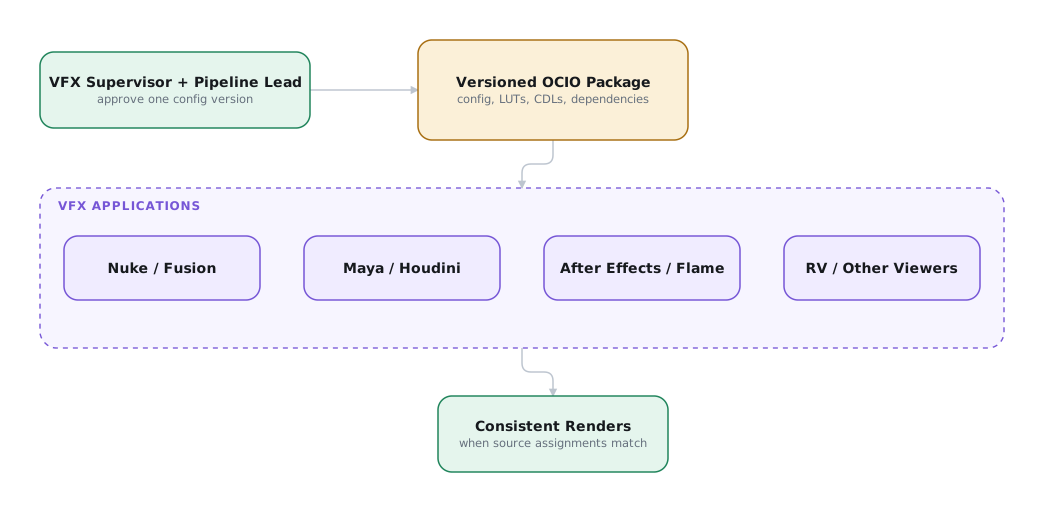
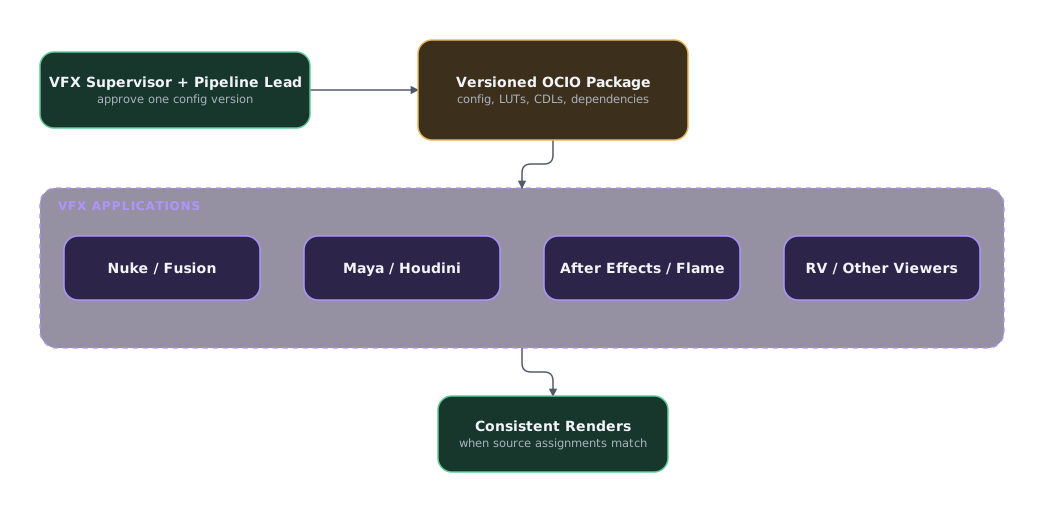
At a VFX facility, the technical director or image-pipeline lead is responsible for the OCIO configuration and version. On an independent production, the VFX supervisor standardizes the configuration and pipeline across independent artists. Each vendor and artist uses the approved config and assigns the documented source color space to every asset.
How ACES is actually delivered
Most facilities implement ACES through a tested OCIO configuration shared across applications. The config exposes the required ACES color spaces, transforms, displays, views, and roles to artists.
The Academy publishes its reference color math in Color Transformation Language (CTL), a
programming language for defining per-pixel color operations. The OCIO ACES project implements those
reference transforms in a smaller cg-config for CGI and compositing and a broader studio-config.
Artists use the approved config. Pipeline engineers compare its results against the CTL reference
when validating the implementation.2
Calling a show "ACES" is incomplete. Every application must use the same OCIO configuration and version.
What to specify on a show
Alongside the three format specifications, a color-managed show needs these choices set in stone:
| Item | Example | Why |
|---|---|---|
| Config identity and version | studio-config-v4.0.0_aces-v2.0_ocio-v2.5.ocio |
If their configs differ, two artists can produce different renders from identical scripts. ACES 1.3 and 2.0 also use different Output Transforms. |
| Working space | ACEScg |
See the AP0/AP1 warning |
| Grading space | ACEScct |
ACEScc and ACEScct are not interchangeable |
| Plate color space | ARRI LogC4 / AWG4 or ACEScg |
Must match what the plate pull produced. A plate already pulled into ACES must be identified by its actual ACES encoding. |
| Delivery color space | ACES2065-1, uncompressed EXR |
Set by production and the DI, not by vendor preference |
| Viewing transform | Output Transform, P3-D65 or Rec.709 | Artists must review under the same view the DI uses |
Distribute one approved OCIO package
Distribute the exact config, its dependencies, the Show LUT, and CDLs as one versioned package. Use the approved production transfer system or another documented shared location. Require every vendor and artist to use that package instead of sourcing another config.
VFX Reference Platform
The annual VFX Reference Platform gives software developers a common target for core library and tool versions. Its purpose is to reduce incompatibilities between VFX applications and integrated pipelines. CY2026 specifies ACES 2.0, OCIO 2.5.x, and OpenEXR 3.4.x, among other dependencies.3
The platform is not a production specification or a guarantee that two applications will process an image identically. Applications adopt the target on different schedules, and a packaged application may not expose every underlying library version. Record the actual application, plugin, OCIO config, and relevant library versions used by each artist.
For an independent production, the platform year is useful shorthand during artist and vendor onboarding. It can expose incompatible software generations before a shot moves between freelancers. The VFX supervisor still needs a tested configuration and confidence package.
Use the platform as a compatibility baseline
- Ask each vendor and artist which VFX Reference Platform year their applications target.
- Compare their application, plugin, OCIO, ACES, and OpenEXR versions.
- Test one plate and render through every participating application.
- If versions cannot match, document the difference and prove the handoff before shot work.
Test the Configuration
An OCIO configuration can load successfully and still apply the wrong transform, clamp image data, or render differently between applications. A controlled round trip exposes those failures before they affect shots.
Prove the OCIO configuration before shot work
Run these checks in a confidence package:
- Round-trip a plate. Convert to the working space and back without operations, then difference against the original. Allow only floating-point precision error.
- Round-trip an extreme. Repeat with a plate containing genuine highlight clipping and deep shadow. Faults that are invisible on a mid-tone chart show up here as clamping.
- Compare viewers. Open the same frame under the same view transform in Nuke and the DI system. Resolve any difference before grading begins.
Use a difference check for the first two tests.
-
Adobe, “OpenColorIO and ACES Color Management.” Named sections “Specify Color Management Settings” and “Layer Effects for Applying OpenColorIO.” Autodesk, “OpenColorIO.” Named sections “Getting the Most from OCIO in Flame” and “Accessing Various OCIO Tools.” ↩
-
Academy Software Foundation, OpenColorIO Configuration for ACES, “Features.” ↩
-
VFX Reference Platform, “Reference Platform,” CY2026. ↩