Assigning and Approving Color Management
The filmmaker defines the intended look, target presentations, budget, and required flexibility. The colorist or image-pipeline lead recommends the technical architecture and is responsible for documenting and testing it with VFX, dailies, editorial, and the DI.
Translate the Color-Management Terms
Color-management language often mixes three questions: What creates the show look? What renders the scene for a display? What encodes that result for a particular monitor or projector? Some systems separate those functions. Others combine them in one transform or LUT.
| Term | Director-speak | What it does |
|---|---|---|
| Creative transform | The repeatable creative treatment | Establishes a look through contrast, color relationships, film emulation, or other creative operations. It can be a LUT, DCTL, grade, or an ACES Look Transform. It does not have to make a display-ready image. |
| Show LUT | The production's approved viewing recipe | Carries the approved look across set, dailies, editorial, VFX review, and the DI. A Show LUT often combines the creative treatment with display rendering for one target. Ask what is inside it. |
| Viewing transform | Whatever makes the working image viewable on the selected display | This broad term may mean only the display-rendering step or the complete viewing chain, including the show look. The phrase alone is not a complete specification. |
| DRT | The scene-to-display rendering step | A Display Rendering Transform maps scene-referred values into a display-referred appearance. It usually handles tone scale, highlight behavior, and gamut mapping. Resolve's DRT and FilmLight T-CAM are examples. |
| ODT | An older ACES term for the display-specific end of the pipeline | In ACES 1, the Reference Rendering Transform created the common rendering and the Output Device Transform adapted it to a target display. The two together became the user-facing ACES Output Transform. ACES 2 uses one Output Transform instead of a separate RRT and ODT.1 |
A DRT does not contain an ODT by definition. DRT describes a general function. ODT names a component of the ACES 1 architecture. The combined RRT and ODT in ACES 1 performs a job comparable to what many applications call a DRT. A non-ACES DRT does not contain an ACES ODT.
Require a function-by-function pipeline description
Ask the image-pipeline lead to document:
- each camera input transform
- the working space
- where CDLs and shot grades are applied
- the creative transform or Show LUT
- the display rendering or Output Transform
- each target display
If one LUT or transform combines several functions, list the functions it contains.
Require a complete color-management proposal
The producer requires:
- one named pipeline lead
- a written recommendation in plain language, including cost or workflow consequences
- a versioned specification and transform package
- a representative camera-to-VFX-to-DI round trip
- approval by the colorist, VFX supervisor, and cinematographer where their work is affected
Choose the qualified pipeline lead before choosing the architecture. Then evaluate that person's proposed workflow, tests, cost, and archival path.
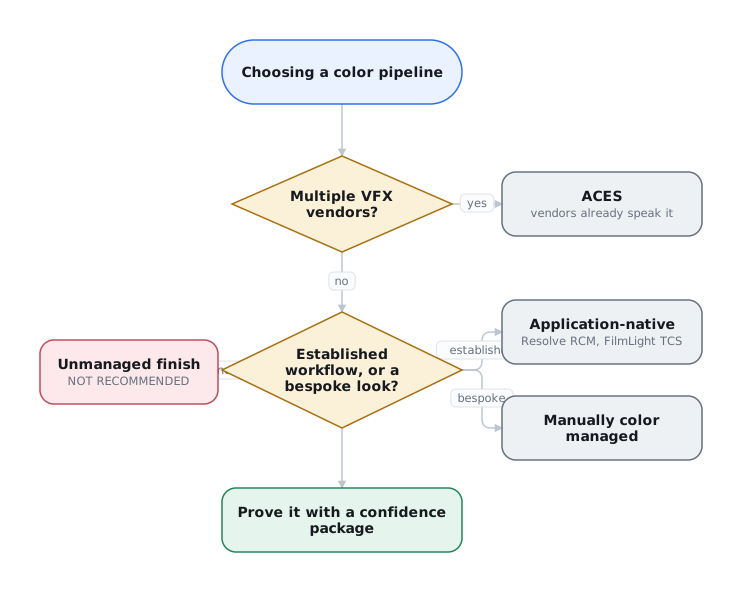
The comparison includes four managed approaches and one unmanaged failure mode:
- Display-referred, unmanaged finish: NOT RECOMMENDED. The look is baked into the grade, with no recoverable scene-referred master.
- Manually Color Managed: a hand-made pipeline with a consistent scene-referred working space, color-space transforms in, node- or layer-based grading, and a standard or bespoke display transform out. This is typically what people mean when they talk about "node-based color management" in Resolve.
- ACES: an open, standardized, scene-referred pipeline (SMPTE ST 2065).
- DaVinci Resolve Color Management (RCM): Blackmagic Design's in-application managed workflow on DaVinci Wide Gamut / Intermediate.
- FilmLight Truelight Color Spaces (TCS) + T-CAM: FilmLight's managed workflow on E-Gamut / T-Log with a color-appearance display transform.
The pipeline lead documents the pipeline's image-state changes. The specification must identify how each source enters the scene-referred working space, which encoding each handoff uses, and where the display transform creates a display-referred output. The producer requires this specification and the round-trip test. The producer is not expected to classify image state or select transforms.
All four managed approaches retain a scene-referred working space and recoverable master.
Choose for interchange, workflow, and archival
Managed systems enforce consistency across cameras, vendors, applications, and deliverables. They do not guarantee better images. Choose based on interchange, workflow, and archival needs.
The five approaches
Display-Referred, Unmanaged Finish (Not Recommended)
The grade operates directly on camera-native log or display-space material and bakes the look into the master. There is no defined working space, separate display transform, or scene-referred graded master to render from later.
- Boundary. A job with a defined working space and the display transform applied last is Manually Color Managed. An unmanaged finish leaves only a baked image for future deliverables.
- Drawbacks. Technical and creative decisions are inseparable. The workflow does not scale well across cameras, vendors, or deliverables, and cannot produce a scene-referred master later.
Avoid an unmanaged finish
Do not choose this workflow for a production that needs VFX, multiple camera types, multiple deliverables, or a recoverable archive. Establish the working space and deliverables with the colorist before photography.
Manually Color Managed
The colorist maps each source into a common scene-referred working space, grades with node- or layer-based tools, and renders through a standard or custom display transform. CSTs, LUTs, and DCTLs replace an automatic vendor framework.
- Benefits. Full control over the working space, tone mapping, and look while retaining a recoverable graded master.
- Drawbacks. Requires an experienced colorist to design, document, test, and distribute every transform. An undocumented manual pipeline is as fragile as an unmanaged one.
ACES
A scene-referred interchange encoding (ACES2065-1, SMPTE ST 2065-1), working spaces derived from it (ACEScg for comp, ACEScct for grading), an Input Transform at the front and an Output Transform at the back, delivered in practice as an OCIO config.
- Benefits. Open, vendor-neutral interchange through OCIO and a documented scene-referred archival encoding in ACES2065-1.
- Drawbacks. Requires setup, testing, and version discipline. Its interchange benefits may go unused on a single-camera, single-deliverable project. Use another approach when the desired look conflicts with the standard Output Transform.
DaVinci Resolve Color Management
Blackmagic Design's DaVinci YRGB Color Managed mode: per-clip Input Color Space → a timeline working space → an Output Color Space per deliverable, with the display transform applied last.
- Benefits. Simple Resolve setup. Documented DWG/Intermediate working space. Straightforward SDR, HDR, Rec.709, P3, and Rec.2020 outputs.
- Drawbacks. The display rendering is internal to Resolve and is not an archival interchange standard. External vendors need supplied transforms and guidance.
FilmLight TCS + T-CAM
FilmLight's Truelight Color Spaces: an E-Gamut / T-Log working space and the T-CAM v2 color-appearance display transform, in Baselight and Daylight.
- Benefits. Scene-referred Baselight workflow with a documented CAM-based DRT and portable FilmLight transform files, OCIO config, and Flame policy.
- Drawbacks. FilmLight controls the implementation. Cross-application support is narrower than ACES.
Side-by-side2
| Display-referred, unmanaged (not recommended) | Manually Color Managed | ACES | Resolve RCM | FilmLight TCS | |
|---|---|---|---|---|---|
| Working space | None (camera-native / display) | Consistent scene-referred (colorist's choice) | ACEScg / ACEScct | DaVinci Wide Gamut + Intermediate | E-Gamut + T-Log |
| Display transform | Baked into grade | Chosen standard or bespoke DRT | ACES Output Transform | Resolve DRT (internal) | T-CAM v2 (CAM-based) |
| Enforces the discipline | No | By the colorist | Automatically | Automatically | Automatically |
| Route back to a scene-referred master | No | Yes, if documented | Yes (ACES2065-1) | Yes (working-space master) | Yes (working-space master) |
| Open standard? | n/a | No, hand-built | Yes, SMPTE ST 2065 | No, single vendor | No, single vendor |
| Published? | n/a | As the colorist documents it | Fully (free SMPTE library + open CTL) | Encoding yes (white paper). Rendering no | Color-space/DRT files + OCIO config. Not a spec |
| Cross-app native support | n/a | Only via the colorist's exported transforms | Broad via OCIO | In-application (Resolve) | Via published files / OCIO config / Flame policy |
| In-app setup (single facility) | None | Moderate–high (build and test) | A little config | Low (if in Resolve) | Low–moderate (if in Baselight) |
| Multi-camera normalization | Poor | Strong (manual CSTs) | Strong | Strong | Strong, equal labor to ACES |
| Multi-vendor VFX (total effort) | Fails | High, colorist supplies transforms + guidance | Low, vendors already speak it | High, colorist authors transforms + guidance per vendor | High, same despite portable files |
| Interoperates with ACES | n/a | Yes, if built on ACES | Is ACES | Yes (Resolve has ACES modes) | Yes (v7 ACES 2.0) |
What an independent production approves
The baseline is a consistent scene-referred working space, display transforms applied last, and a documented re-renderable master. The pipeline lead may implement that manually or through ACES, Resolve Color Management, or FilmLight TCS. Do not approve an unmanaged finish.
Use a framework (ACES / RCM / TCS) when:
- You have multiple camera systems or VFX vendors. Prefer ACES when work crosses applications and vendors.
- You lack the color-science resources to build and vet a bespoke workflow. Adopt a documented framework instead of an untested custom pipeline.
Between the frameworks:
- Choose ACES for the widest, most vendor-neutral interchange and for a scene-referred archival master: the graded scene-referred master case.
- Choose Resolve RCM for a single-facility Resolve finish with scene-referred VFX deliveries in an agreed working space.
- Choose FilmLight TCS / T-CAM when you finish at a Baselight house or specifically want T-CAM's rendering. Its published files and OCIO config make it more portable than Resolve's DRT, and it interoperates with ACES.
Use a manually color-managed pipeline when:
- You have the color-science resources to design, document, and test it, plus a specific reason to control the DRT or look.
- The job is small and fixed but still needs a consistent working space and recoverable master.
- The colorist can supply and support the transforms and written guidance across every VFX vendor.
Even a single-deliverable commercial needs a consistent working space when it combines camera sources or reuses grades and looks.
Choose by interchange and archival needs
More sources, tools, vendors, deliverables, or uncertainty favor a framework and often ACES. A small, fixed pipeline can remain manual. In either case, retain a consistent working space and a recoverable master.
Approve the pipeline before shot work
Approve the pipeline in pre-production with the colorist. Record it in the technical specifications and prove it with a confidence package before shot work. Preserve a defined working space and re-renderable master.
-
Academy Software Foundation, “Look Transforms,” “Output Transforms,” and “About ACES 2.0.” ↩
-
Blackmagic Design, DaVinci Resolve 21 Reference Manual, ch. 9, The Colorist Guide to DaVinci Resolve 20, lesson 4, and DaVinci Resolve 17: Wide Gamut Intermediate. See also Kirk, Colour: Sense & Measurement, chs. 5–6, and FilmLight, “Colour Management: Truelight.” ↩