Visual Effects Quality Control Practices
Quote
Jeremy Selan writes, "One unfortunate reality in film production is that the typical artist display is not as high fidelity as the eventual theatrical viewing environment. Most often the theatrical audience will see more color detail than the original artist."1
The first rule of VFX is do no harm: the work must not unintentionally degrade the original image quality. Before production, the VFX vendor's technical director and their team define and test the complete imaging pipeline. On smaller productions, the VFX supervisor or lead artist is responsible for this work. The technical director dictates the expected result for every vendor and artist. Vendors execute those requirements.
The VFX supervisor and their team review VFX renders against the original plates to confirm that no unintentional degradation has occurred. This comparison often happens in the DI, where the original camera media is already conformed as the plate beneath each VFX insert. The colorist can A/B the plate and render to reveal subtle problems that may only become visible in projection. This comparison belongs in the vendor's standard QC process. Production must also verify that each render is acceptable before approving it as final.
Image Processing Practices
Scaling Algorithms
Scaling remaps pixels. Algorithm and filter choice impact interpolation, sharpness, aliasing, and ringing.
Impulse scaling, also called nearest-neighbor, is fast but produces visible aliasing unsuitable for final-quality work. Smoother filters reduce aliasing at the cost of softness and more processing.
Some filter kernels extend below zero so an enlarged edge remains sharp instead of becoming uniformly soft. Rifman and Lanczos are common examples. Near a high-contrast edge, their positive and negative lobes can push the reconstructed image above and below the source values. The overshoot and undershoot appear as ringing.
Negative pixels are one possible result of the undershoot. Clamping removes those negative values, but it does not remove the filter behavior that caused the ringing.
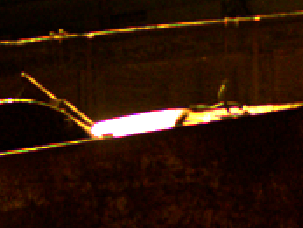


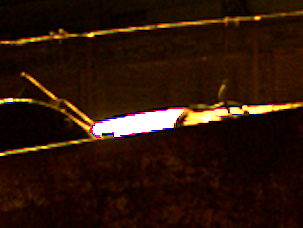
Scene-linear values can carry an extreme range between a bright highlight and a nearby dark pixel. A filter with negative lobes can turn that contrast into severe overshoot and undershoot. Transform scene-linear EXRs to an appropriate log encoding before scaling, then return them to scene-linear after the final resize.
Control scaling artifacts
Choose the mitigation per shot:
- Use a filter without negative lobes where the softness is acceptable. No negative weights means no ringing.
- Scale as close to 1:1 as possible, and resample as few times as possible. Each resample can add artifacts. Concatenate compatible transforms so the application resamples once.
- Round-trip through log around the resize. This bounds the overshoot by compressing the range the filter sees. Filtering log values no longer averages light, so this trades physical correctness for artifact suppression. It suits alpha-free images at close to 1:1 best, and is least appropriate where energy accuracy matters.
Compositing applications do not manage this automatically. Nuke filters in the current working
space. A log round trip must be explicit. Its Transform and Tracker clamp control discards negative
intermediate values but leaves highlight overshoot intact.2
This issue also applies to scaling in the DI. In DaVinci Resolve, place the linear-to-log operation in the Input LUT stage as a 1D LUT or DCTL. The Input LUT runs before image scaling and retains the precision needed for the transform. Edit Sizing and Color-page Input Sizing concatenate into one operation. Node Sizing and Output Sizing do not refer back to the original source raster and can add separate filter passes.3
For a scene-linear EXR delivery, return the image from log to scene-linear only after the last resize. If Output Sizing is active, apply the log-to-linear operation as a project Output LUT. A clip- or timeline-level log-to-linear transform occurs earlier and allows Output Sizing to filter the image in scene-linear, which can produce objectionable ringing.
Titles and graphics are rarely scene-linear, so this specific scene-linear warning usually does not apply to their compositing in the DI. They still require appropriate scaling and visual QC.
Concatenated Image Transforms
Every resample can soften an image. Concatenate successive transforms so the application performs one net resample. Color corrections, filters, distortions, merges, and other non-concatenating nodes between transforms can break the chain.
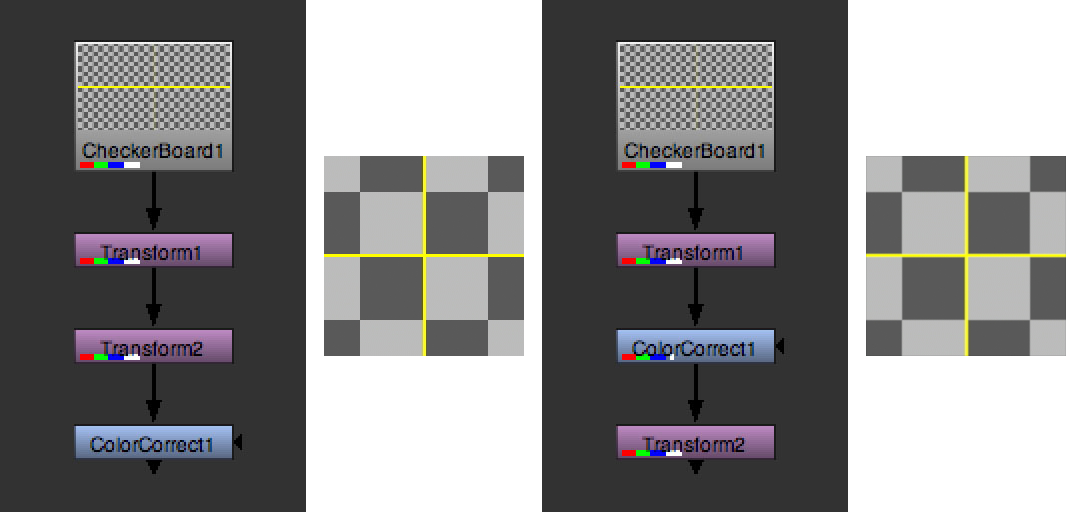
In the example below, Transform1 scales by 0.10 and Transform2 scales by 10.0. Together they form
an identity transform. On the left, both transforms concatenate before ColorCorrect, so the image
is resampled once. On the right, ColorCorrect breaks the chain and the image loses sharpness.
Color correction is one common way to break a chain. A filter, blur, distortion, lens warp, or merge can do the same. If an identity transform loses sharpness, inspect the nodes between the transforms.
A paint or removal workflow may stabilize a shot, apply the repair, then invert the stabilization to restore the original motion. If those transforms do not concatenate, the complete image receives two filter passes even though most of the frame was not changed. Composite only the repaired region over the unaltered plate. The filter passes then affect the painted region instead of the complete frame.
Transfer Functions
Compositing often uses a working space different from the plate and delivery encodings. Apply the agreed input transform to move each plate into the working space. Perform the composite there, then apply the agreed output transform to return the final render to its required encoding. Compare the final render with the plate through the same viewing transform. Untouched pixels must return without a color or contrast change. Scene-linear is the normal working space for operations that must behave in proportion to light.
A Nuke script can convert camera-log material to a scene-linear working space for compositing. It then returns the render to the specified destination encoding. This round trip relies on reversible scene-referred transforms and high-precision floating-point processing.
Other compositing packages such as Adobe After Effects, Blackmagic Design's DaVinci Resolve, and Fusion Studio use different working-space and color-management models. Test the complete workflow in pre-production and document the approved result.
Quality Control Practices
Vendor QC is the final check before a render enters the DI. It must cover the complete shot, technical delivery, comparison with the plate and prior revision, and continuity in sequence.
QC every shot before delivery
The vendor or artist checks the complete shot for corrupt or missing frames, matte edges, CG render noise, speckles, color shifts, formatting, naming, and frame-number errors. Compare the render against the plate and prior version, then review the sequence for continuity. Use automated checks for malformed frames and visual inspection for compositing errors.
A composite that passes on an artist display may fail after grading or on a larger target display. Review hard masks, grain and noise mismatches, shadow density, and black-point errors under aggressive viewing adjustments.
Gamma Checking
Raise and lower the viewport gamma aggressively to reveal matte lines and mismatches in noise, grain, or black level.

Stress the image during review
Raise and lower gamma and exposure, then difference the render against the plate at high gain. Review the result under the approved display transform and inspect adjacent shots for continuity.
Exposure Checking
Raise and lower exposure in scene-linear. Compare composited highlights and shadows with equivalent values in the plate and adjacent shots. Look for clipping, inconsistent highlight levels, and black-point differences in color or value.

Difference Checking
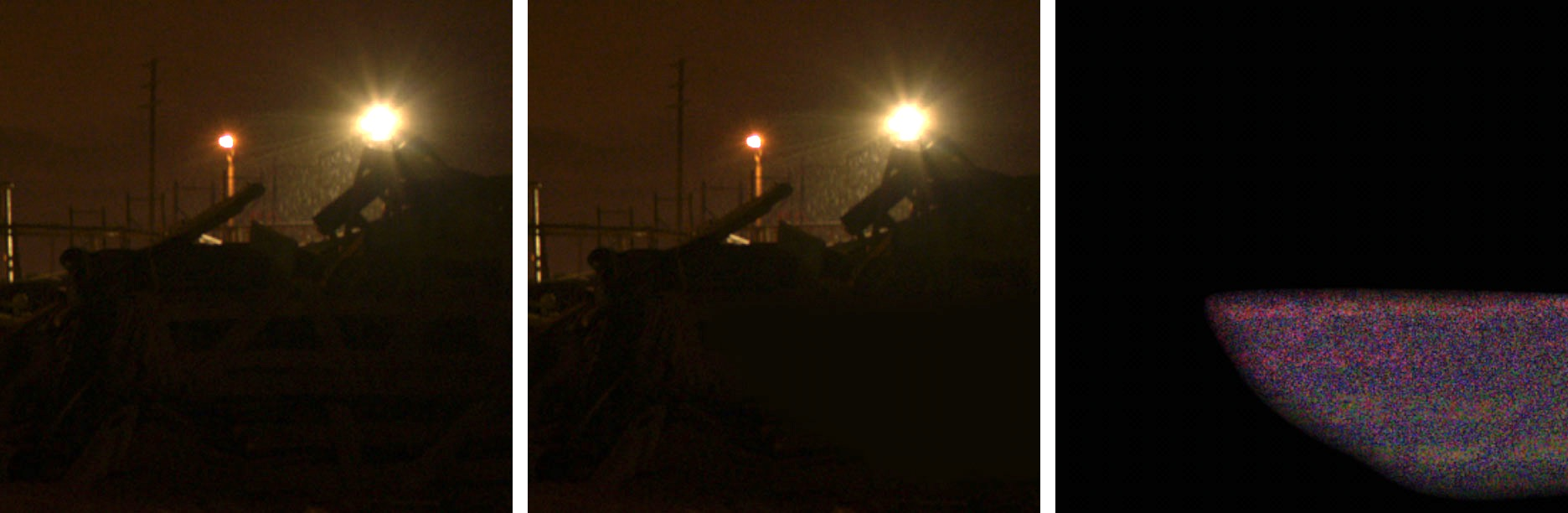
Difference the VFX render against the original plate at high gain. The result can reveal matte lines, grain mismatches, tracking errors, and highlight or shadow clamping.
NaN and Infinite Values
Floating-point images can contain values that are not finite. A NaN is not a number. Positive or negative Inf represents infinity. These values may appear as isolated black or white pixels, or remain inconspicuous until a color-space transform, blur, resize, sharpen, or other spatial operation spreads them across neighboring pixels.
The VFX pipeline must detect and sanitize NaN and Inf values before a final render reaches the DI. Replace them with appropriate finite values or clamp them with a tool that explicitly handles non-finite data. Include this check in automated render validation and inspect the corrected frame to confirm that the operation has not concealed a larger render failure.
-
Foundry, “Choosing a Filtering Algorithm,” tip below the filter table. ↩
-
Blackmagic Design, DaVinci Resolve 21 Reference Manual, pp. 155 and 294–305. ↩