Archival
The producer or rights holder decides what must remain accessible, funds the archive, controls the accounts and physical media, and assigns responsibility for migration. They obtain the studio or distributor specification and preserve the required elements in addition to the distribution master.
The DI, sound, editorial, VFX, and archive specialists define the formats, manifests, checksums, dependencies, and restore procedure. Together, they archive the masters, projects, dependencies, and documentation needed to remaster the show.
Recommended three-layer preservation model
This handbook recommends three picture layers assembled from common studio preservation practices. No single studio or standard mandates this exact package. Each layer protects against a different failure:
| Layer | Preserves | Excludes |
|---|---|---|
| Ungraded scene-referred conform | Final conform, VFX, opticals, titles, and source image latitude | Grade, Show LUT, display transform, grain, and other creative texture |
| Graded scene-referred master | Final grade and creative look before the output transform | Display-specific output transform |
| Display-referred preservation master | The approved appearance for one named display target | Future flexibility outside that target |
Preserve all three picture layers
The DI archives all three at the original conformed resolution before any delivery resize or upscale. Record the raster, image state, color encoding, and transform state for each master.
An application archive, such as a DaVinci Resolve Archive, is a useful recovery layer but not a replacement for these masters. It depends on the application, project compatibility, Camera RAW decoders, plugins, fonts, LUTs, and operating system. Preserve the project and camera originals, then keep application-independent picture masters that can be restored without rebuilding the original workstation. See Camera RAW and long-term preservation.
Ungraded scene-referred conform
Render the complete conformed, texted picture with final VFX, opticals, and titles at the original DI-conformed resolution. Render matching textless material as separate whole-shot assets. Use camera-native log or a documented scene-linear encoding, typically 16-bit DPX or 16-bit float OpenEXR.
Keep the ungraded master reversible
Do not bake in the grade, Show LUT, display transform, grain, halation, or other creative texture. Do not apply an irreversible input transform. If sources require normalization into one scene-referred interchange space, document the transform and retain the camera originals.
Graded scene-referred master
Match the ungraded archival master's format and resolution, but include the final grade in the DI working color space. In a managed pipeline, archive the scene-referred grading space, not any camera-native encoding. Keep grading operations before the display transform so future masters can be generated from the same graded source.
Display-referred preservation master
Render the final approved image with its output transform applied. Name the display target and mastering conditions. Preserve each approved theatrical, SDR, or HDR target that cannot be recreated as a mechanical conversion.
Preserve each approved display target
Use a high-quality frame sequence or mezzanine appropriate to the target. A ProRes 4444 or 4444 XQ master can preserve an approved video finish. A 16-bit TIFF sequence can preserve a DCDM or another image-sequence master. This layer does not replace the scene-referred masters.
Show Look Up Tables (LUTs)
A future session must be able to rebuild the original color pipeline.
Archive every color dependency
The DI collects the display transform, creative looks, camera normalizations, technical conversions, LUTs, and DCTLs used by the project. Record their filenames, versions, order, and purpose.
Review dependencies before accepting the archive
Check:
- Encrypted DCTLs (
.dctle): Check for an expiry date, machine lock, or license lock. Obtain an unencrypted or license-free equivalent when possible. - OpenFX plugins: Record the plugin, version, license requirements, and baked fallback. A missing plugin can prevent the grade from reproducing.
LUTs and their dependencies can be gathered and bundled for archive with Video Village's DRP Inspector, which reads a DaVinci Resolve project and reports any unexpected or at-risk dependencies (external LUTs, DCTLs, OFX plugins) so they can be collected before the project is stored.
Reference EDLs
Generate flattened EDLs of the final DI timeline. Match the EDLs to the master and archival renders.
These EDLs let a future operator split the render at edit points. The future session can use a different platform.
Archival Documentation
Archival documentation must let a qualified person restore the project years later on different hardware and software, without relying on production memory.
Write the archive for a future operator
Identify the authoritative version. Explain how to rebuild it. Warn against plausible but incorrect uses of the material.
Include:
- Document control: Project, archive version, date, author, technical contacts, scope, superseded documents, and the package that represents final creative intent.
- Source material: Asset families, originating department or vendor, file formats, rasters, frame rates, image state and color encoding, timecode source, naming rules, handles, mattes, multiview structure where applicable, and known gaps.
- Project environment: Application, version and build, operating system where relevant, project or database organization, reel or longplay structure, bin layout, track logic, and versioning method.
- Conform: FFOA and LFOA, frame ranges, source-to-timeline relationship, editorial replacements, layer rules, and any alternate cuts or branches.
- Framing and scaling: Working raster, pixel aspect ratio, resize method, framing charts, output rasters, extraction rules, and deliverable-specific reframes that cannot be recreated by a simple crop.
- Color pipeline: Input encodings, grading space, color-management configuration, LUT and transform order, display targets, white point, graphics treatment, output transforms, and the exact dependency files.
- Text and graphics: Fonts, source applications, alpha or matte handling, color encoding, texted and textless ranges, and instructions for recompositing elements.
- Exceptions: Shot or timecode ranges that use alternate sources, speed treatment, unusual transforms, special titles, or other choices that are not evident from the media.
- Master lineage: Every ungraded scene-referred, graded scene-referred, display-referred, theatrical, video, HDR, SDR, texted, textless, language, and accessibility master. Identify the revision, representation, approval state, source asset, and master that must drive future work.
- Relinking and restore: Archive root, folder map, relink rule, expected offline media, external dependencies, reconstruction order, validation procedure, checksums, storage locations, and the most recent restore-test result.
Keep the archive instructions usable
Use exact filenames, paths, versions, frame ranges, and hashes. Put long inventories and exception lists in appendices or machine-readable sidecars. Do not bury the only manifest, checksum list, or EDL inside a PDF.
Keep the documentation both inside the archive package and separately with the archive catalog. Do not include passwords, license keys, or active credentials. Record the person responsible for the credentials and the access procedure instead.
Delivery checksums and preservation hashes
Delivery checksums prove that a transfer arrived unchanged. Preservation hashes support later integrity checks, but only when the archive records the algorithm and expected value.
Record and recheck every checksum
Use the checksum and manifest required by the recipient for delivery. Do not change the delivery algorithm without approval. Keep a strong preservation hash for the archive, record its algorithm, validate every transfer, and schedule later integrity checks.
Follow the publication rule in Asset Identity, Naming, and Versioning. A hashed, delivered asset remains unchanged. Corrections become a new revision with a new manifest.
Record the archive scope, locations, checksums, dependencies, and restore instructions in the Archive and Preservation Specification.
Storage: LTO, cloud, and the trouble with hard drives
Archive costs extend beyond the first copy. Retrieval, egress, verification, hardware, support, and planned migration determine whether the material will remain usable.
Compare the complete storage cost
Compare archive creation, media, storage, retrieval, egress, integrity checks, and migration. Do not compare only the media price.
The calculator estimates the cost to archive, retain, and fully restore a data set. Set the data size and retention period with the controls. Treat the result as a planning estimate, not a quote. Cloud rates and egress tiers change, and the LTO figures separate tape stock from service fees.1
| Option | Hard costs | Archive | Storage | Restore | Total |
|---|
Estimates at mid-2026 rates for a single full restore to the open internet. Cloud storage is each provider's cold/archive tier. Egress tiers and provider rates vary: verify before budgeting. Backblaze and Wasabi assume the restore falls within their included free-egress ratio. LTO assumes you keep the tapes (no vault fee). See the footnote for the service-rate assumptions.
Compare storage, retrieval, and egress together. Cold-cloud tiers can store data for about $1/TB/month but charge heavily for a full restore. Flat-rate services such as Backblaze and Wasabi charge more for storage and can include egress. Managed LTO adds write and restore service costs. The tape stock itself has no recurring holding charge. Cloud remains useful for an offsite copy with managed redundancy.
Before budgeting, obtain current pricing. Review the account and egress risks.
Do not use one hard drive as the archive
Magnetic remanence is not the primary risk. The drive, interface, filesystem, and maintenance process can fail first:
- No integrity monitoring. Without scheduled checksum validation, corruption can remain undetected until no valid second copy exists.
- Mechanical trouble on spin-up. Stiction, lubricant, bearings, or electronics can prevent an idle drive from starting even when the platter data remains intact.
- Undetected corruption. Without checksums, damaged files can be copied into later backups.
- Single point of failure. One drive also means one enclosure, filesystem, and interface.
Hard drives are fine as a nearline copy. Never use one as the only long-term copy.
Bonded or financed films can have contractual archival requirements. Obtain the completion, insurance, and distributor specifications. They can require LTO, checksums, redundant copies, and offsite or vaulted storage.
LTO requires planned migration. Tape is offline, air-gapped, and self-describing through LTFS, but drive compatibility changes by generation. Earlier drives generally read two generations back and wrote one. LTO-10 cannot read or write LTO-9 media.2
Schedule migration around readable hardware
Set migration dates by drive availability, not only by tape life. Never retire the last working drive that can read the oldest cartridge. An LTO-9 archive requires a maintained LTO-9 drive or migration before that hardware becomes unavailable.
Use the 3-2-1 rule
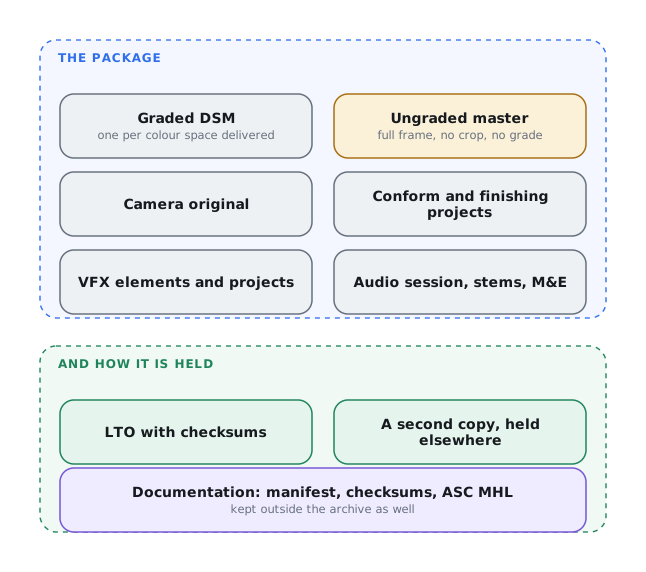
Keep three copies, on two different media, with one offsite. For an independent film that usually means two LTO copies, or one LTO plus a cold-cloud offsite copy. Validate each with checksums (an MHL, media hash list). Retain all three preservation masters, full-shot textless elements, the audio stems, M&E, applicable optionals, dialogue guide, and the conform project. Whatever you choose, do not let a single hard drive be the only thing standing between you and a future remaster.
-
LTO hard cost = tape stock only (ceil(TB ÷ 18) cartridges at ~$105 each). Archive and restore are a managed-service rate (~$50/TB each way, per 2025–26 rate cards), typically with a ~20 TB minimum or an hourly rate for smaller jobs. In-house instead means buying your own deck, software, and hardware. You keep the tapes, so there is no vault fee. Cloud figures use each provider's cold/archive tier. Egress assumes one full download. Prices are from mid-2026. Verify them before budgeting. ↩
-
LTO Program, “LTO-10 Technology,” “Frequently Asked Questions about LTO-10,” and “What Are the Key Features of the New LTO-10 Tape Drive?” ↩