DCP: The Digital Cinema Package
A DCP is the package that a digital cinema server plays. Festival delivery requires decisions about format, resolution, audio, encryption, accessibility, transport, and QC. See the Detailed Production Workflow for the mastering path.
The producer supplies the current festival or venue specification and decides encryption with the rights holder. The filmmaker approves picture, sound, subtitles, and captions. The DCP author chooses the compliant package implementation and documents validation. Production requires start-to-finish playback QC on a cinema server and projector.
What a DCP is
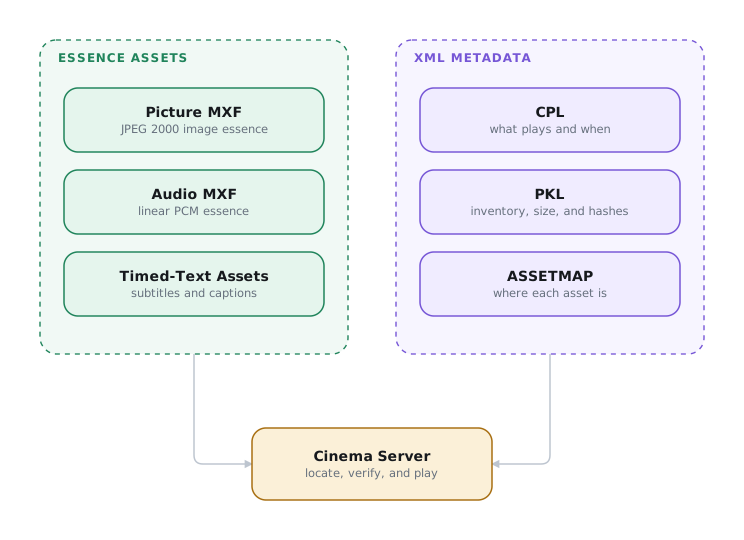
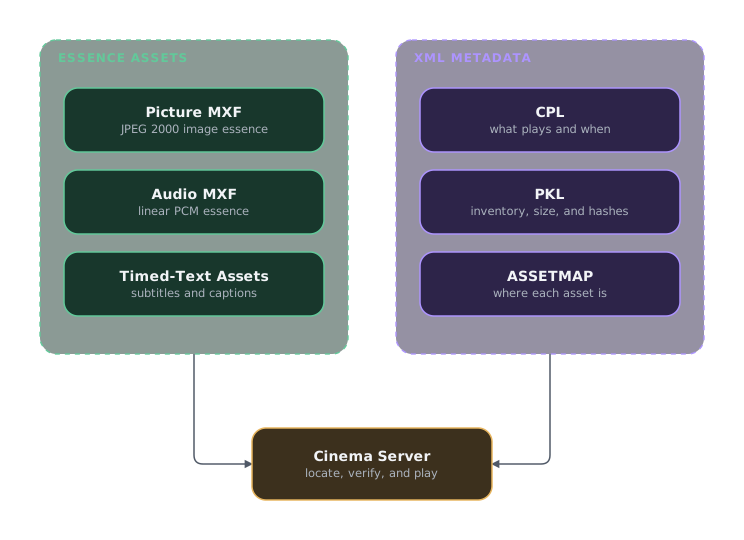
A DCP stores essence in MXF track files, assembles it with a CPL (Composition Playlist), inventories it with a PKL (Packing List), and locates it with an ASSETMAP. IMF later reused this architecture for mastering and distribution.1 DCP essence targets cinema playback:
| Component | Encoding |
|---|---|
| Picture | JPEG 2000, intra-frame, 12-bit, in DCI X′Y′Z′: gamma 2.6, 48 cd/m² reference white (see Color Spaces). X′Y′Z′ is itself gamut-unbounded. The practical P3 limit is the projector's, not the container's |
| Audio | 24-bit linear PCM, up to 16 channels at 48 or 96 kHz |
| Subtitles / captions | SMPTE Timed Text (ST 428-7) or Interop XML, with PNG or font-rendered glyphs2 |
What is actually in the folder
A DCP is a folder. Almost all of its size is a small number of very large MXF track files: the picture, the sound, and any subtitle or caption essence. The rest is three small XML files, together a few tens of kilobytes describing a few hundred gigabytes.
The three XML files describe the assets for different purposes:
| File | The question it answers | What it records for each asset |
|---|---|---|
| ASSETMAP | Where is it? | The asset's UUID and its path on the delivered medium |
| PKL (Packing List) | What is in this delivery, and did it arrive intact? | UUID, file size, hash, and asset type |
| CPL (Composition Playlist) | What plays, in what order? | Which reel and role (picture, sound, or subtitle), plus the entry point and duration used from that file |
Two distinctions matter:
- The CPL defines each playable version. A CPL can reuse, reorder, or select different portions of existing track files. One set of assets can support alternate-language audio, different subtitle and caption configurations, alternate endings, and other editions. A version file (VF) adds a CPL and only the new essence assets, while referencing unchanged assets from the original version (OV). IMF later used the same principle for supplemental packages.
- The PKL is an inventory, not a playlist. It can list files that no CPL references. The CPL alone defines what plays.
The ASSETMAP turns each UUID into a file path so the server can locate the assets referenced by the PKL and CPL.
Two package flavors exist:
- Interop (IOP) is the older format. It supports fewer features but plays on legacy servers.
- SMPTE DCP is the modern standardized format. High frame rates, immersive audio, and properly signalled closed captions require it.3
Default to SMPTE DCP using the Bv2.1 profile (SMPTE RDD 52:2020). Major festivals still accept Interop, but Venice prefers SMPTE and Berlinale recommends it.
If a venue requires legacy compatibility, use Interop. Before authoring, obtain the festival specification.
Resolution: 2K, 4K, and the bit-rate cap
DCPs come in two resolution classes, 2K and 4K, each with three containers. The rasters are fixed, and Flat is not the full width of the container:
| Container | 2K | 4K |
|---|---|---|
| Flat (1.85:1) | 1998 × 1080 | 3996 × 2160 |
| Scope (2.39:1) | 2048 × 858 | 4096 × 1716 |
| Full (1.90:1) | 2048 × 1080 | 4096 × 2160 |
An aspect ratio between Flat and Scope may need two theatrical framings for consistent presentation across both screen types. See Non-Standard Theatrical Aspect Ratios.
DCI caps JPEG 2000 image essence at 250 Mbit/s for both 2K and 4K.16 A 4K DCP therefore spends the same data budget on four times the pixels.
A 4K DCP plays on a 2K projector. Do not author a separate 2K package for 2K screens. A 2K DCP likewise plays on 4K systems.
JPEG 2000 is resolution-scalable: a 4K codestream contains a complete 2K resolution level. A 2K server decodes that level without scaling or transcoding. This is single inventory: one package for both resolutions.
If the show finished in 4K, deliver 4K. The fixed bit-rate cap means the gain is smaller than the pixel count suggests and is most visible in detailed, high-contrast material. Deliver 2K when smaller transfers matter more. Either package remains broadly compatible.
Frame rates and the general-release envelope
For broad compatibility, follow SMPTE DCP Bv2.1: 4K at 24 fps. SMPTE ST 429-2 permits 4K at 24, 25, or 30 fps, and DCI's 2024 HDR addendum permits 4K at 48 or 60 fps with a 450 Mbit/s ceiling, but those modes fall outside the general-release profile.
Bv2.1 is an interoperability profile, not a physical limit. Dolby Cinema, IMAX, and other premium formats use private specifications that can exceed it. Get those specifications from the vendor.
Audio: channels and how it was mixed
DCP audio is discrete, uncompressed PCM. The channel layout and mixing environment determine how it plays in the theater.
Prefer 5.1 over 2.0. Its center channel anchors dialogue to the screen for every seat. A 2.0 mix creates a phantom center that pulls toward the nearer speaker away from the room's centerline. Many festivals expect 5.1.
2.0 is not Dolby Stereo. LoRo is discrete left/right with no center or surround information. Lt/Rt is matrix-encoded and decodes to L, C, R, and surround. Identify a two-channel delivery explicitly. Treating one as the other misroutes dialogue and surround.
Mix for the theater, not the nearfield. Use a calibrated dubbing stage at reference level with the cinema X-curve (SMPTE ST 202 / ISO 2969).17 A nearfield mix usually plays too loud and bright in a theater. If theatrical exhibition is possible, budget a theatrical mix rather than a nearfield bounce.
DCP Inspector can analyze the DCP audio tracks in LKFS and estimate a target Dolby fader level. Use this as a gross-error check. It can reveal that a mix is exceptionally far from normal theatrical practice before playback QC. The estimate does not account for the room, calibration, audience, spectral balance, dynamics, or creative intent, and does not replace playback on a calibrated stage.
Playback level and the loudness spiral
Cinema reference is Dolby fader 7.0, calibrated to 85 dB SPL per screen channel. Some theaters play below reference because some films are mixed excessively loud. Filmmakers then mix louder in anticipation, giving theaters more reason to turn down. The cycle sacrifices headroom and dynamic range, while films mixed properly at reference are punished by playing too quietly.
Mix at theatrical reference
Mix at reference, or only slightly below it when that is a deliberate creative choice. Do not pre-compensate for an assumed low playback level by crushing the mix or pushing everything louder.
For private and festival screenings:
- QC the DCP in the actual auditorium whenever possible. Start playback at 7.0 and work down only if necessary. Agree on the final level with the projectionist.
- Account for the audience. A full auditorium absorbs more sound than an empty one, so a mix that feels slightly hot during an empty-room QC may land correctly with a full house.
- If you cannot attend, send the projectionist a note explaining that the film was mixed on a calibrated theatrical stage at reference. Ask them to begin at 7.0 and preserve the intended level unless the room presents a specific problem.
Encrypted or unencrypted
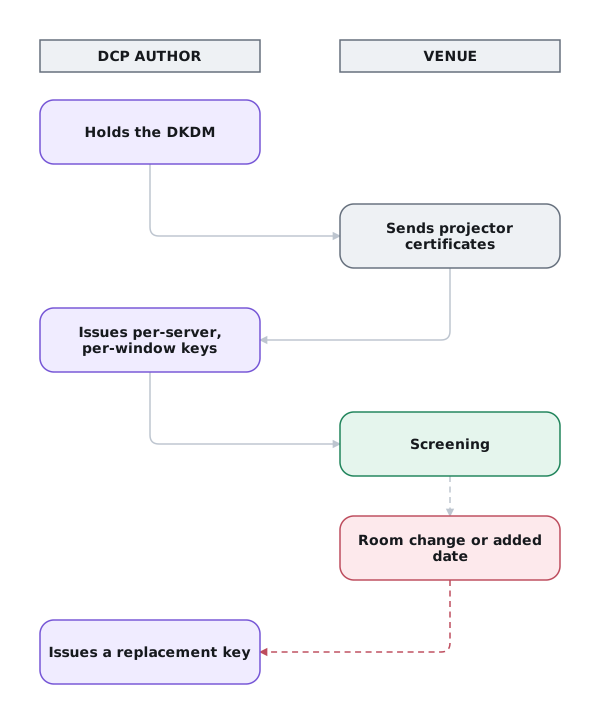
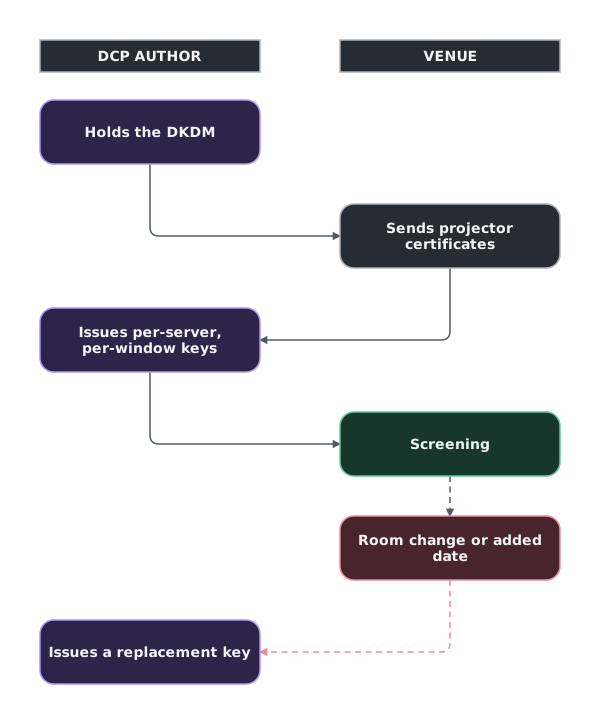
An encrypted DCP uses AES-128. Playback requires a KDM (Key Delivery Message) encrypted to one server certificate and valid for a specified time window. An unencrypted DCP plays on any compliant server.
Decide on encryption before authoring
The producer confirms whether a right-holder requires encryption. Default to an unencrypted festival DCP when no such requirement exists. A later change requires new MXF track files, CPL, PKL, hashes, and keys.
The JPEG 2000 codestream does not require recompression. The author must still rebuild the package.
For festivals, default to unencrypted unless a right-holder requires encryption. Venice recommends unencrypted DCPs, Sundance strongly prefers them, and Berlinale accepts either.11 Encryption requires a certificate and time-limited KDM for every playback server. A wrong certificate, expired window, or last-minute room change prevents playback.
If encryption is required, the producer obtains every server certificate and screening window from the festival. The producer also arranges 24-hour key-management support.12
Accessibility: captions and described audio
Accessibility requirements vary by festival:4
- Sundance: English-language projects deliver both CCAP and OCAP DCPs. Non-English projects deliver standard subtitles plus English SDH.
- SXSW: every film, TV project, and music video must include CCAP. Non-English content also requires English subtitles.5
- Hot Docs: closed captions for English-language features.
- IFFR: SDH and audio description strongly encouraged.
- Tribeca: makes best efforts to provide closed captions for its regular film program and encourages audio description.6
- TIFF: marks individual screenings when closed captions or audio description are available. Its public guidance does not state a universal delivery requirement for selected films.7
- Berlinale, Cannes, Venice, and Locarno: no published mandate.
Captions for Deaf and hard-of-hearing viewers come in two forms. The DCP name identifies which form the package contains:8
- OCAP (open captions) are always visible and require no venue hardware. They are the most reliable accessible screening format.
- CCAP (closed captions) feed personal devices such as CaptiView readers or caption glasses. They work only when the venue has functioning caption hardware.
SDH differs from ordinary translation subtitles: beyond the dialogue, it carries speaker IDs and non-dialogue sound cues (music, effects).
Described audio (VI-N) narrates key visual action for blind and low-vision viewers. A separate Hearing Impaired (HI) track carries a dialogue-boosted mix. Map HI to channel 7 and VI-N to channel 8.9 Channel 15 carries sign-language video. Channels 9, 10, and 16 remain blank. Validate the channel map: a misplaced track can pass structural QC but never reach the assistive device.
Confirm accessibility before authoring
The producer obtains the festival specification and gives the DCP author the required caption, subtitle, HI, and VI-N tracks. If venue capability is unknown, deliver an OCAP version. It requires no caption hardware.
Delivering to a festival
For physical delivery, use the medium and file system named by the festival. CRU DX115 drives remain common. USB 3.0 SSDs are increasingly accepted.13 For maximum server compatibility, format Linux ext2/ext3 with 128-byte inodes under ISDCF Doc 3. Some festivals also accept exFAT or NTFS.10
Electronic delivery is rising. Venice takes files by Aspera, while Berlinale uses its own Digital Cinema Portal. CineSend and Massive provide managed DCP transfers.14 A feature DCP can be hundreds of gigabytes. Budget enough upload time and bandwidth.
Use the ISDCF package name
The DCP author follows the ISDCF Digital Cinema Naming Convention (DCNC).15 Write the name in ContentTitleText inside the CPL and PKL. If the package uses AnnotationText, write the same name there. Renaming the folder does not change the title on a cinema server.
QC on a real cinema server
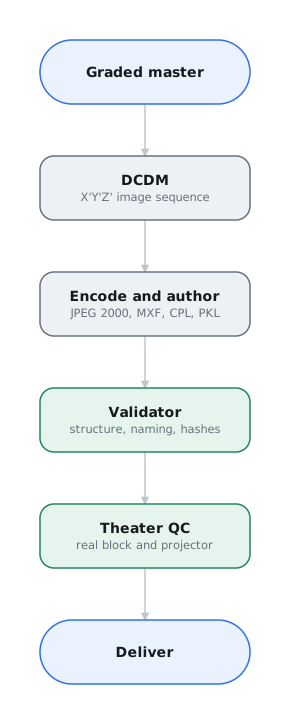
File validation and playback QC answer different questions. Validation checks package structure. Cinema playback checks whether the complete DCP ingests, plays, sounds, and appears as intended.
Validate, ingest, and play the complete DCP
Before playback QC, run Video Village's DCP Inspector. Then ingest the DCP on a cinema server and play it through a cinema projector from start to finish. Desktop playback does not prove that the package will ingest or screen correctly.
Validation catches structural faults but does not replace cinema-server playback.
Common DCP authoring failures
Before delivery, review these items:
Repair supported CPL errors before reauthoring
DCP Inspector can repair many common CPL errors directly. Validate the package first. Repair supported errors before returning to the authoring vendor or platform.
-
Naming: follow the ISDCF convention. Match the aspect-ratio token to the raster so the server selects the correct masking preset.
-
Content kind: match the CPL's
ContentKind(feature,trailer,test,psa, and so on) to the composition name. -
Leaders and markers: omit bars, tone, slates, countdowns, 2-pops, and tail pops. If used, keep
FFOCandLFOCpaired, ordered, and inside the correct reel. -
Audio: use DCI channel order (L, R, C, LFE, Ls, Rs, HI, VI-N), confirm every track contains the intended mix, and check true peak for inter-sample clipping.
-
Timed text: start tracks at
EntryPoint=0and preserve the track structure across every reel. Interop OV and VF packages each need their own subtitle files and UUIDs. -
Integrity and packaging: regenerate PKL hashes after any re-wrap, include every CPL-referenced asset, remove stray files, and apply encryption consistently.
-
Bit rate: check peak instantaneous rate, not only the average. Detailed frames can exceed the cap and stutter even when the package average is compliant.
A playback QC pass on a DCI media block (Dolby, GDC, Sony, Barco Alchemy, Qube) and projector is the only place to catch:
- Ingest and validation errors, and Interop/SMPTE incompatibilities with a particular server generation.
- Audio channel mapping. Review the center, surrounds, LFE, HI, and VI-N. Identify any rotated or swapped channels.
- Subtitle and caption rendering. Review timing, position, and glyphs. For CCAP, review synchronization on the personal-display device.
- Framing and masking: the right aspect, no cropping, correct Flat/Scope container.
- Frame-rate support, dropped frames, and audio-video sync across the whole runtime.
- KDM validity. For encrypted packages, test the key on the designated server during the authorized window.
Play the film from start to finish. Listen to the full mix. Review captions on the actual assistive device.
Delivery checklist
- Decide encryption early, and default to unencrypted for festivals unless a rights-holder demands otherwise.
- Plan accessibility early. Before festival deadlines, author OCAP/SDH and described-audio assets at the correct frame rate.
- Get each festival's exact specification. Before mastering, record the package type, delivery media, naming, and accessibility tracks.
- QC on real hardware. Desktop playback cannot prove cinema-server ingest, channel routing, captions, masking, or uninterrupted playback.
-
SMPTE ST 429-7, ST 429-8, and ST 429-9. See also SMPTE OV 2067-0 and Library of Congress, “Interoperable Master Format.” ↩
-
Deluxe Digital Cinema, Specifications for Digital Cinema Source and DCP Content Delivery, version 5.11, secs. 2–4. See also DCI, Digital Cinema System Specification. ↩
-
Festival accessibility requirements, verified August 2026: Sundance Institute, “Submissions FAQ”; Hot Docs, “Film Submissions FAQs”; International Film Festival Rotterdam, “Film Entry”; Internationale Filmfestspiele Berlin, “Festival Media”; Venice International Film Festival, “Technical Specifications”; Locarno Film Festival, “Rules and Regulations.” Some festivals issue detailed requirements only after acceptance. Confirm the current accepted-project specification before authoring. ↩
-
South by Southwest, 2026 Film & TV Festival Technical Specifications for DCP, “Closed Captions,” pp. 1–2. Issued to accepted filmmakers, not publicly posted. Obtain the detailed specification from the festival. The public SXSW exhibition-format FAQ confirms the DCP requirement but does not reproduce the caption specification. ↩
-
Tribeca Festival, “Accessibility,” “Closed Captions and Audio Descriptions.” ↩
-
Toronto International Film Festival, “Accessibility at TIFF.” ↩
-
Inter-Society Digital Cinema Forum, “Open and Closed Captions.” ↩
-
Deluxe Digital Cinema, Specifications for Digital Cinema Source and DCP Content Delivery, version 5.11, sec. 3.2.6 and table 4, pp. 18–19. ↩
-
Inter-Society Digital Cinema Forum, ISDCF Doc 3, sec. 4, pp. 2–3. DCI does not specify a delivery-drive file system. ↩
-
Venice International Film Festival, “Technical Specifications”; Sundance Institute, “Submissions FAQ”; Internationale Filmfestspiele Berlin, “Festival Media.” ↩
-
Sundance Institute, “Submissions FAQ,” and Venice International Film Festival, “Technical Specifications.” ↩
-
Venice International Film Festival, “Technical Specifications”; Internationale Filmfestspiele Berlin, “Festival Media”; Marché du Film, “Market Screenings.” ↩
-
Venice International Film Festival, “Technical Specifications,” and Internationale Filmfestspiele Berlin, “Festival Media.” ↩
-
Inter-Society Digital Cinema Forum, Digital Cinema Naming Convention. ↩
-
DCI, Digital Cinema System Specification, §4.3.1, and High Dynamic Range D-Cinema Addendum, sec. 6.1.1, tables 2–3. See also SMPTE ST 429-2 §8.3. ↩
-
SMPTE ST 202 and ISO 2969. See also Deluxe Digital Cinema, Specifications for Digital Cinema Source and DCP Content Delivery, version 5.11, sec. 2.2.3, p. 12. ↩