Asset Identity, Naming, and Versioning
The production asset ID keeps approvals and delivery records tied to the same logical asset after files are renamed, copied, or transcoded. The filename is a working label. The production's asset register is the authoritative record.
Assign an ID before an asset leaves its department
The producer or post supervisor assigns the production asset ID and names one person to maintain the asset register. Keep that ID when a vendor or recipient assigns another identifier.
Give every asset a stable identity
The production asset ID is the stable asset ID assigned and controlled by the production. Its identifier scope names the register or authority within which the ID is unique.
For example, HBL_010_020 identifies shot 020 in sequence 010 of the fictional production Harbor
Light. It is unique inside the production's asset register. It does not need to be unique across the
film industry.
The person responsible for the asset register records both values when material will cross departments, facilities, or tracking systems:
| Field | Example |
|---|---|
| Production asset ID | HBL_010_020 |
| Identifier scope | North Pier Pictures / Harbor Light asset register |
| Recipient ID | Netflix Content Hub asset ID, Disney record ID, or another assigned value |
Add each external ID in another field so either value can find the same asset.
Keep one simple production-owned post log
For a production managed through post by one or two people, the asset register can be one shared spreadsheet. It needs to answer three questions: What is current? Where are the production's copies? Who received the material, and when?
Do not catalog every file or temporary render. Use the VFX shot list for shot revisions and the delivery manifest for files inside a package. The post log points to those records instead of duplicating them.
Track these milestones:
- editorial turnovers and their offline references
- VFX turnover and final-delivery packages, with shot details kept in the VFX shot list
- approved picture masters and textless elements
- audio printmasters, stems, and music deliverables
- DCPs, timed-text packages, and distributor deliveries
- final project files and archive packages
Update the post log at each handoff or approval
Use the existing shot, master, or package name as the asset ID. Do not create another numbering system. For each milestone, record:
- item and purpose
- current revision and state
- locations of the production's copies
- sender, recipient, and date
- link to the relevant shot list, manifest, QC report, or approval record
Add a row when material leaves the production, receives approval, is replaced, or receives an external ID. Mark an older row as superseded instead of deleting it. For an internal register, the project name provides the identifier scope. Add vendor or buyer IDs only when they exist.
Keep the spreadsheet in production-controlled storage and include it in the archive. A vendor can maintain a more detailed system, but the production retains the final export and delivery records.
Separate the kinds of change
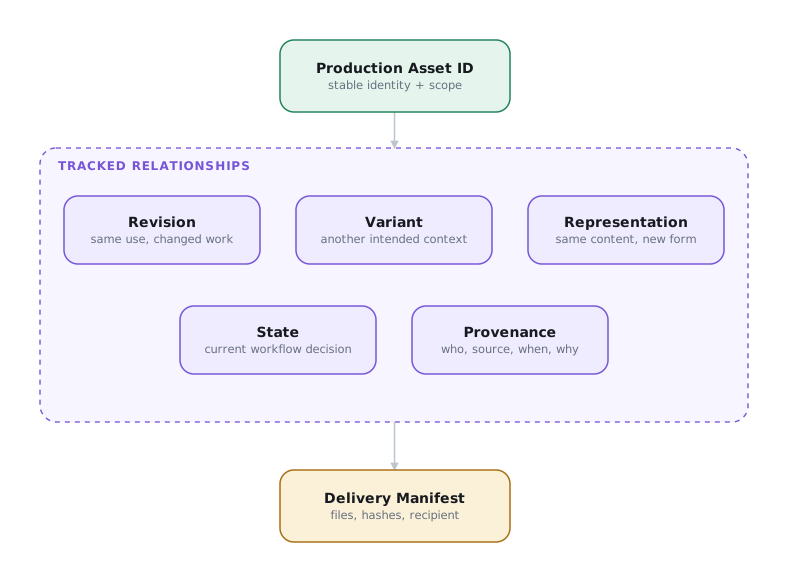
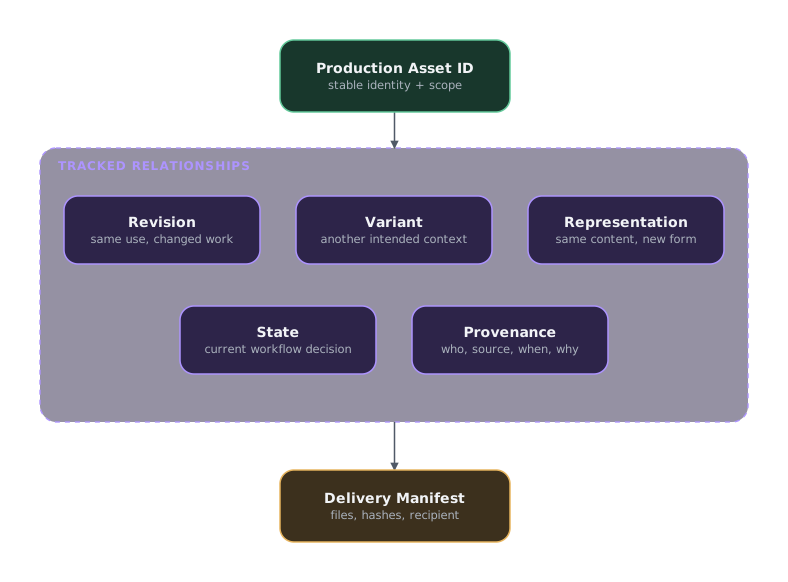
The word version can describe several different relationships. Track them separately.1
| Field | Meaning | Example |
|---|---|---|
| Revision | Changed work intended for the same use | v012 corrects v011 |
| Variant | Related work intended for another context | Domestic, censored, localized, or alternate ending |
| Representation | The same content in another technical form | ACEScg EXR sequence, Rec.709 ProRes QuickTime, review H.264, or IMF track file |
| State | Current workflow decision | WIP, in review, approved, rejected, final, delivered, or superseded |
| Provenance | Who made the asset, from what source, when, and why | Vendor, source revision, change note, date, and approver |
An approved revision can have several representations. A ProRes file made from an approved EXR sequence is not automatically a new creative revision. A censored edit is a variant because it is intended for another use. Approval is a state, not part of the revision number.
Distinguish assets, compositions, and packages
An asset is a picture, audio, timed-text, project, or metadata object used to make or represent the work. An asset group is a set managed as one unit, such as a VFX turnover.
A composition is the set of instructions that assembles assets into a presentation. An IMF CPL is a composition. A new CPL can reorder resources, use different frame ranges, select another language, or create another ending without duplicating all of the underlying track files.
A package gathers assets, compositions, and package metadata for transfer or delivery. Do not use a package name as the only identity for every asset inside it.
Use filenames as labels
The department publishing the asset builds its filename from the fields people need while working. A useful pattern can include:
- Project or title code
- Asset or shot ID
- Task, purpose, or variant
- Revision
- Frame number or extension
For example:
Keep filenames portable
Use letters, numbers, underscores, hyphens, and periods. Avoid spaces and characters that fail on another operating system. Keep the complete path within the limits of every operating system, transfer tool, storage service, and recipient system in the workflow.
The publishing department follows the recipient's required filename convention for delivery. Netflix, Disney, broadcasters, labs, and platforms use different controlled fields. Their naming patterns are delivery requirements, not a universal naming standard.
Send a manifest with every delivery
A manifest is an inventory of the files in a delivery. It lets the sender and recipient confirm that the package is complete, verify the files with checksums, and connect each file to the asset register.
For a small production, the manifest can be a CSV exported from a spreadsheet. List at least:
| Field | Example |
|---|---|
| Relative path | shots/HBL_010_020/HBL_010_020_comp_v012.1001.exr |
| Production asset ID | HBL_010_020 |
| Revision and representation | v012, ACEScg OpenEXR frame |
| Byte size | 18439276 |
| Checksum | SHA-256 and its 64-character value |
| State | Approved |
An integrity manifest can list every file in an image sequence. The asset register can group those frames as one representation of the shot. Use the format required by the recipient when one is specified.
Send a manifest with every delivery
The publishing department exports the file inventory, checksums it, and records the delivery in the asset register. The recipient confirms receipt and reports any mismatch against the same manifest.
See the Asset and Delivery Manifest Specification.
Publish new media as a new revision
A delivered revision may already be referenced by another facility, manifest, or approval record. Replacing its media silently breaks that history even when the filename stays the same.
Never replace a published revision
After an approved asset has been delivered and hashed, the publishing department does not replace its media under the same asset ID and revision. Publish a new revision and a new manifest.
Record every published asset
- production asset ID and identifier scope
- revision, variant, representation, and state
- filename, path, byte size, checksum, and checksum algorithm
- source or derived-from asset ID
- source and record timecode or frame range where applicable
- language and territory where applicable
- picture, audio, or timed-text properties
- package, CPL, and recipient IDs where applicable
- creator, creation date, change reason, approver, and approval date
Keep company terms in context
Some common delivery terms belong to one company:2
| Term | Context |
|---|---|
| NAM and GAM | Netflix archival-master terminology |
| IMF-A, IMF-D, ISM, DPO, DTO, Proxy-C, and Proxy-D | Disney mastering and conformance terminology |
| Revision, variant, representation, state, and provenance | MovieLabs concepts that work across companies and workflows |
Use company terms when discussing that company's specification. Use the general vocabulary in production records that must survive a change of buyer or vendor.